Best Of


Re: NR7101 next Firmware Release
I would quote the question: "Why the NR7302 is not available to end users?"
 verso
verso
Re: NR7302 firmware upgrade
For everyone reading this:
Zyxel does not provide a firmware for the NR7302. They don't care about their customers.
 equinox
Re: 1.37 - Wrong Remote Access VPN Batch file script
Hi @Zyxel_Melen
The script installs fine. Yes. But take a deeper look.
The variable SplitTunneling is set to $True in the beginning of the script.
Later there are two if "%SplitTunneling%"=="True" statements.
Because SplitTunneling is set to $True the if statements should evaluate as true and the call to "Add-VpnConnectionRoute" should be called which is not the case.
Try to add an "echo IF STATEMENT!" within the if statements to see that you will not see the echo.
I'm using Win11 Pro 25H2.
I've send you the VPN script via PM.
 e_mano_e
Re: ZWO entry for NWA55AXE
For planning purposes in ZWO Planner, the NWA110AX is a good substitute to represent the NWA55AXE's coverage and heatmap characteristics.
Regarding WiFi planning with mesh deployments, I'd also like to mention that Nebula will be introducing a new heatmap feature, currently expected in Q2 2026. Keep an eye on the News and Release - Zyxel Community category for updates on this.
How to mitigate DDoS Attacks?
Over the past few days, users have been subjected to a significant DDoS (Distributed Denial of Service) attack, causing widespread outages. The following signs will help you recognize if this is the case:
If you have experienced the following problems in the past few days you have likely been subjected to a DDoS attack:
- High CPU / RAM utilization;
- Firewall freezing / unresponsive;
- Increased load on the network;
- The traffic load on connection ports has increased;
Understanding the Situation
A DDoS attack floods a network, service, or server with excessive traffic from multiple sources, rendering it inaccessible to legitimate users. This recent attack highlights the need for robust defense mechanisms and rapid response strategies.
To verify if you have been subjected to a DDoS attack, log into your device's WebGUI and check the followings:
(Please unplug the WAN port if the WebGUI is unavailable)
Log & Report > Log / Events
-If you notice a very large number of logs attempting to access the internal server within one second, it indicates possible DDoS attack.

Security Policy > Policy Control
-Looking at rules hits of WAN to Internal policies. The hit count will increase significantly.

Reassurance and Action Plan
While a DDoS attack can cause disruption, it is not fatal. However, it's important to be aware and take proactive steps to protect your devices and network. Here are some recommended actions:
We will collect relevant IP addresses and include them in the IP Reputation Blocking Filter database with our vendor to eliminate all possible sources of attack as quickly as possible.
However, for operational protection of your device, you can block these addresses manually. The IP address table below will be updated accordingly
Apply Security Policy:
Security Policy > Policy Control
- Implement Policy Control to block known attacker IP addresses. This will help prevent DDoS packets from flooding devices and avoid performance issues or system hangs.

3.38.109.148/32 | 137.74.182.133/24 | 177.54.147.0/24 178.215.236.244/32 |
|---|---|---|
Link to the list of updated IP addresses
Enable DoS / ADP Prevention:
[uOS]Security Policy > DoS Prevention > DoS Prevention Policy
[ZLD]Security Policy > ADP
- Enable DoS Prevention with Low Sensitivity. If the attack is severe, we suggest increasing the sensitivity and block duration

Enable External Block List
[uOS]Security Services > External Block List > IP Reputation
[ZLD]Security Services > Reputation Filter > IP Reputation > Block List
(You must have Gold Security Pack License)
-The Source URL is that collected from our backend data. It is recommended that you update every hour.
(ZLD recommends updating daily)

Enable Custom IPS Rule (ZLD ONLY)
[ZLD]Security Services > IPS
(Gold Security Pack License required)
-Create Custom Signature Rules, Block SYN Flag with payload greater 50 Bytes.

Final Thoughts
The recent DDoS attack underscores the necessity of maintaining vigilant cybersecurity practices. By taking the recommended actions, you can significantly reduce the risk of further disruptions and protect your network from potential threats. If you have any questions or need any more help, please do not hesitate to reach out to our support team. Stay safe and vigilant.
Re: Enable/Disable Global zone forwarder is not that good
Hi @PeterUK
After checking, this still needs the USG FLEX H not request the DNS option in the DHCP discover/request. Let me help share this requirement with our product team. This might be adding an option that disable DHCP request DNS option in each external interface setting.
Idea post:
Disable DNS server in global zone forwarder for USG FLEX H — Zyxel Community
Re: Why is AirPlay/Print not supported?
Hi @BraVo
Welcome to the Zyxel Community!
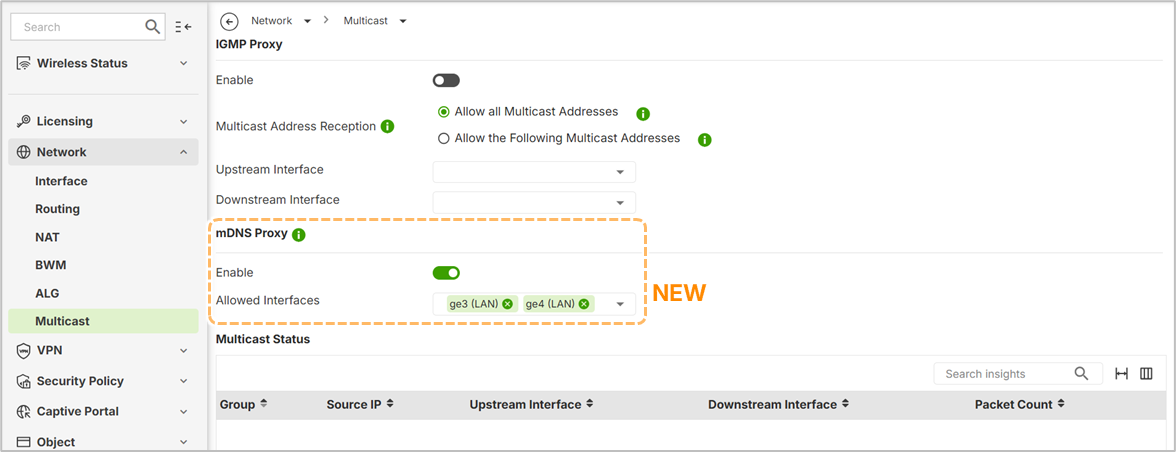
Regarding mDNS configuration, please ensure that your device is upgraded to the latest firmware version, as uOS v1.37 now supports mDNS Proxy settings. Please refer to the following article and image.