Why Can't Custom Admin Users Log In to USG FLEX?
Options

Zyxel_Emily
Posts: 1,499




 Zyxel Employee
Zyxel Employee
in Other Topics
Question:
When a new admin user is created on the USG FLEX, logging into the Web GUI with this account fails, showing a "login denied" message.
Answer:
The issue arises because the "default" profile for the WWW authentication method is configured to use only "ad" (Active Directory). Therefore, admin accounts not found in the AD server are denied access. To resolve this, include the "local" authentication method in the "default" profile by navigating to the authentication settings via the Web GUI.
- Go to Configuration > Object > Authentication > Auth. Method.
- Edit the "default" profile and add "local" as an authentication option.
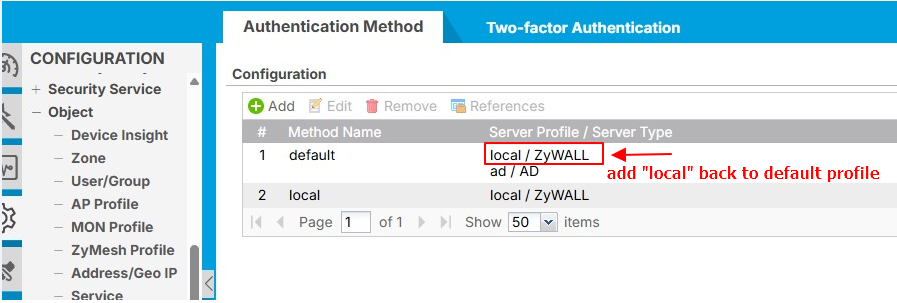

- Check Two-Factor Authentication (2FA): Ensure that 2FA is disabled for the custom admin accounts to allow successful login.
Recommendation: Always review the authentication settings whenever adding new admin users. This ensures compatibility with the login methods used in your system.
0
Categories
- All Categories
- 442 Beta Program
- 3.1K Nebula
- 243 Nebula Ideas
- 6.8K Security
- 781 USG FLEX H Series
- 387 Security Ideas
- 1.8K Switch
- 87 Switch Ideas
- 1.5K Wireless
- 58 Wireless Ideas
- 7.2K Consumer Product
- 324 Service & License
- 527 News and Release
- 101 Security Advisories
- 31 Education Center
- 10 [Campaign] Zyxel Network Detective
- 5.3K FAQ
- 34 Documents
- 91 About Community
- 121 Security Highlight