How to Configure Bandwidth Management (BWM) for VPN on the USG FLEX Series?
Options

Zyxel_Stanley
Posts: 1,482




 Zyxel Employee
Zyxel Employee
in VPN
Question:
How to Configure Bandwidth Management (BWM) for VPN on the USG FLEX Series?
On the USG FLEX series, Bandwidth Management (BWM) works only when the VPN is configured as a route-based VPN (VTI).
Please note that policy-based VPNs do not support BWM.
Answer:
Step-by-Step Configuration:
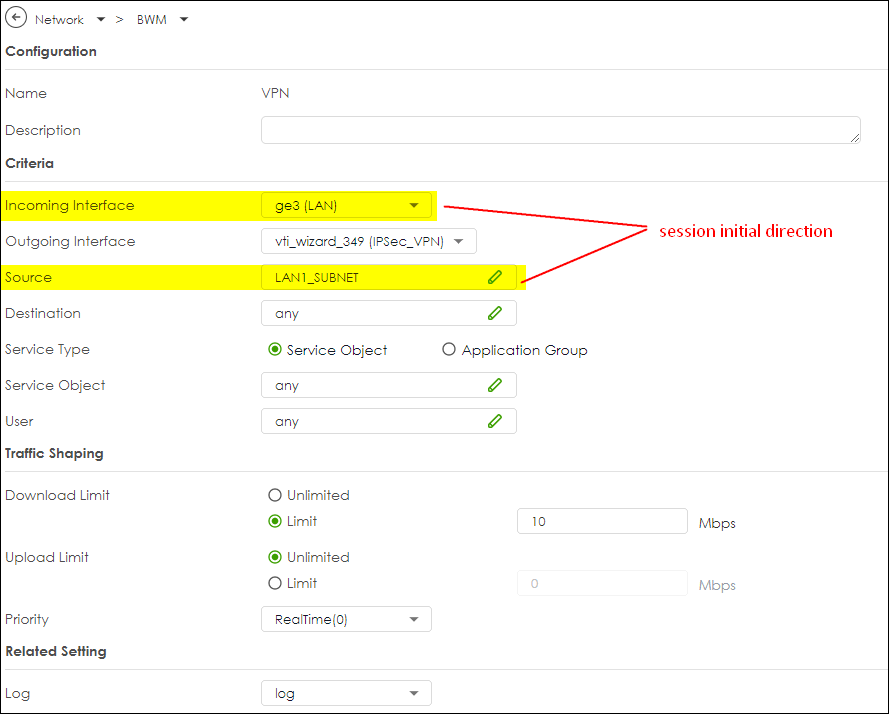
(1) Configure the VPN as a route-based VPN (VTI).
(2) Create the BWM rules:
Incoming Interface: e.g., ge3 (LAN)
Outgoing Interface: VTI interface
Source Address: Your LAN subnet
Destination: any or the VPN peer IP
Download Limit: e.g., 10 Mbps
Upload Limit: e.g., Unlimited or as needed
0
Categories
- All Categories
- 442 Beta Program
- 3.1K Nebula
- 243 Nebula Ideas
- 6.8K Security
- 781 USG FLEX H Series
- 387 Security Ideas
- 1.8K Switch
- 87 Switch Ideas
- 1.5K Wireless
- 58 Wireless Ideas
- 7.2K Consumer Product
- 324 Service & License
- 527 News and Release
- 101 Security Advisories
- 31 Education Center
- 10 [Campaign] Zyxel Network Detective
- 5.3K FAQ
- 34 Documents
- 91 About Community
- 121 Security Highlight