How can I resolve the issue of the “OK” button being greyed out in macOS SecuExtender?





 Zyxel Employee
Question:
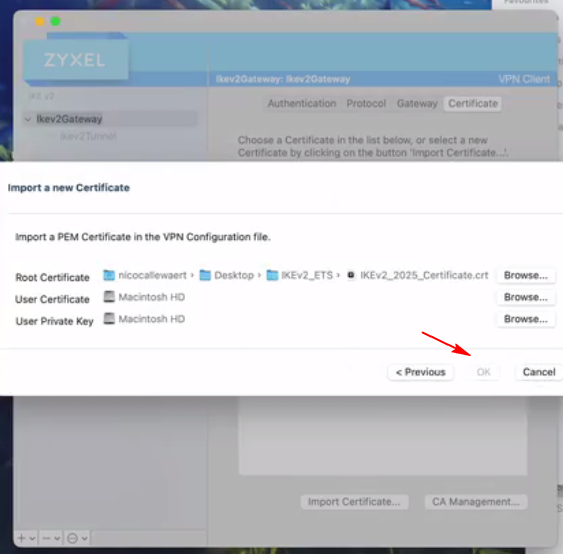
I would like to manually create a VPN tunnel on macOS SecuExtender. When importing a new certificate, the OK button remains greyed out.
How can I resolve the issue of the “OK” button being greyed out in macOS SecuExtender?
Answer:
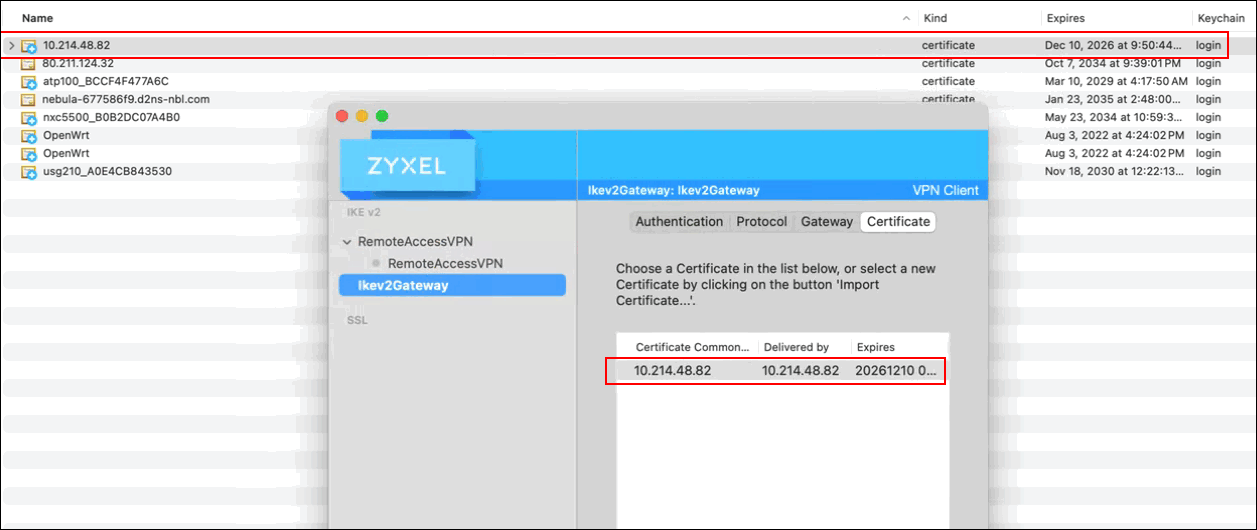
(1)Import the certificate using macOS Keychain Access.
Open Keychain Access and manually import the self-signed certificate.
(2) Set the certificate to “trusted.”
After importing, ensure the certificate’s trust settings are configured as “Always Trust” so it can be recognized properly by SecuExtender.
(Recommended Alternative) Use the “Get from Server” feature in SecuExtender.
SecuExtender supports the Get from Server function to automatically download VPN settings. Instead of manually importing the certificate, select Get from Server to retrieve the IKEv2 configuration file.
This avoids macOS security restrictions and eliminates the need for manual certificate handling.
Categories
- All Categories
- 442 Beta Program
- 3.1K Nebula
- 242 Nebula Ideas
- 6.8K Security
- 779 USG FLEX H Series
- 387 Security Ideas
- 1.8K Switch
- 87 Switch Ideas
- 1.5K Wireless
- 58 Wireless Ideas
- 7.2K Consumer Product
- 324 Service & License
- 527 News and Release
- 101 Security Advisories
- 31 Education Center
- 10 [Campaign] Zyxel Network Detective
- 5.3K FAQ
- 34 Documents
- 91 About Community
- 121 Security Highlight