[Nebula] How to optimize wireless performance with enable broadcast/multicast storm control?

 Zyxel Employee

Function description:
Storm Control is a feature to help network administrator to limit the broadcast or multicast packets amount per second(pps). Enable the storm on access point will drop ingress packets on uplink port to release more air time to transmit data. The value of Broadcast storm packet is 100 pps and Multicast storm packet is 100 pps.

Scenario:
In large scale network without partitioned into VLAN subnets, the traffic may include enormous broadcast and multicast packets.
When the broadcast and multicast packet storm in the environment, it will affect the Wi-Fi usage if the storm packets pass through the wireless. Because broadcast and multicast frames are transmitted in lower speed, being the bottleneck of the entire network.

Configuration:
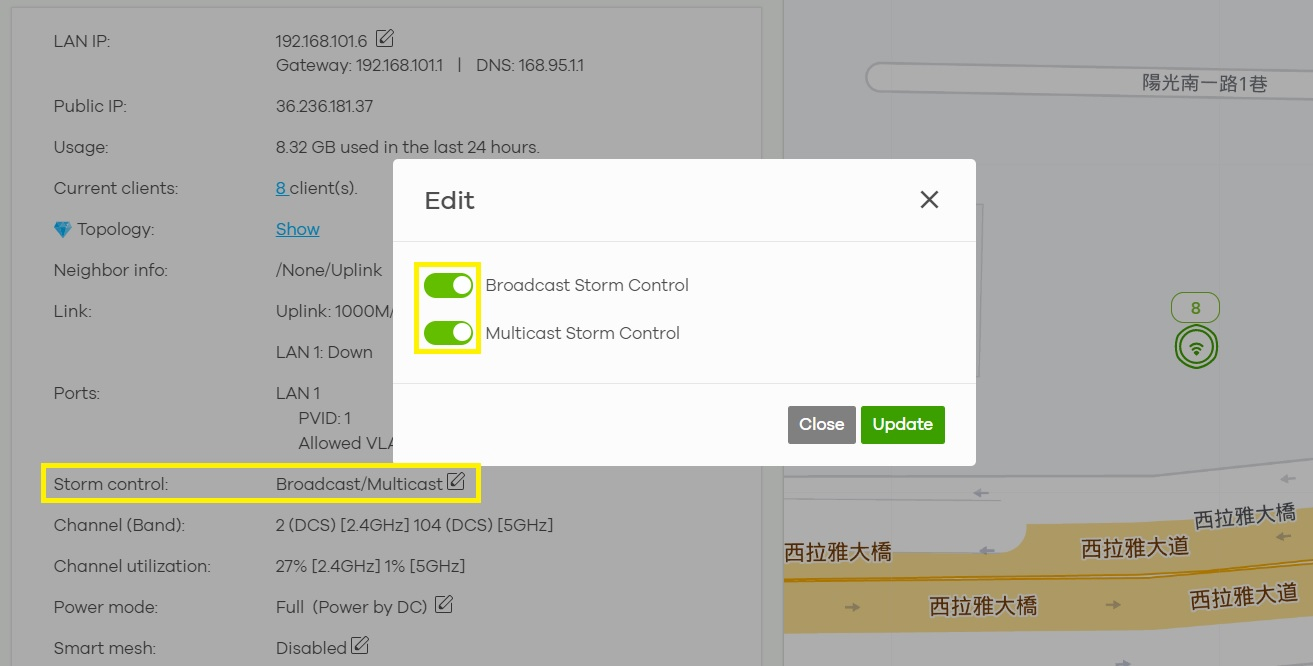
- Go to Devices > Access points > click on the device > Device page > Status > Storm control.
- Enable Broadcast Storm Control and Multicast Storm Control, click Update to save the changes.
In the Monitor > Access points > Event Log, you can select System in Category to view logs.
When the storm control performs the logs will record as Multicast storm is detected on UPLINK. Broadcast storm is detected on UPLINK.

Note:
1.The broadcast/multicast storm control is workaround, the best solution is to redesign the network topology and partition broadcast domains into different VLANs.
2.Video data usually transmitted in multicast packets, it is not suggested enable multicast storm control in the scenario where an IPTV is connecting in AP’s LAN port.
Also you could enable storm control on switch in your network.
Categories
- All Categories
- 442 Beta Program
- 3.1K Nebula
- 234 Nebula Ideas
- 6.7K Security
- 732 USG FLEX H Series
- 373 Security Ideas
- 1.8K Switch
- 87 Switch Ideas
- 1.5K Wireless
- 57 Wireless Ideas
- 7.1K Consumer Product
- 319 Service & License
- 511 News and Release
- 99 Security Advisories
- 31 Education Center
- 10 [Campaign] Zyxel Network Detective
- 5.2K FAQ
- 34 Documents
- 89 About Community
- 117 Security Highlight