FQDN stopped update IP lookup




 Guru Member
USG FLEX 700H V1.36(ABZI.0)
For some reason FQDN are not being lookup any more when I test on FLEX 200H thats fine to the same DNS.
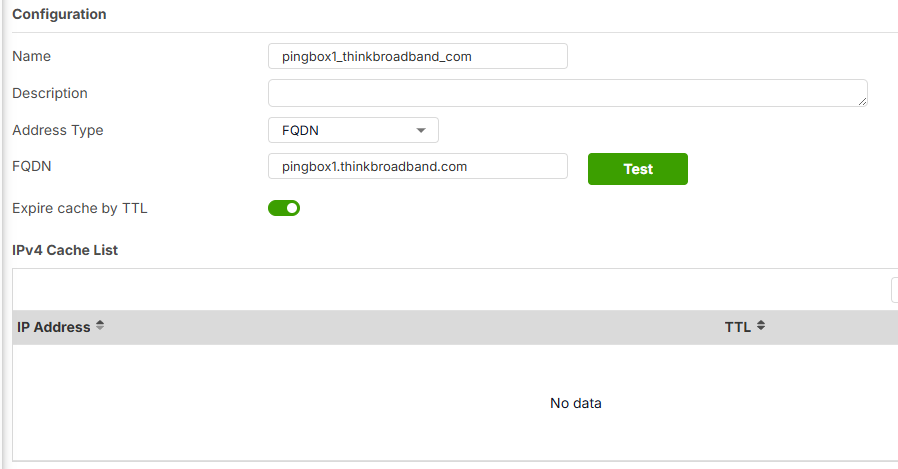
Like I put in pingbox1.thinkbroadband.com for a rule but the FLEX700H will not DNS for it.
Not rebooted yet
All Replies
-
Hi @PeterUK,
Based on your description, the USG FLEX 700H is experiencing issues with FQDN IP lookup, while your FLEX 200H on the same DNS is functioning correctly.
Here are some initial troubleshooting steps and information requests:
Preliminary Solutions:
- Check FQDN Cache Refresh: The USG FLEX H Series devices check and update the FQDN cache every two minutes or when the cache's TTL (Time-To-Live) expires. Although the H-Series allows FQDN caching to be configured to never expire, ensure the FQDN object for
pingbox1.thinkbroadband.comis configured correctly and that the device can actively query the address. - DNS Resolution Check: Use the CLI command
cmd diagnostics nslookup domain-name-or-ip domain-name pingbox1.thinkbroadband.comon your USG FLEX 700H to verify if the device can resolve the domain name. This will help determine if the issue is with general DNS resolution or specific to FQDN object updates. - DNS over HTTPS/TLS: If you are using DNS over HTTPS (DoH) or DNS over TLS (DoT), the firewall may not be able to properly inspect and update the FQDN. Try disabling DoH on your browser or changing the action of "DNS over HTTPS/TLS detection" to "Pass" on the USG FLEX 700H.
- Reboot: Although you mentioned you haven't rebooted yet, a reboot can often resolve transient issues. Please consider rebooting the USG FLEX 700H.
Information Gathering:
To further assist you, please provide the following:
1. Screenshots of the FQDN Address Object configuration forpingbox1.thinkbroadband.comon your USG FLEX 700H.
2. Network Topology Diagram: A simple diagram showing how your USG FLEX 700H is connected to the internet and your internal network, including DNS server configurations.
3. Diagnostic File: Collect the diagnostic file from your USG FLEX 700H. You can do this via the GUI by navigating toMaintenance > Diagnostics > Diagnosticsand clicking "Collect Now". If the device is unresponsive, please refer to the troubleshooting steps for collecting diag-info via console.This AI response aims to provide initial troubleshooting steps and identify information needed for further diagnosis. Feel free to share additional details based on the suggestions above — this will help community members offer more targeted assistance.
If you have feedback or idea about this AI assistant, share them in Community Feedback.0 - Check FQDN Cache Refresh: The USG FLEX H Series devices check and update the FQDN cache every two minutes or when the cache's TTL (Time-To-Live) expires. Although the H-Series allows FQDN caching to be configured to never expire, ensure the FQDN object for
-
Hi @PeterUK
May I know if this issue occurs on the client only? What's the result if you use the network tool to nslookup?
Zyxel Melen0 -
Hi Barry and Melen
Yes its been over two minutes and setup on FLEX 200H in the same way is fine so something not right with the FLEX700H at this time.
0> cmd diagnostics nslookup domain-name-or-ip domain-name pingbox1.thinkbroadband.com
nslookup-diagnostics
ok
result "Trying "pingbox1.thinkbroadband.com"
;; ->>HEADER<<- opcode: QUERY, status: NOERROR, id: 3836
;; flags: qr rd ra; QUERY: 1, ANSWER: 1, AUTHORITY: 0, ADDITIONAL: 0;; QUESTION SECTION:
;pingbox1.thinkbroadband.com.\x09IN\x09ANY;; ANSWER SECTION:
pingbox1.thinkbroadband.com. 114 IN\x09A\x0980.249.99.164Received 61 bytes from 127.0.0.1#53 in 0 ms
"
..
..
0>
0> cmd diagnostics nslookup Query-Server 192.168.53.2 domain-name-or-ip domain-name pingbox1.thinkbroadband.com
nslookup-diagnostics
ok
result "Trying "pingbox1.thinkbroadband.com"
Using domain server:
Name: 192.168.53.2
Address: 192.168.53.2#53
Aliases:;; ->>HEADER<<- opcode: QUERY, status: NOERROR, id: 910
;; flags: qr rd ra; QUERY: 1, ANSWER: 1, AUTHORITY: 0, ADDITIONAL: 0;; QUESTION SECTION:
;pingbox1.thinkbroadband.com.\x09IN\x09ANY;; ANSWER SECTION:
pingbox1.thinkbroadband.com. 300 IN\x09A\x0980.249.99.164Received 61 bytes from 192.168.53.2#53 in 34 ms
"
..
..
0>note I have a local DNS server running bind
DNS over HTTPS/TLS not a problem don't use it.
Reboot will do at some point
Flex 700H P6 VLAN 53 with IP 192.168.53.1/27, 192.168.53.6/27, 192.168.53.26/27, 192.168.53.14/27 to DNS server 192.168.53.2 and 192.168.53.4 as backup by USG60
Will PM you the Diagnostic File
0 -
Hi Melen
The issue is not the client but the FLEX H not doing lookups for a FQDN for the cache.
However the Wildcard FQDN cache are happing when DNS goes through the FLEX 700H but non Wildcard FQDN are not being looked up by the FLEX 700H itself
0 -
update in testing on the FQDN Address Object configuration for pingbox1.thinkbroadband.com I click the test button I get this
Trying "pingbox1.thinkbroadband.com"
;; ->>HEADER<<- opcode: QUERY, status: NOERROR, id: 53274
;; flags: qr rd ra; QUERY: 1, ANSWER: 1, AUTHORITY: 0, ADDITIONAL: 0;; QUESTION SECTION:
;pingbox1.thinkbroadband.com. IN ANY;; ANSWER SECTION:
pingbox1.thinkbroadband.com. 260 IN A 80.249.99.164Received 61 bytes from 127.0.0.1#53 in 8 ms
Then I go out of that FQDN lookup pingbox1.thinkbroadband.com to view it again and still shows No data for IPv4 Cache List.
Have not rebooted yet
0 -
After a reboot the FQDN are now updating within 3 minutes
0 -
Its done it again FQDN not updating even if I delete the FQDN and add it back as a policy rule its not doing the lookup its self.
0 -
Update so I did some looking in SSH settings
If I do
object address-object fqdn enabled false

commit
then
object address-object fqdn enabled true

commit
It starts working again
0 -
Hi @PeterUK
Thanks for updating the details. So the issue is occurring on the Address Object IPv4 Cache List.
We are investigating on this and I will update you once I get further information.
Zyxel Melen0 -
So by chance I found what trigged this to happen
So on reboot interfaces get there IP DHCP and DNS Global Zone Forwarder auto gets add then fqdn updates on lookups for the given IPv4 Cache List and what triggers the stop in this case is unplugging the SFP for 30 seconds which causes DNS Global Zone Forwarder auto IP to be removed then when you plug the SFP back in no more fqdn updates even when I don't use them auto added DNS as I use my added 192.168.53.2 and 192.168.53.4 for the FLEX H to use.
0



 Zyxel Community Virtual Assistant




Categories
- All Categories
- 442 Beta Program
- 3.1K Nebula
- 242 Nebula Ideas
- 6.8K Security
- 778 USG FLEX H Series
- 387 Security Ideas
- 1.8K Switch
- 87 Switch Ideas
- 1.5K Wireless
- 58 Wireless Ideas
- 7.2K Consumer Product
- 324 Service & License
- 526 News and Release
- 101 Security Advisories
- 31 Education Center
- 10 [Campaign] Zyxel Network Detective
- 5.3K FAQ
- 34 Documents
- 91 About Community
- 121 Security Highlight


