Flex 200H - SSLVPN attempts to reconnect every few seconds

 Freshman Member

Hello
I set up a Flex 200H with SSL VPN and installed OpenVPN Connect. This worked fine for a few weeks. Then I started using "OpenVPN Gui" which allows for an "%connection%_up.bat file to be executed as soon as the connection is running. This file starts the internal 2FA Website. This also works fine. For this I use a different user-account, one that has 2FA with an authenticator set up.
Now I started deploying this configuration without 2FA with the OpenVPN Connect Software. This worked a few weeks. For some unknown reason 1 client and my own OpenVPN Connect cannot connect anymore. The connection is started and within 2-3 seconds OpenVPN Connect shows "trying to connect" again and again. Strangely enough, I can still connect using OpenVPN GUI. I also does not matter if this is an account with or without 2FA activated, it connects and I have access. The other client has tried both VPN-Clients as well and both do not work for him anymore (he uses an account without 2FA).
Firewall-Reboot did not solve this.
Firmware v1.35 is installed. An update to v1.36 is no option, then Remote Access VPN with Strongswan on Android does not work anymore (connection yes but no data transfer).
Both OpenVPN Connect and OpenVPN GUI use the exact same ovpn-file and of course the only possible Flex H settings.
Problem exists on Windows 10/11 and a Windows Server 2019 which I used for testing.
Does anyone have any ideas why this is and what to do about it?
Thanks
Eric
Accepted Solution
-
Hi @Eric_26
No worry, please take your time and hope you'll get better soon.
About the 2FA part: Yes, once the Two-factor Authentication > VPN access enables, all of users requires to enable Two-factor Authentication for this user.
Zyxel Melen0

 Zyxel Employee



All Replies
-
Hi @Eric_26,
I understand you're experiencing an issue with your USG FLEX 200H SSL VPN where OpenVPN Connect clients are repeatedly trying to reconnect, while OpenVPN GUI clients are working correctly. This can be a frustrating issue, especially when it was previously functional.
Here are some steps you can take to troubleshoot this:
Verify SSL VPN Configuration on USG FLEX 200H:
- Navigate to
VPN > SSL VPNon your firewall. - Ensure the "Incoming Interface", "Clients will use VPN to access", "Client Network", and "Authentication" relative information is correctly configured.
- Confirm that the SSL VPN service is added to the service group
Default_Allow_WAN_To_ZyWALLand that port 10443 (default for SSL VPN) is allowed from WAN to the firewall.
- Navigate to
Check OpenVPN Client Configuration:
- Since both OpenVPN Connect and OpenVPN GUI use the same
.ovpnfile, carefully examine the contents of the.ovpnfile. - If you are using a split tunnel configuration, ensure that the
redirect-gatewaydirective is removed and the specific routes for your internal networks are correctly defined in the.ovpnfile.
- Since both OpenVPN Connect and OpenVPN GUI use the same
Consider TLS Version Compatibility:
- Zyxel firewalls allow you to enforce a minimum TLS version for SSL VPN connections. The default is TLS 1.2. If your OpenVPN Connect client is attempting to connect with an unsupported TLS version (e.g., TLS 1.1 or older), the connection will be rejected.
- Check your USG FLEX 200H's SSL VPN advanced settings (
SSL VPN > Advanced Settings) to verify the "Minimum TLS Version" setting.
Two-Factor Authentication (2FA) Considerations:
- For OpenVPN clients, if 2FA is enabled, the 2FA authentication page will not automatically open. You will need to manually navigate to
http://yourdeviceip:8008in a web browser after establishing the VPN connection to complete the 2FA. Ensure this is being done for the accounts with 2FA enabled.
- For OpenVPN clients, if 2FA is enabled, the 2FA authentication page will not automatically open. You will need to manually navigate to
To help me further investigate this issue, please provide the following information:
- Screenshots of your SSL VPN configuration from the USG FLEX 200H (VPN > SSL VPN settings).
- The exact error messages displayed in the OpenVPN Connect client logs when it attempts to connect.
- A copy of your
.ovpnconfiguration file (please redact any sensitive information like public IP addresses or pre-shared keys). - Confirm if the issue occurs with all OpenVPN Connect clients or only specific ones.
- If possible, enable Zyxel Support Access for your Nebula organization. This allows our support team to directly view your cloud environment configuration, significantly shortening troubleshooting time. You can typically find this option under
Help > Support Requestin the Nebula console, or within the device's local GUI if it's not Nebula-managed. Please provide the Organization or Site name if you enable this.
This AI response aims to provide initial troubleshooting steps and identify information needed for further diagnosis. Feel free to share additional details based on the suggestions above — this will help community members offer more targeted assistance.
If you have feedback or idea about this AI assistant, share them in Community Feedback.0 -
Hi @Eric_26
To better check you issue, could you share the info that Barry's suggested and the SSLVPN log on the USG FLEX H?
Zyxel Melen0 -
Hello Zyxel_Melen
The infos Barry suggested are useless.
Verify SSL VPN Configuration on USG FLEX 200H - answered in original posting
Check OpenVPN Client Configuration - again, in OP.
Consider TLS Version Compatibility - Does not exist in v1.35, I can only regenerate a certificate
Two-Factor Authentication (2FA) Considerations - again, in OP
Screenshots of your SSL VPN configuration from the USG FLEX 200H (VPN > SSL VPN settings). I will see to this as soon as I have a moment
The exact error messages displayed in the OpenVPN Connect client logs when it attempts to connect. - again, OP
A copy of your .ovpn configuration file - I will see to this as soon as I have a moment
Confirm if the issue occurs with all OpenVPN Connect clients - again, OPEric
0 -
I see you said about “Firmware v1.35 is installed. An update to v1.36 is no option...”
You likely have routing rules that cause traffic flow not to go down VPN read here on how to deal with this.
https://community.zyxel.com/en/discussion/comment/81074/#Comment_810740 -
Hi @Eric_26
I understand in your point of view that some check item from Barry is OP, but I need you help to provide the full logs from OpenVPN to help us identify this issue. With full logs, we can clarify which process encounter the issue and find how to resolve. Also, please help enable Zyxel support access for your organization so we can check the firewall's log and your configuration & device info.
Zyxel Melen0 -
Hello PeterUK
Thank you for your reply. I read the mentioned post last friday and tried to set it up on my own Flex 50H. I guess I made a mistake setting it up or stumbled over how to put right settings in, since I did not get further with this and decided to go back to the previous firmware. I have another Flex 200H online somewhere and will try again there.
Greetings
Eric0 -
Hello Zyxel_Melen
Yes, I understand.
Third Party access to the firewall is not possible at this time. I need to get special permission to allow this at all.
The Logs from OpenVPN inkl. 2 printscreens and the sslvpn Logs from the Flex200H are attached to this posting. All usernames and IPs have been replaced.
OpenVPN shows connected (images 1), then within 1-2 seconds it changes to "trying to connect" (images 2), after some seconds it shows connected again. This will repeat itself on and on.
Thank you very much for trying to help.
Eric—files are downloaded and deleted by Zyxel Melen—
0 -
something you can try but should really not be needed is open RemoteAccess_SSLVPN.ovpn in notepad and add under
client
dev tun
proto tcp
….
client
dev tun
proto tcp
tun-mtu 1372
….
then import again
0 -
Hi @Eric_26
Thanks for the details.
From the openvpn log, we can see the log "EVENT: CONNECTED" and the following log "Transport Error: Transport error on 'xxxx: NETWORK_EOF_ERROR.
From the firewall's log, we can see "SSL VPN sslvpn LoginUser from <ip> CLIENT_DISCONNECT to device notify uam fail".
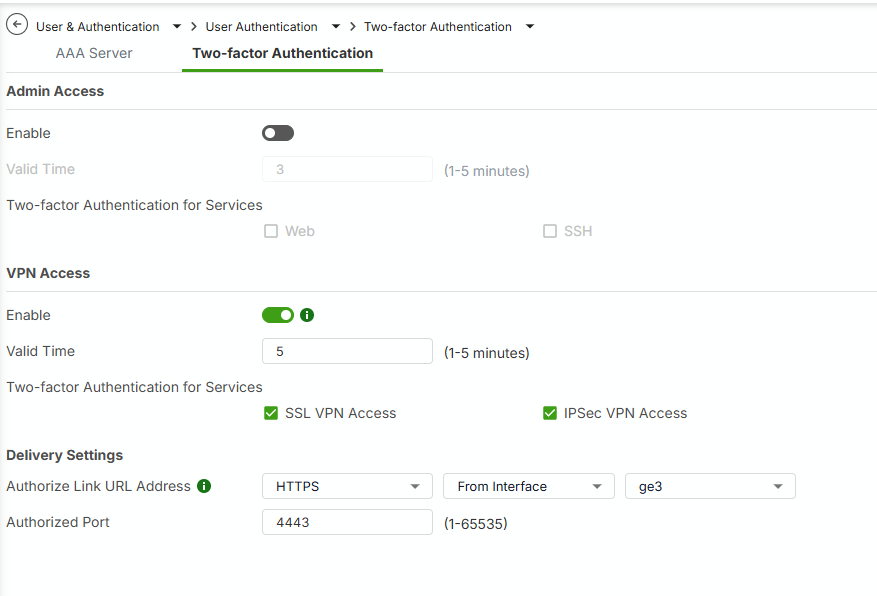
Also, you mentioned "Remote Access VPN with Strongswan on Android does not work anymore (connection yes but no data transfer)", which lead to a possibility: "2FA verification".
Could you help to check:
- Do you enable "Two-factor Authentication > VPN Access"? Path "Menu > User & Authentication > User Authentication > Two-factor Authentication"
- Do you enable "Two-factor Authentication" for this SSL VPN user?
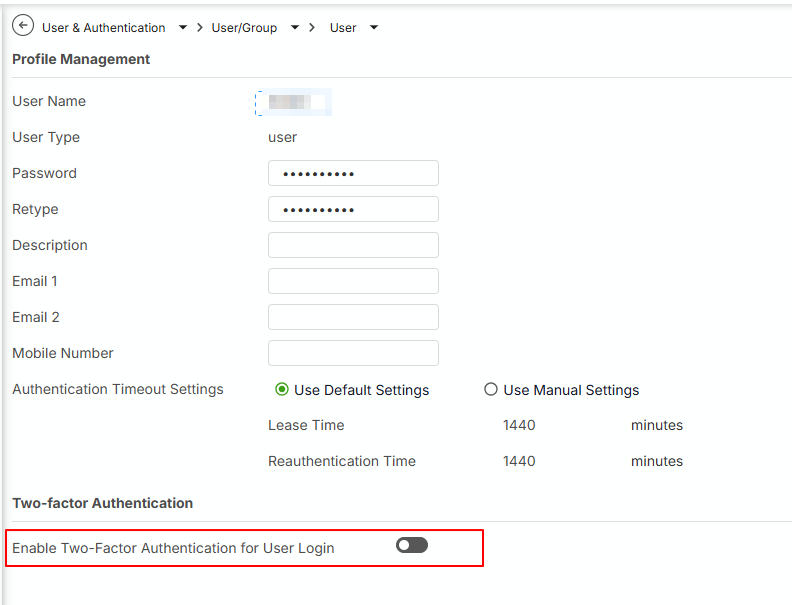
In my test, if I use the configuration as above, I get the same result as yours. Please help to check if it is the case. You need to enable Two-factor Authentication for this user to avoid immediately disconnect SSLVPN.
Hope this helps.
Zyxel Melen0 - Do you enable "Two-factor Authentication > VPN Access"? Path "Menu > User & Authentication > User Authentication > Two-factor Authentication"
-
@PeterUK & Zyxel_Melen
I will try your possible solutions as soon as I can, which will be later this afternoon or tomorrow. After that I will let you know the results.
Eric1



 Guru Member


Categories
- All Categories
- 442 Beta Program
- 3.1K Nebula
- 237 Nebula Ideas
- 6.8K Security
- 740 USG FLEX H Series
- 376 Security Ideas
- 1.8K Switch
- 87 Switch Ideas
- 1.5K Wireless
- 58 Wireless Ideas
- 7.2K Consumer Product
- 319 Service & License
- 512 News and Release
- 99 Security Advisories
- 31 Education Center
- 10 [Campaign] Zyxel Network Detective
- 5.3K FAQ
- 34 Documents
- 91 About Community
- 119 Security Highlight




