Script per configurazione vpn Ikev2 con atp200



 Freshman Member
Good morning, the ATP200 wizard for creating an Ikev2 VPN doesn't ask me for which operating system I want to download the script at the end of the configuration. How do I get that script? Thanks.
Best Answers
-
Hi @pieroCastampi,
It sounds like you're looking for the IKEv2 VPN client script after configuring your ATP200. Here's how you can typically obtain it:
From the ATP200 Web GUI after the wizard: After completing the Remote Access VPN Setup Wizard on your ATP200, when it presents options for "Non-SecuExtender IPSec VPN client,"
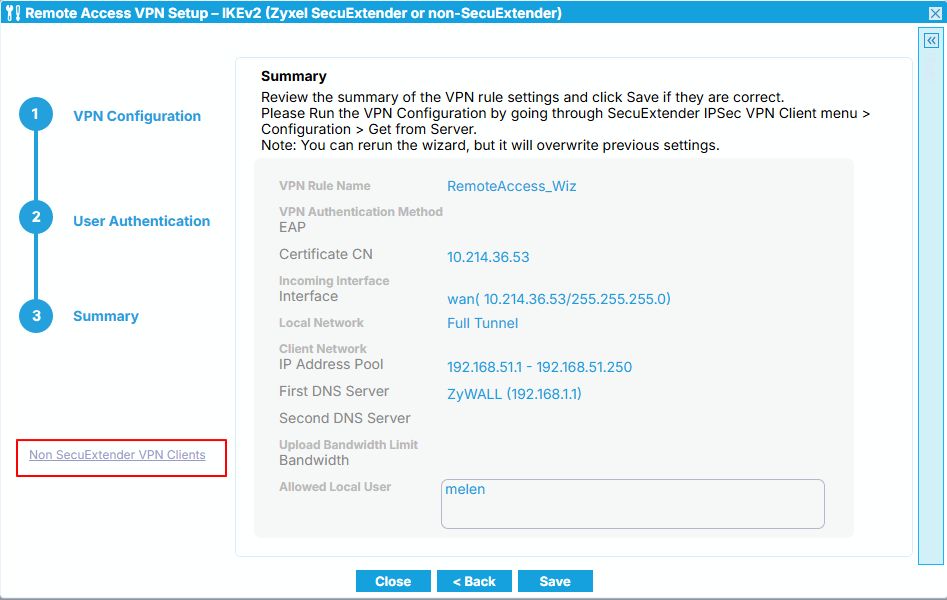
you should be able to select the operating system for which you want to download the script. This will generate a configuration script specifically for that OS (e.g., Windows, iOS/macOS, Android strongSwan).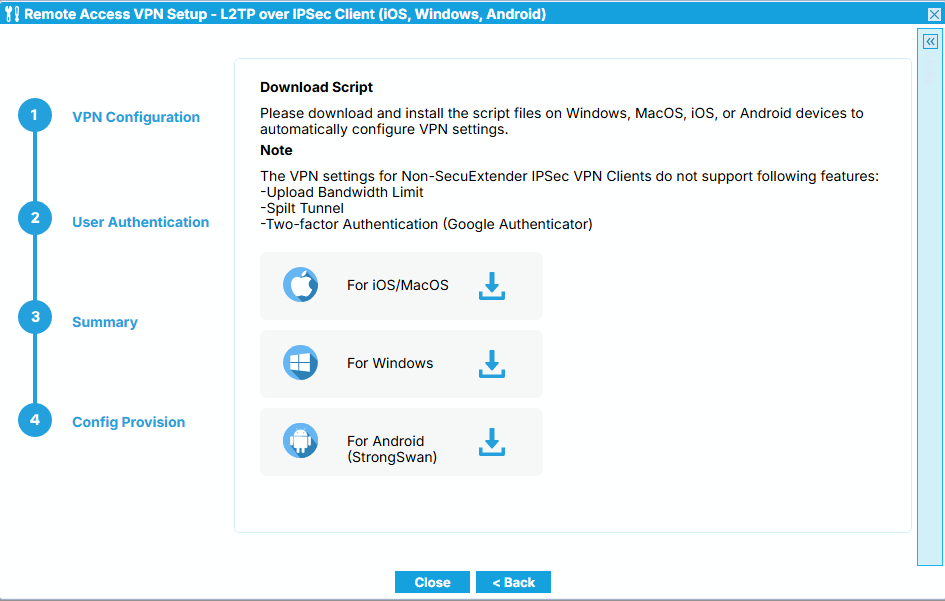
For Windows native IKEv2 client: The wizard should provide a script file that you need to extract and run as an administrator.
- For iOS/macOS: You would typically send the script file to the device (e.g., via email), download it, and then install it as a profile.
- For Android: You'll usually need the strongSwan app. The script can be imported into strongSwan after being sent to the device.
- "Get from Server": For SecuExtender IPSec clients, you can often use the "Get from Server" function within the client itself by entering the gateway IP and credentials to retrieve the provision file.
If the option to select the operating system for script download is not appearing as expected at the end of the wizard, it might be due to a specific configuration or firmware version.
To help us investigate this further, please provide the following information:
- Device Model: Zyxel ATP200
- Firmware Version: Please specify the exact firmware version running on your ATP200.
- Screenshots: If possible, please provide screenshots of the final steps of the IKEv2 VPN wizard where you expect to see the OS selection for script download.
- Network Topology: A brief description or diagram of your network setup.
This AI response aims to provide initial troubleshooting steps and identify information needed for further diagnosis. Feel free to share additional details based on the suggestions above — this will help community members offer more targeted assistance.
If you have feedback or idea about this AI assistant, share them in Community Feedback.0 -
Ok grazie mille
0


 Zyxel Community Virtual Assistant
All Replies
-
Hi @pieroCastampi,
It sounds like you're looking for the IKEv2 VPN client script after configuring your ATP200. Here's how you can typically obtain it:
From the ATP200 Web GUI after the wizard: After completing the Remote Access VPN Setup Wizard on your ATP200, when it presents options for "Non-SecuExtender IPSec VPN client,"
you should be able to select the operating system for which you want to download the script. This will generate a configuration script specifically for that OS (e.g., Windows, iOS/macOS, Android strongSwan).For Windows native IKEv2 client: The wizard should provide a script file that you need to extract and run as an administrator.
- For iOS/macOS: You would typically send the script file to the device (e.g., via email), download it, and then install it as a profile.
- For Android: You'll usually need the strongSwan app. The script can be imported into strongSwan after being sent to the device.
- "Get from Server": For SecuExtender IPSec clients, you can often use the "Get from Server" function within the client itself by entering the gateway IP and credentials to retrieve the provision file.
If the option to select the operating system for script download is not appearing as expected at the end of the wizard, it might be due to a specific configuration or firmware version.
To help us investigate this further, please provide the following information:
- Device Model: Zyxel ATP200
- Firmware Version: Please specify the exact firmware version running on your ATP200.
- Screenshots: If possible, please provide screenshots of the final steps of the IKEv2 VPN wizard where you expect to see the OS selection for script download.
- Network Topology: A brief description or diagram of your network setup.
This AI response aims to provide initial troubleshooting steps and identify information needed for further diagnosis. Feel free to share additional details based on the suggestions above — this will help community members offer more targeted assistance.
If you have feedback or idea about this AI assistant, share them in Community Feedback.0 -
Ok grazie mille
0
Categories
- All Categories
- 442 Beta Program
- 3.1K Nebula
- 243 Nebula Ideas
- 6.8K Security
- 781 USG FLEX H Series
- 387 Security Ideas
- 1.8K Switch
- 87 Switch Ideas
- 1.5K Wireless
- 58 Wireless Ideas
- 7.2K Consumer Product
- 324 Service & License
- 527 News and Release
- 101 Security Advisories
- 31 Education Center
- 10 [Campaign] Zyxel Network Detective
- 5.3K FAQ
- 34 Documents
- 91 About Community
- 121 Security Highlight


