[2026 February Tips & Tricks] New in uOS 1.37: Application-Aware Policy Routing for USG FLEX H


 Zyxel Employee
Introducing Application-Aware Policy Routing in USG FLEX H series
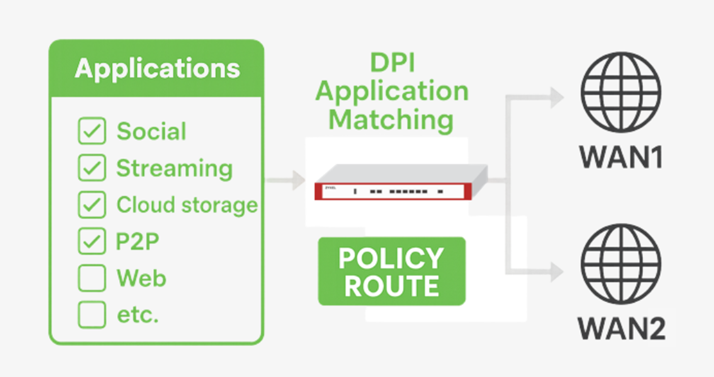
In today’s fast-paced digital environment, not all network traffic is created equal. Your business-critical Microsoft Teams call shouldn't have to compete for bandwidth with a large Windows Update or someone streaming 4K video in the breakroom. Traditional routing, which relies on simple IP addresses and ports, often lacks the nuance to tell these apart.
We are excited to announce a major firmware update that introduces Application-Aware Policy Routing. This feature transforms your firewall into an intelligent traffic controller that understands exactly what is running on your network.
⚙️Intelligent Steering Beyond IP Addresses
Application-Aware Policy Routing allows your firewall to make routing decisions based on the specific applications being used. By leveraging Deep Packet Inspection (DPI), the system identifies the "fingerprint" of your traffic in real-time.
Instead of just seeing a generic data stream, your firewall can now distinguish between:
- Productivity Tools: Microsoft Teams, Google.
- Entertainment: YouTube or Netflix.
- System Tasks: Windows Updates or cloud backups.
- Social Media: Facebook or Dropbox
🔑Why Your Network Needs Application Awareness
By integrating application matching into your policy routes, you gain solid control over your hardware resources and user experience:
- Prioritize critical applications: Ensure the most important business tools always use your lowest-latency, highest-quality WAN paths.
- Cost-effective offloading: Steer non-essential or high-bandwidth traffic—like software updates or cloud storage—to secondary or more cost-efficient links.
- Eliminate congestion: Reduce network "traffic jams" by steering different categories of traffic across multiple WAN interfaces (WAN1 and WAN2) simultaneously.
- Superior User Experience: Provide a lag-free environment for productivity applications, keeping your team focused and efficient.
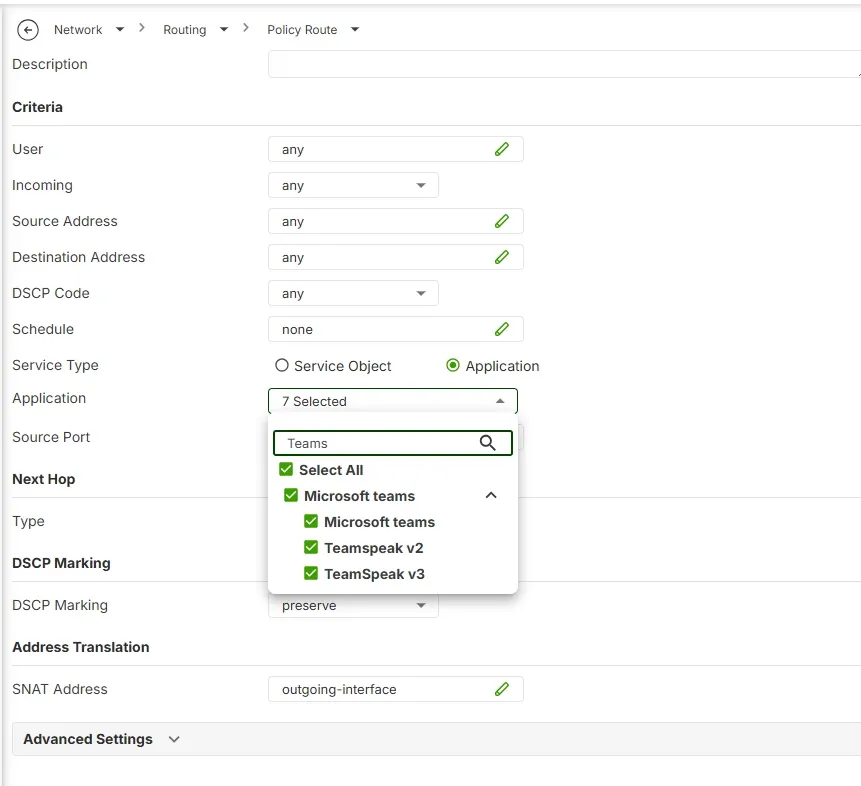
In the Policy Route page, select “Application”, then specify a list of applications as one of the matching criteria:
💡How It Works
The process is seamless. As traffic enters the firewall, the DPI Application Matching engine identifies the application. The Policy Route then applies your custom-defined rules to "steer" that specific application to the most appropriate outgoing connection, whether it’s your primary fiber line or a backup link.
This update is designed to make your network work harder for you, ensuring that your most valuable bandwidth is always reserved for productivity tasks.
👉Ready to optimize your network? Update to the uOS 1.37 today to unlock Application-Aware Policy Routing.
Categories
- All Categories
- 442 Beta Program
- 3.1K Nebula
- 243 Nebula Ideas
- 6.8K Security
- 781 USG FLEX H Series
- 387 Security Ideas
- 1.8K Switch
- 87 Switch Ideas
- 1.5K Wireless
- 58 Wireless Ideas
- 7.2K Consumer Product
- 324 Service & License
- 527 News and Release
- 101 Security Advisories
- 31 Education Center
- 10 [Campaign] Zyxel Network Detective
- 5.3K FAQ
- 34 Documents
- 91 About Community
- 121 Security Highlight