1.37 uOS - impossible to edit NAT name





 Guru Member
Hello everyone,
when you set a rule for a NAT:

You cannot edit its name:
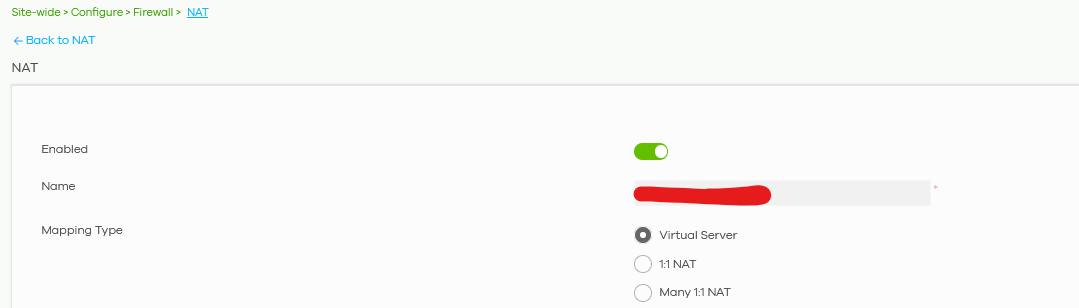
You cannot copy it either, only rewrite it.
Is it possible to remove this limitation?
All Replies
-
Hi @GiuseppeR,
Thank you for reaching out to the Zyxel Community regarding the NAT rule naming limitations on your USG FLEX H series device.
Based on the current design of the Zyxel USG FLEX H series and Nebula Control Center, the name of an object, including NAT rules, cannot be modified once it has been created. If you need to change the name of a NAT rule, the current process requires you to delete the existing rule and create a new one with the desired name.
We understand this may be an inconvenience, and we appreciate your feedback on this limitation.
To further investigate and assist you, please provide the following information:
- Device Model: (e.g., USG FLEX 100H)
- Firmware Version: You mentioned 1.37 uOS, please confirm the exact version.
- Network Topology Map: A simple diagram showing how your USG FLEX H series is connected to your network.
- Nebula Organization and Site Name: This will allow us to access your device's configuration if you enable Zyxel Support Access.
To enable Zyxel Support Access:
- Navigate to Help > Support Request in your Nebula console.
- Enabling this feature authorizes the Zyxel support team to directly view your cloud environment configuration, which can significantly shorten troubleshooting time.
This AI response aims to provide initial troubleshooting steps and identify information needed for further diagnosis. Feel free to share additional details based on the suggestions above — this will help community members offer more targeted assistance.
If you have feedback or idea about this AI assistant, share them in Community Feedback.0 -
Hi @GiuseppeR
Just like Barry mentioned, it can't be modified after created since it is an object is the system. May you share the reason you want to edit it?
Zyxel Melen0 -
Hi @Zyxel_Melen
for example you create a rule "New_Server" for opening a port TCP 12345.
Some time after that you receive another request for opening another port on the same server, so it could be useful to rename first rule "New_Server_TCP12345" and write a second rule as "New_Server_UDP98765"
Nowadays to have those 2 rules, you have to recreate the first one from zero.
It is not efficient.
If it is impossible by design, I don't know your source code, at least having a Copy command should save some time: you could copy the first rule renaming it before saving to firewall and you could add the second rule.
1 -
Hi @Zyxel_Melen,
I would also like to request this feature.
I’ve noticed that within Security Policy settings, rule names cannot be edited directly. However, the “Copy to” function allows a rule to be duplicated under a different name. As @GiuseppeR mentioned , if directly editing rule names is not possible — and this applies not only to NAT rules but to all rule types on the USG Flex H Series, including Site-to-Site VPNs — could a similar “Copy” function be implemented across other areas of the UI?
For example, I recently had a situation where a client’s branch office firewall was relocated to new premises. The Site-to-Site VPN name needed to then be updated from “LocationA_To_HQ” to “LocationB_To_HQ.” Since renaming was not possible, the configuration had to be rebuilt entirely, including Phase 1 and Phase 2 settings, PSK, and other VPN parameters.
I feel as though a more streamlined approach is surely possible here?
0 -
Sometimes I wonder what makes support ask these questions. For real!
I have a complex rule, I need a similar one, I do not want to take screenshots to then enter it all manually – because renaming a line of config is beyond the scope of a € 700,– appliance…
I also don't want to do this in the Terminal or via Console or edit a config file and re-upload that and then wait 5 minutes for reboot. Because it is 2026.0 -
Hi @Zyxel_Melen
I agree with @Lucas_Wilson and @StefanZ
Hope to see a positive feedback from Zyxel, at least for advanced users 😁
0 -
Hi @GiuseppeR, @StefanZ, @Lucas_Wilson
Open a idea request.
0 -
0
-
Hi @GiuseppeR @Lucas_Wilson @StefanZ @Maverick87
Please allow me to update this has added the feature list, and we will monitor the comment and votes of this idea post to evaluate it.
Zyxel Melen1



 Zyxel Community Virtual Assistant




 Freshman Member


 Master Member


Categories
- All Categories
- 442 Beta Program
- 3.1K Nebula
- 242 Nebula Ideas
- 6.8K Security
- 777 USG FLEX H Series
- 387 Security Ideas
- 1.8K Switch
- 87 Switch Ideas
- 1.5K Wireless
- 58 Wireless Ideas
- 7.2K Consumer Product
- 324 Service & License
- 526 News and Release
- 101 Security Advisories
- 31 Education Center
- 10 [Campaign] Zyxel Network Detective
- 5.3K FAQ
- 34 Documents
- 91 About Community
- 121 Security Highlight


