1.37 uOS - Gold Security Pack trial does not apply to H series

 Guru Member



Hello everyone,
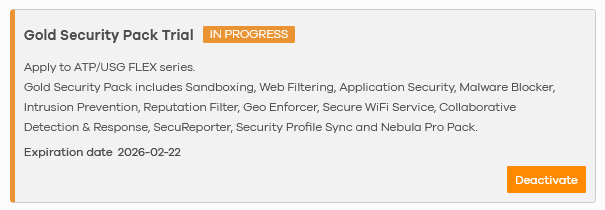
as you can see I activated a Gold Security Pack trial linked to a site where I have a 100HP with 1.37 onboard:
But Nebula shows me:

So checking its licenses it seems to me that the Nebula update does not accept trial for updated H series:
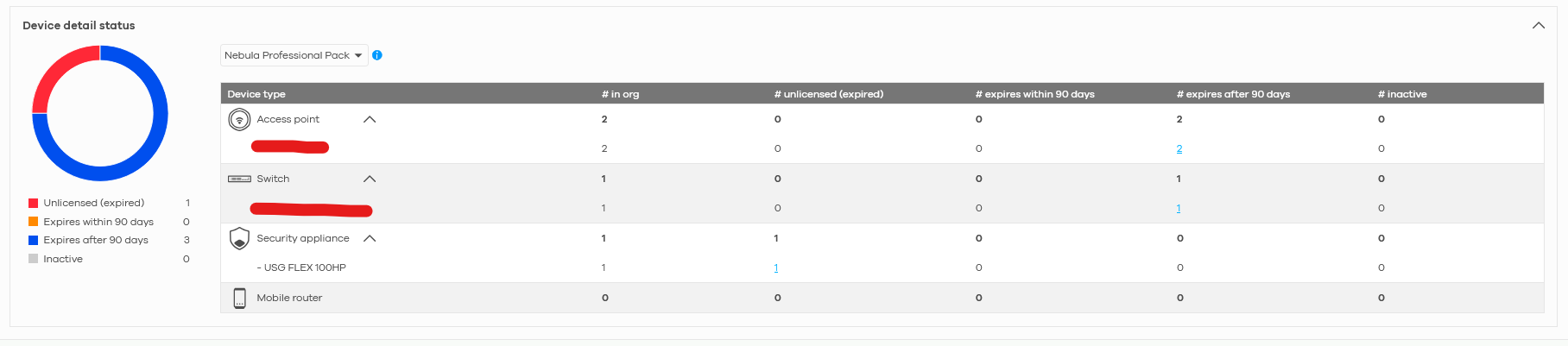
How can I fix that?
All Replies
-
Hi @GiuseppeR,
It appears you're encountering an issue where your Gold Security Pack trial isn't being recognized by Nebula for your USG FLEX 100HP, leading to a grace period notification.
Here's some information regarding licenses for USG FLEX H Series devices in Nebula and steps to help resolve this:
- USG FLEX H Series Licensing: When a USG FLEX H Series device is registered to Nebula, it automatically comes with a 366-day Entry Defense Pack. If a device has both Entry Defense and Gold Security Pack licenses active, the Gold Security Pack takes higher priority.
- Gold Security Pack Features: The Gold Security Pack provides comprehensive security features, including Web Filtering, Anti-Malware, Application Patrol, IPS, Reputation Filter, and Nebula Professional Pack.
- Troubleshooting Registration and Configuration: If your USG FLEX H is not updating its configuration from Nebula, ensure the initial setup wizard in the local GUI has been completed to properly register the device. You can also try using the live tool in the Nebula Portal to perform an overwrite.
To address the trial not being applied, please follow these steps:
- Complete Initial Setup Wizard: Log in to the local GUI of your USG FLEX 100HP and ensure you have completed the initial setup wizard. This process is crucial for proper device registration and license activation within Nebula.
- Verify Device Registration in Nebula: Confirm that your USG FLEX 100HP is successfully registered to your Nebula organization and site. You should see its information, including license status, within the Nebula portal.
- Perform Overwrite in Nebula (if needed):
- Log in to the Nebula Portal.
- Navigate to the device settings for your USG FLEX 100HP.
- Look for a "live tool" or "overwrite" option to force Nebula to re-synchronize the configuration with your device.
- Check for Firmware Updates: Ensure your USG FLEX 100HP is running the latest firmware version. Firmware updates often include enhancements for license management and Nebula integration.
- Refresh License Status: In the Nebula portal, navigate to your device's license section and look for an option to "Refresh" the license information. This can sometimes force an update of the displayed license status.
If the issue persists after following these steps, please provide us with the following information to help us investigate further:
- Nebula Organization and Site Name: This will allow our support team to access your cloud environment configuration if needed.
- Screenshots of the Device's License Page in Nebula: Please provide a screenshot of the "Device detail status" showing the license information.
- Enable Zyxel Support Access: To expedite troubleshooting, please enable Zyxel Support Access via
Help > Support Requestin your Nebula console. This will grant our team temporary access to view your cloud environment configuration.
This AI response aims to provide initial troubleshooting steps and identify information needed for further diagnosis. Feel free to share additional details based on the suggestions above — this will help community members offer more targeted assistance.
If you have feedback or idea about this AI assistant, share them in Community Feedback.0 -
Hi @GiuseppeR
Thanks for asking. This is because the Gold Security Pack Trial on Nebula is for ATP/USG FLEX series only. USG FLEX H is currently not supported.
Zyxel Melen0 -
Hi @Zyxel_Melen
do you plan to add Trial support for Gold Security Pack on H series too?
H series will be your main series firewall, it would be nice to have 30 days testing on Nebula before buying the subscription.
0 -
Hi @GiuseppeR
Thank you for your feedback.
At this time, we do not have plans to extend the Nebula-based Gold Security Pack trial to the USG FLEX H series. However, please note that all new USG FLEX H devices already include a complimentary 30-day Gold Security Pack trial out of the box, allowing you to fully evaluate the security features before committing to a subscription.
Zyxel Melen0 -
Hi @Zyxel_Melen
thanks for this info. I'll follow your path.
0

 Zyxel Community Virtual Assistant




Categories
- All Categories
- 442 Beta Program
- 3.1K Nebula
- 234 Nebula Ideas
- 6.7K Security
- 732 USG FLEX H Series
- 373 Security Ideas
- 1.8K Switch
- 87 Switch Ideas
- 1.5K Wireless
- 57 Wireless Ideas
- 7.1K Consumer Product
- 319 Service & License
- 511 News and Release
- 99 Security Advisories
- 31 Education Center
- 10 [Campaign] Zyxel Network Detective
- 5.2K FAQ
- 34 Documents
- 89 About Community
- 117 Security Highlight


