Cable port Console USG FLEX 200

 Freshman Member
Bonjour,
J'ai un USG Flex 200.
J'ai besoin de me connecter dessus en port console.
Suite a une mauvaise manipulation, le mot de passe pour se connecter à l'interface web ne fonctionne plus.
J'ai vu qu'il faut se connecter soit avec Putty ou TerTerm avec un cable console
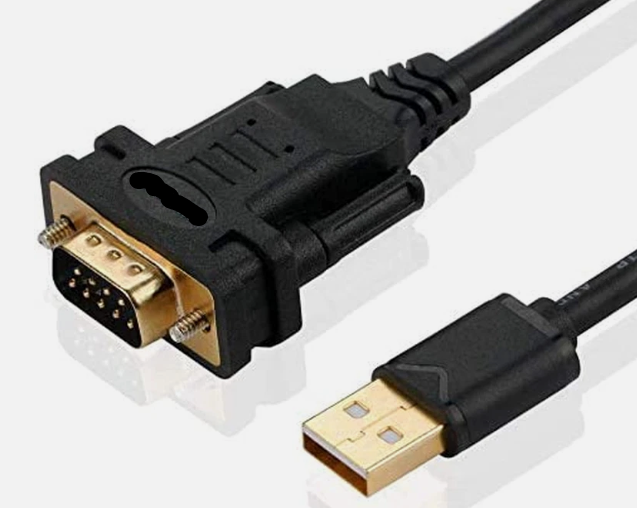
Pouvez vous me dire quel câble faut-il ?
Merci
Accepted Solution
-
Hi @Julien69290,
Welcome to the Zyxel Community!
To connect to your USG FLEX 200 via the console port, you'll need a specific cable type and terminal settings.
- Console Cable: Use an RS232-to-USB adapter to connect to your computer's USB port.
- Terminal Settings: In a terminal emulator like PuTTY or Tera Term, configure the serial connection as follows:
- Speed (Baud Rate): 115200 bps
- Data Bits: 8
- Parity: None
- Stop Bits: 1
- Flow Control: None
Once connected via console, please follow the steps under the Reset admin password section in the article to restore the default password 1234.
Zyxel Tina
0 - Console Cable: Use an RS232-to-USB adapter to connect to your computer's USB port.





 Zyxel Employee
All Replies
-
Hi @Julien69290,
Welcome to the Zyxel Community!
To connect to your USG FLEX 200 via the console port, you'll need a specific cable type and terminal settings.
- Console Cable: Use an RS232-to-USB adapter to connect to your computer's USB port.
- Terminal Settings: In a terminal emulator like PuTTY or Tera Term, configure the serial connection as follows:
- Speed (Baud Rate): 115200 bps
- Data Bits: 8
- Parity: None
- Stop Bits: 1
- Flow Control: None
Once connected via console, please follow the steps under the Reset admin password section in the article to restore the default password 1234.
Zyxel Tina
0 - Console Cable: Use an RS232-to-USB adapter to connect to your computer's USB port.
Categories
- All Categories
- 442 Beta Program
- 3.1K Nebula
- 243 Nebula Ideas
- 6.8K Security
- 781 USG FLEX H Series
- 387 Security Ideas
- 1.8K Switch
- 87 Switch Ideas
- 1.5K Wireless
- 58 Wireless Ideas
- 7.2K Consumer Product
- 324 Service & License
- 527 News and Release
- 101 Security Advisories
- 31 Education Center
- 10 [Campaign] Zyxel Network Detective
- 5.3K FAQ
- 34 Documents
- 91 About Community
- 121 Security Highlight


