uOS - Import DHCP Reservations
Options

Zyxel_Claudia
Posts: 254  Zyxel Employee




Zyxel Employee
Importing DHCP Reservations in uOS
Zyxel Networks has transitioned from the term "static binding" used in ZLD to DHCP Reservation in the new uOS firmware. This feature is located under Network Status > DHCP Table and allows administrators to reserve specific IP addresses for clients within a subnet.
Benefits and File Requirements
This feature is primarily designed to simplify migration between firewalls for managing large numbers of entries via an external spreadsheet.
- Format: Only CSV files are accepted; XLS files will be rejected.
- File Size: The file must be less than 1 MB.
- Model Capacity: Each model has a limit; for example, the USG FLEX 50H supports 64 entries. If a CSV exceeds the model limit, the entire import fails.
Table Structure and Headers
The CSV must include at least six specific headers for the H-series to recognize the data: Interface, IP Address, Host Name, MAC Address, Description, and Status. Key requirements for fields include:
- Status: Must be set to "reserved" for the entry to be imported as a static binding.
- Host Name: Must be unique. If left empty, the firewall generates one automatically using the IP address, eg, host-19216816815.
- Subnet Match: The reservation is only applied if the specified interface name and subnet match the firewall configuration.
Migration and Error Handling
When migrating from ZLD, users must edit the ZLD CSV to change interface names (e.g., LAN1 to GE1) and update the "reserve" column to the "status" column using the keyword "reserved". If an import contains errors, invalid entries are ignored while valid ones are successfully imported. Detailed error logs can be found in the Diagnostics section under system logs.Success imported DHCP recoreds:
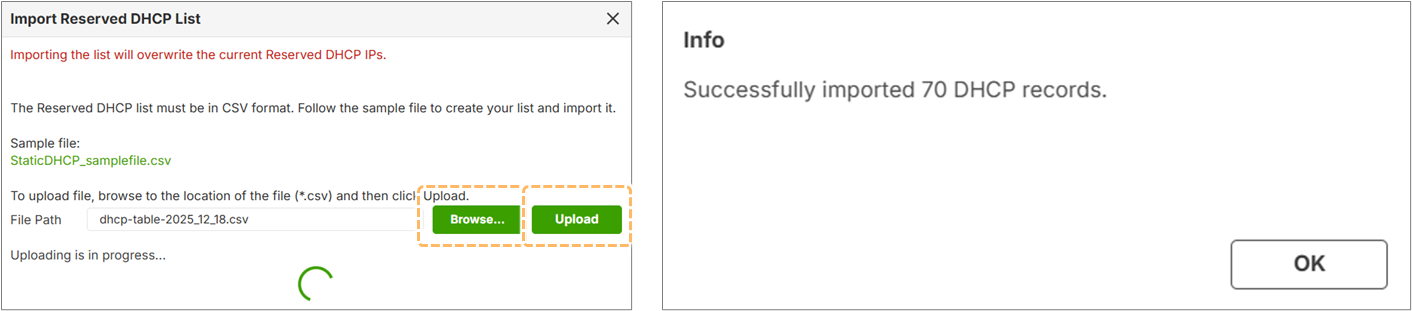
Sample of Error Message (1): Missig required fields in table header:

Sample of Error Message (2): Invalid IP or MAC address, Firewall will generate an error log: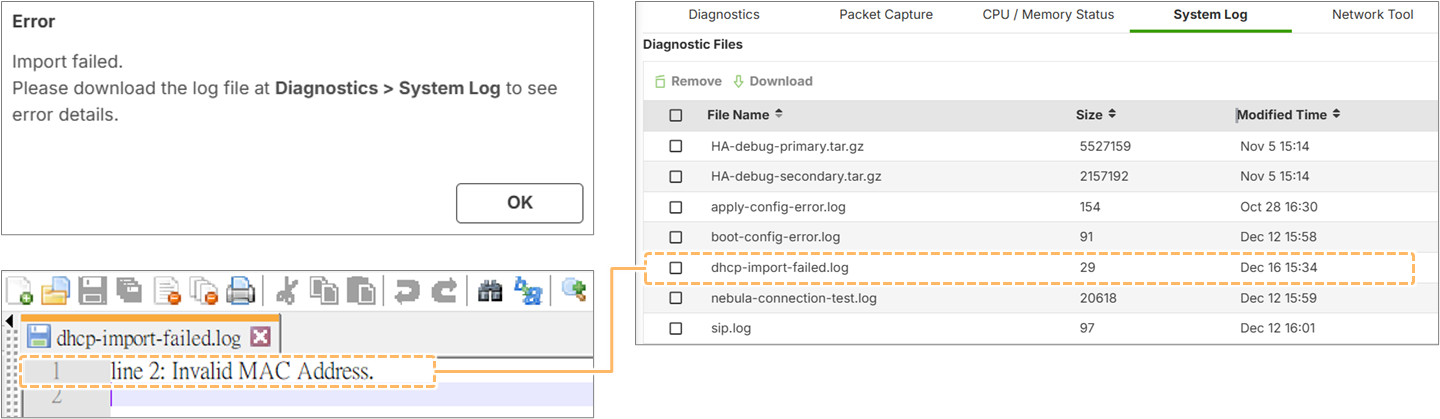
0
Categories
- All Categories
- 442 Beta Program
- 3K Nebula
- 232 Nebula Ideas
- 132 Nebula Status and Incidents
- 6.7K Security
- 691 USG FLEX H Series
- 365 Security Ideas
- 1.8K Switch
- 87 Switch Ideas
- 1.4K Wireless
- 56 Wireless Ideas
- 7.1K Consumer Product
- 312 Service & License
- 505 News and Release
- 97 Security Advisories
- 31 Education Center
- 10 [Campaign] Zyxel Network Detective
- 5.1K FAQ
- 34 Documents
- 89 About Community
- 112 Security Highlight