uOS - Interface Rate Limiting

 Zyxel Employee



Interface Rate Limiting and Bandwidth Management
Zyxel has introduced Interface Rate Limiting to work alongside Bandwidth Management (BWM). While BWM sets limits per IP, it cannot set a threshold for the total bandwidth consumed by all clients on an interface. Interface Rate Limiting provides this total threshold, acting as a guaranteed bandwidth limit for the entire client segment.
Configuration and Interface Support
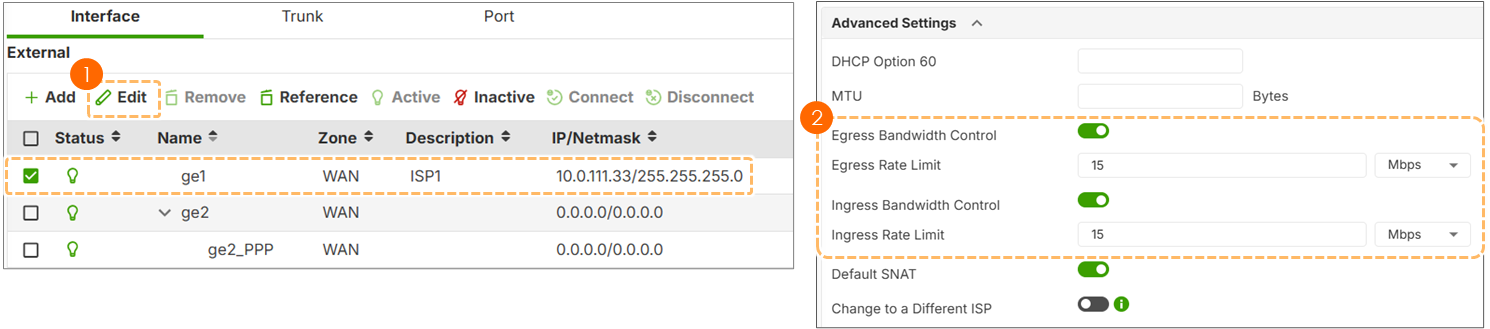
This setting is found under the Advanced Settings of an interface. It supports various interface types:
- Ethernet and VLANs: Fully supported for ingress and egress control.
- Link Aggregation and Bridges: Supported, but currently recommended for advanced users as behavior across combined interfaces is complex.
Max Burst Size and Buffering
The firewall uses a buffer to store packets when traffic exceeds the rate limit. This is known as the Maximum Burst Size. By default, this is calculated as (Rate Limit * 1,000,000 / 80), resulting in a default buffer of approximately 12.5 MB. The absolute maximum buffer size is 4 GB, though high values may increase CPU overhead.
BWM vs. Interface Rate Limiting
It is important to distinguish between these two features. BWM is session-based and uses "incoming" and "outgoing" labels. Interface Rate Limiting is based on the physical direction of traffic relative to the port, using Ingress (entering the firewall) and Egress (leaving the firewall) metrics.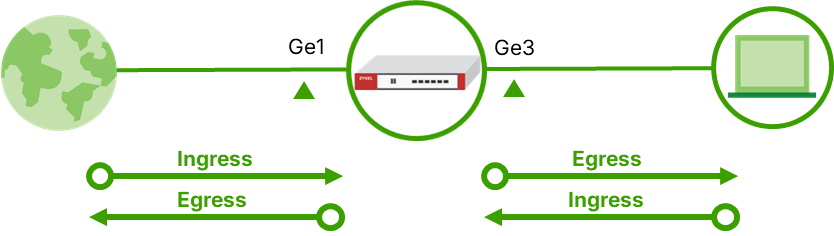
Configure Interface Rate Limiting
Categories
- All Categories
- 442 Beta Program
- 3.1K Nebula
- 234 Nebula Ideas
- 6.7K Security
- 706 USG FLEX H Series
- 369 Security Ideas
- 1.8K Switch
- 87 Switch Ideas
- 1.4K Wireless
- 56 Wireless Ideas
- 7.1K Consumer Product
- 313 Service & License
- 512 News and Release
- 99 Security Advisories
- 31 Education Center
- 10 [Campaign] Zyxel Network Detective
- 5.2K FAQ
- 34 Documents
- 89 About Community
- 116 Security Highlight