Unstable 802.1x/VLAN on GS1900-8

 Freshman Member
We're experiencing instabilities around clients that authenticate with 802.1x doesn't get redirected to the correct VLAN. A cable disconnect/connect or reboot may help. On a Windows client these commands helped: netsh lan reconnectipconfig /releaseipconfig /renew. Any tips to improve this?
All Replies
-
Hi @lgp
Could you help to clarify:
- Does this issue happen randomly? Or it is happening periodically?
- Is there other switches in this network? If so, do these switches have this issue?
Since the switch assign VLAN bases on the Radius reply attributes, so need you to capture the Radius packets on the Radius server to check the attributes when issue happens.
- If the assign VLAN is incorrect, then this issue is on the Radius server.
- If it is correct, please check the MAC table on the GS1900. And collect the tech support file for us to investigate further. (Require item: Radius packets, tech support file.)
P.S.1. Check MAC table path: Menu > Monitor > MAC table
P.S.2. Collect diagnostic file: Maintenance > Configuration > Backup
Zyxel Melen0 -
It happens almost daily with our macOS and Windows clients. The GS1900 is connected to a larger network running Aruba/HPE switches and these has been very stable and working fine.
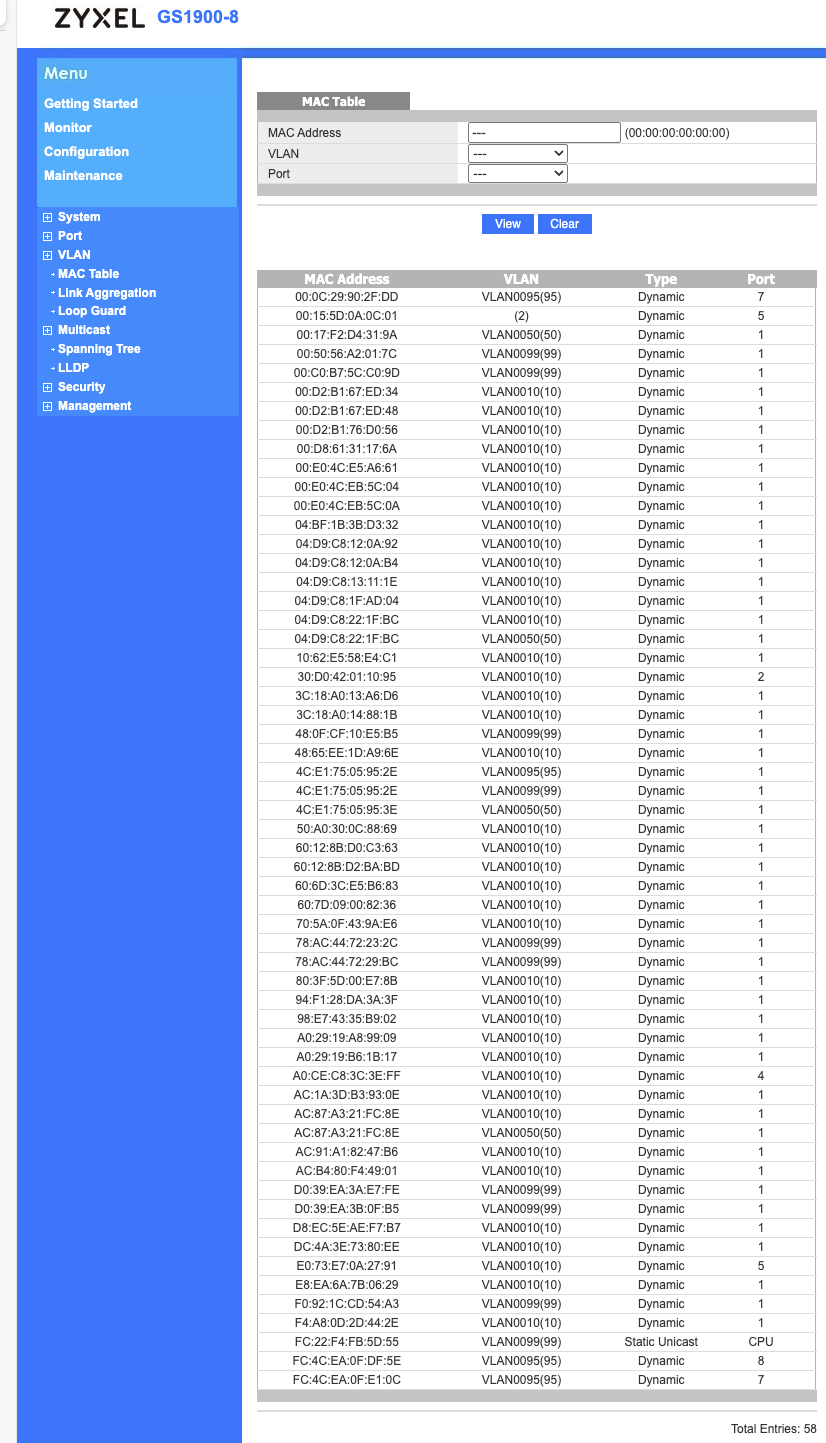
I have included the Mac table and running configuration. I will try to check for Radius packets.
0 -
Hi @lgp
Thanks for the information. Please help to select the tech-support before download in Maintenance > Configuration > Backup page. It will collect other information for us to investigate this issue.
Additionally, from the MAC table, it seems like port 1 is the uplink port. May I know which port and VLAN had this issue? Also, in your topology, the GS1900 acts as an access switch. Are there any HPE/Aruba switch acts as an access switch? Or the switches you mentioned are aggregate/core switches?
Zyxel Melen0 -
port 1 is the uplink port to the HPE Aruba switch. The issue were identified on port 2,3,5 and 6 which has Windows and Mac clients connected. An authenticated client should end up in VLAN 10 and guests should end up in VLAN 50. The HPE Aruba switch which this Zyxel is connected, act as an access switch accept for the port where the Zyxel is connected. I've switched off spanning-tree, tagged the port with VLAN 10,50, 95 and 99, no aaa port-access configuration for the specific port.
The included log is taken at that point where the mac is connected to port 2 and receives correct IP and VLAN 10 but the 802.1x is not working in the Cisco FMC firewall. The network traffic from the Mac is not tagged with user information. For all our other clients connected directly to the HPE Aruba-switch, this is working.
====file downloaded by Zyxel Melen====
0 -
Hi @lgp
The included log is taken at that point where the mac is connected to port 2 and receives correct IP and VLAN 10 but the 802.1x is not working in the Cisco FMC firewall. The network traffic from the Mac is not tagged with user information. For all our other clients connected directly to the HPE Aruba-switch, this is working.
I want to clarify some details:
- Do you mean the MAC get VLAN 10 IP address? But I remember the issue is that the switch didn't set correct VLAN after Radius server
- Do you mean the Radius server is Cisco FMC firewall? If not, then why to mention Cisco FMC firewall here?
- "The network traffic from the Mac is not tagged with user information." Do
- May I know how did you confirm the Radius server authorized the MAC access?
- Could you help to capture the Radius packet on the Radius server and the GS1900's uplink? To capture packet on GS1900, you can use port mirror function, and connect a PC with Wireshark to record. Remember to filter "radius" during packet capture.
Zyxel Melen0

 Zyxel Employee



Categories
- All Categories
- 442 Beta Program
- 3.1K Nebula
- 237 Nebula Ideas
- 6.8K Security
- 747 USG FLEX H Series
- 377 Security Ideas
- 1.8K Switch
- 87 Switch Ideas
- 1.5K Wireless
- 58 Wireless Ideas
- 7.2K Consumer Product
- 319 Service & License
- 512 News and Release
- 99 Security Advisories
- 31 Education Center
- 10 [Campaign] Zyxel Network Detective
- 5.3K FAQ
- 34 Documents
- 90 About Community
- 119 Security Highlight


