MLO Smart Mesh Backhaul Not working NWA130BE

 Freshman Member


I'm using the latest firmware (V7.30(ACIL.2)), this is on brand new purchased NWA130BEs for another site (Non ProPack in this site, this isn't a requirement ??), I can't seem to get MLO between the Smart Mesh backhaul working. MLO is working fine for a client.
It also appears I can't force the Uplink on 6ghz in general, like if I change the Uplink setting to use 6ghz on the Downlink AP the Downlink AP won't ever connect.
I currently have everything set back up as default, all channels selected for MLO, the downlink AP will connect on 2.4ghz, then choose 5ghz.
I don't remember this being a root issue on my main site, but FYI All SSIDs that are on the 5ghz/6ghz channels only use WPA3. Radio Mode for 5ghz/6ghz is forced to 802.11be
Also, the APs are like 10 feet from each other during testing. Am I missing anything?
Best Answers
-
Hi @jj38100,
The issue you're encountering is a known issue with 6 GHz uplink operation when APs are configured in Repeater mode. With firmware V7.30(ACIL.2), the 6 GHz band doesn't function as expected for wireless mesh uplinks.
The fix will be included in the next firmware release this month.
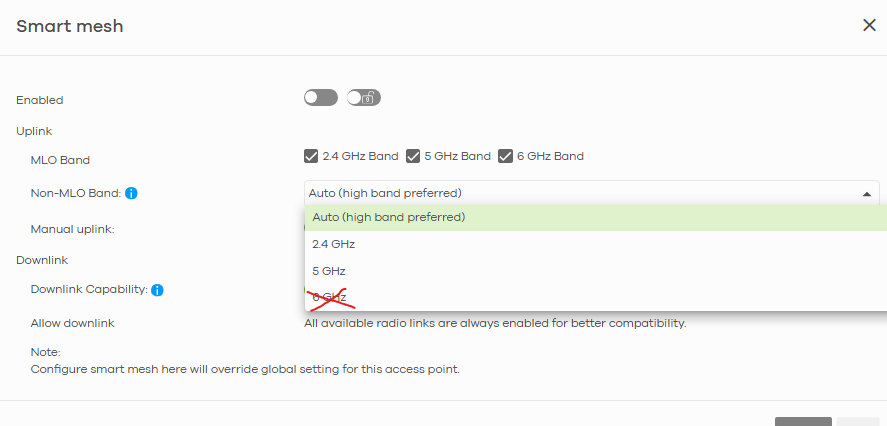
As a temporary workaround, please avoid configuring Repeater APs to use 6 GHz only for uplinks (this causes mesh connection failure). Alternatively, you may downgrade to V7.20(3) for continued use.
We appreciate your understanding!
Zyxel Tina
0 -
Hi @jj38100,
The next firmware version is currently in the final stage of testing and is expected to release the week after next (week of Feb 23). If downgrading to v7.20(3) is not suitable for you, we recommend the temporarily workaround I mentioned earlier: avoid setting Repeater APs to use 6 GHz only for uplinks—configure 2.4G, 5G, or Auto instead.
Thank you for your understanding!
Zyxel Tina
1

 Zyxel Employee



All Replies
-
As an update, I enabled the 802.11be radio no the 2.4ghz and MLO is working on 2.4ghz+5ghz but not 6ghz. I changed the Uplink channels to exclude 2.4ghz and it only connections on 5ghz…. sigh, not sure what's up, why is SmartMesh refusing to use the 6ghz band at all???
0 -
Hi @jj38100,
The issue you're encountering is a known issue with 6 GHz uplink operation when APs are configured in Repeater mode. With firmware V7.30(ACIL.2), the 6 GHz band doesn't function as expected for wireless mesh uplinks.
The fix will be included in the next firmware release this month.
As a temporary workaround, please avoid configuring Repeater APs to use 6 GHz only for uplinks (this causes mesh connection failure). Alternatively, you may downgrade to V7.20(3) for continued use.
We appreciate your understanding!
Zyxel Tina
0 -
Thank you! I thought I was going crazy. Not sure if down revving is a good idea, 7.30 also fixed some bugs I had at my other site..
Hopefully the next version doesn't have any other bugs I'll hit
0 -
I guess I should ask, is there a way to get the firmware early?
0 -
Hi @jj38100,
The next firmware version is currently in the final stage of testing and is expected to release the week after next (week of Feb 23). If downgrading to v7.20(3) is not suitable for you, we recommend the temporarily workaround I mentioned earlier: avoid setting Repeater APs to use 6 GHz only for uplinks—configure 2.4G, 5G, or Auto instead.
Thank you for your understanding!
Zyxel Tina
1 -
That's fine. Downgrading I tested and sure enough multiple issues around key handshake, drops, radio reboots, and everything.
5ghz is fine for now, 2.4ghz is dedicated to legacy/IoT devices.
Hopefully the next version resolves most of these issues, it seems like since launch Wifi 7, the 6ghz band, and MLO has had a lot of issues.
Thanks again
0
Categories
- All Categories
- 442 Beta Program
- 3.1K Nebula
- 237 Nebula Ideas
- 6.8K Security
- 747 USG FLEX H Series
- 377 Security Ideas
- 1.8K Switch
- 87 Switch Ideas
- 1.5K Wireless
- 58 Wireless Ideas
- 7.2K Consumer Product
- 319 Service & License
- 512 News and Release
- 99 Security Advisories
- 31 Education Center
- 10 [Campaign] Zyxel Network Detective
- 5.3K FAQ
- 34 Documents
- 90 About Community
- 119 Security Highlight


