NWA50BE Causing Hardwire Network Disruption
All Replies
-
Hi Judy,
I will attempt to get a network topology map done at the weekend, but for the time being the switch in the system is unmanaged, so I don't believe I can get any info from it. It's a Belkin F5D5141-8, which connects via a home plug system through the house wiring to a Plusnet Hub 2 router that connects to the actual external internet. All cables are CAT6 or better. Port speeds are 1Gbps except the house wiring which can only manage just under 400Mbps.
I did another test this morning, and the diagnostics file is attached. This one was very disruptive.
Ian
-diagnostic file is removed-
0 -
Hi @ianj14 ,
Based on the diagnostic information, we do not observe any abnormal behavior on the AP. The uplink is operating at 1Gbps full duplex with no collisions, and both overall traffic and broadcast levels remain minimal. In addition, no loop condition is detected, and the management interface is functioning normally.
From the provided information, we assume your typology as below:
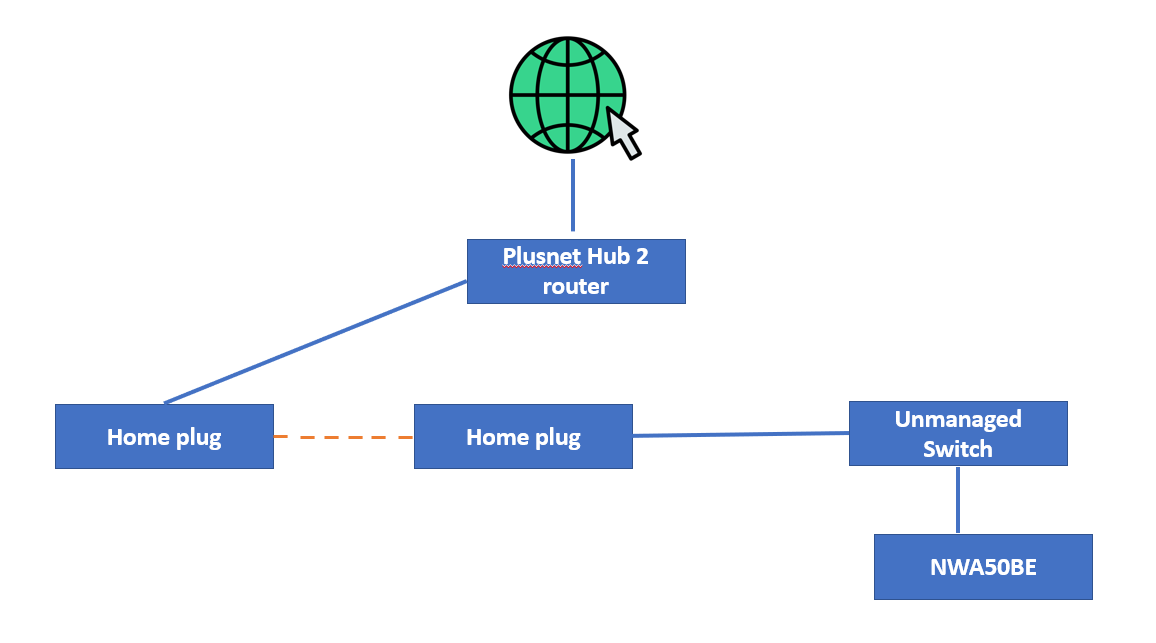
With this topology and observed behavior, the issue is more likely related to the powerline (HomePlug) environment rather than the AP itself. Since powerline operates as a shared medium, it can be sensitive to broadcast and multicast traffic, which may impact overall performance across all connected devices.
To further validate this, we suggest temporarily bypassing the HomePlug connection and directly connecting the AP (switch) to the router via Ethernet for comparison. If the issue no longer occurs, this will help indicate that the behavior is related to the powerline environment.
Zyxel_Judy
0 -
Hi Judy,
I have wondered about the home plug connection potentially being part of the problem. It's important to note that I have no problems without the Zyxel unit turned on, the rest of the system works as expected, so there would have to be something specific to the Zyxel in relation to home plug that was causing the disruption.
Although I can test with a direct ethernet connection, it's not a viable option as I can't have network cables snaking round the house, I have to use the home plug due to distances between the internet port from outside and the destination devices.
The topology is about right.
Ian
0 -
Update: due to an issue with connectivity between my laptop and the F5D5141-8 switch which showed up today, I'm working on the possibility that the switch, perhaps due to it's age, is malfunctioning. This would only be something that has happened recently, and in many respects it seemed otherwise fine, but the Zyxel could have been showing the beginnings of malfunction in it.
I have now substituted it with a Netgear GS116, which while not in any way new, has spent most of it's time in a box out of the way. It will take a week or two to see what happens, and if necessary also do a direct ethernet test as well.
0 -
I'm not even going to wait a week. Switching out the Belkin switch for the Netgear switch is clearly working. So the issue was an old switch that had begun to detoriorate only recently. Replacing it has solved the problem.
Apologies for any annoyance or inconvenience I may have caused. It wasn't obvious that the switch was at fault when I first started using the Zyxel.
0


 Freshman Member




 Zyxel Employee
Categories
- All Categories
- 442 Beta Program
- 3.1K Nebula
- 243 Nebula Ideas
- 6.8K Security
- 783 USG FLEX H Series
- 389 Security Ideas
- 1.8K Switch
- 87 Switch Ideas
- 1.5K Wireless
- 58 Wireless Ideas
- 7.2K Consumer Product
- 325 Service & License
- 527 News and Release
- 101 Security Advisories
- 31 Education Center
- 10 [Campaign] Zyxel Network Detective
- 5.3K FAQ
- 34 Documents
- 91 About Community
- 122 Security Highlight


