How to Capture Switch Packets via Port Mirroring?
Options

Zyxel_Tina
Posts: 1,008




 Zyxel Employee
Zyxel Employee
Why capture packet?
In troubleshooting scenarios, packet captures are often essential. For example, you may need to verify if the switch is correctly obtaining an IP from an upstream device like a gateway, router, or DHCP server. This guide provides step-by-step instructions on how to accomplish this.
Typology
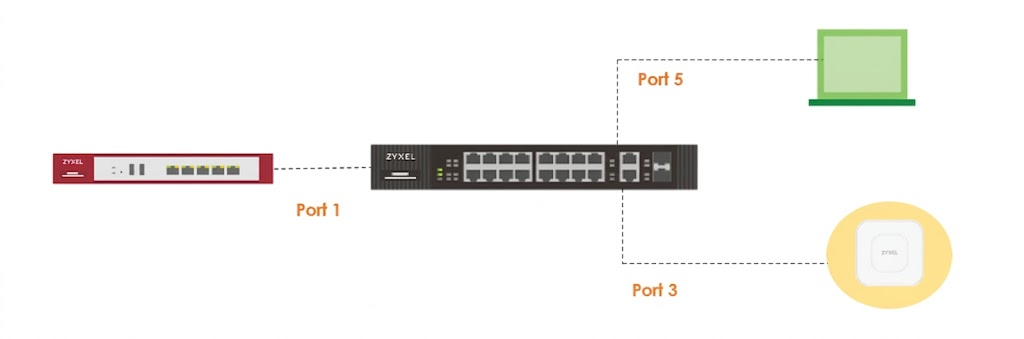
Steps:
In the Switch GUI
- Choose the Mirroring feature
- Choose the monitor port (connected to your PC), and mirrored port (connected to the uplink device)
- Click Apply
Note: The steps for setting up mirroring can vary between different switches.

In the laptop where Wireshark has already installed inside
- Click the “Capture” button on the dashboard, or the gear icon on the menu bar.

- Select the Ethernet interface

- Capture packets for several minutes. Then, click "Stop" in the Wireshark tool to end the packet capture.
After completing the packet capture, the packet file can be analyzed to review the captured information.
Zyxel Tina
0
Categories
- All Categories
- 442 Beta Program
- 3.1K Nebula
- 241 Nebula Ideas
- 6.8K Security
- 755 USG FLEX H Series
- 379 Security Ideas
- 1.8K Switch
- 87 Switch Ideas
- 1.5K Wireless
- 58 Wireless Ideas
- 7.2K Consumer Product
- 320 Service & License
- 512 News and Release
- 99 Security Advisories
- 31 Education Center
- 10 [Campaign] Zyxel Network Detective
- 5.3K FAQ
- 34 Documents
- 90 About Community
- 119 Security Highlight