Qnap VPN behind a USG20W-VPN Firewall



 Freshman Member
Good morning,I have this problem:
I use the Qbelt VPN on my QNAP NAS.
The NAS's VPN server has an IP address of 10.10.10.1/24, the office network is 192.168.0.0/24, the firewall has an IP address of 192.168.0.1, and the NAS has an IP address of 192.168.0.250/24.
When I connect with my home VPN, I ping the firewall (192.168.0.1) and the NAS's VPN server (10.10.10.1), but when I try to ping the NAS (192.168.0.250) or any other device, no one responds.
The firewall has a static route configured as follows:
Destination: 10.10.10.0 Subnet: 255.255.255.0 Next-Hop: 192.168.0.250
and a policy control configured as follows:
From: WAN
To: LAN1
Source: WAN
IPDestination: NAS IP
Service: any
Allow
Can you help me understand the problem? Thanks
Accepted Solution
-
Hi @Luky,
the problem is that the VPN created by the NAS not route to the 192.168.0.0/24 LAN.When you create the VPN on the NAS, is the NAS itself that manage this connection, and remain into the NAS (the firewall act only as external point for the local connection with the NAS —> so the firewall manage only the 192.168.0.0/24).
When you establish a connection between WAN and Qbelt, is the "Qbelt manager" (in this case the QNAP) that manage this connection.
You need to configure a route between 10.10.10.0/24 and 192.168.0.0/24 inside the QNAP (as explain is the QNAP that manage this connection).Other question: you're secure that you cannot reach the 192.168.0.0/24 LAN? As explain the PING packet is a "special" packet that it's not guaranteed to be handled correctly. Have you tried reaching a real Web Server/SMB service, etc., by pointing to the LAN IP?
If you use \\192.168.0.250 instead of \\10.10.10.1, you can reach the samba service of QNAP?I have a QNAP TS-253D and you can configure whenever you want.
0





 Master Member
All Replies
-
IMVHO this is more a QNAP-community/support forum question rather than a Zyxel support question…
And according to QNAP advertisement/communication about QBelt, it's NAS-oriented rather than network-oriented.
0 -
Hi @Luky,
remember that the PING packet is the ICMP/8 service.In any case, try to check the logs and try to find the "ACCESS BLOCK" rule, check the source and destination IP and try to find a solution starting on this.
Also…. why you have added the route to firewall? In this case the routing is managed by the QNAP. Is the QNAP that hosts the VPN, so the routing is internal to the QNAP.Also… because the VPN is managed by the QNAP, can be a QNAP rule that not forward the ICMP/8 service outside the network.
But for me, the first step is to check if you see some blocking rules into the firewall logs with some source/desc IP that you know (10.10.10.0/24 or 192.168.0.0/24). Probably as explain before, you don't see anything because is the QNAP that manage and route all.
0 -
Hi @Luky,
Welcome to the Zyxel Community!
Please allow us to clarify the traffic flow in your setup. Since the VPN server (Qbelt) is hosted on the QNAP NAS itself, the USG20W only acts as a pass-through, forwarding incoming VPN connection requests to the NAS. Once the VPN tunnel is established, all traffic flows directly between your remote client (10.10.10.x) and the NAS (10.10.10.1) without passing through the firewall. As a result, routing between the VPN subnet (10.10.10.0/24) and the office LAN (192.168.0.0/24) is handled by the NAS. We therefore recommend focusing your troubleshooting on the QNAP side.
Check NAS VPN and Routing Behavior
Please ensure that:
- The VPN server settings allow clients to access the local LAN
- IP forwarding (or equivalent routing functionality) is enabled on the NAS
- The NAS does not have any local firewall rules blocking traffic between subnets
Verify Return Path
With the static route already configured on the firewall, also ensure that return traffic from LAN devices is routed back to VPN clients via the NAS.
Zyxel Tina
0 -
Thanks everyone for your replies. I granted Zyxel support temporary access, and they confirmed that the firewall configuration is correct. They recommended enabling logs and running a test, but they believe the problem lies with the NAS, as you suggested. I tried disabling the NAS's internal firewall, but the problem persists. Unfortunately, this NAS (TS-264) doesn't allow many changes. I'll also try disabling the antivirus and repeating the test, but I honestly doubt that's the problem. The really strange thing is that with the exact same NAS, used by other customers with a Zyxel firewall, the problem doesn't occur and everything works perfectly. The NAS's VPN server logs show the connections without any alerts.
0 -
Hi @Luky,
the problem is that the VPN created by the NAS not route to the 192.168.0.0/24 LAN.When you create the VPN on the NAS, is the NAS itself that manage this connection, and remain into the NAS (the firewall act only as external point for the local connection with the NAS —> so the firewall manage only the 192.168.0.0/24).
When you establish a connection between WAN and Qbelt, is the "Qbelt manager" (in this case the QNAP) that manage this connection.
You need to configure a route between 10.10.10.0/24 and 192.168.0.0/24 inside the QNAP (as explain is the QNAP that manage this connection).Other question: you're secure that you cannot reach the 192.168.0.0/24 LAN? As explain the PING packet is a "special" packet that it's not guaranteed to be handled correctly. Have you tried reaching a real Web Server/SMB service, etc., by pointing to the LAN IP?
If you use \\192.168.0.250 instead of \\10.10.10.1, you can reach the samba service of QNAP?I have a QNAP TS-253D and you can configure whenever you want.
0 -
Hi @Maverick87 ,
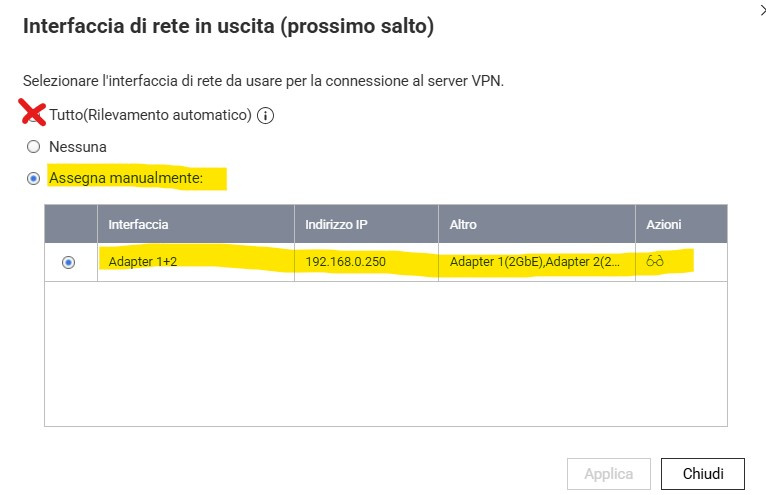
I can confirm that the problem was with the VPN server configuration on the NAS! I'm sharing the solution with everyone in case anyone else encounters the same issue: in the VPN server settings in Qbelt, under "Outgoing network interface," I unchecked the "All (auto-detect)" option and set it to "Manually assign," selecting the two network adapters configured for load balancing. After doing this, I started pinging the NAS and all network devices while connected to the VPN! Thanks everyone!
I'm attaching an image.
1




 Guru Member


 Zyxel Employee
Categories
- All Categories
- 442 Beta Program
- 3.1K Nebula
- 241 Nebula Ideas
- 6.8K Security
- 755 USG FLEX H Series
- 379 Security Ideas
- 1.8K Switch
- 87 Switch Ideas
- 1.5K Wireless
- 58 Wireless Ideas
- 7.2K Consumer Product
- 320 Service & License
- 512 News and Release
- 99 Security Advisories
- 31 Education Center
- 10 [Campaign] Zyxel Network Detective
- 5.3K FAQ
- 34 Documents
- 90 About Community
- 119 Security Highlight