[USG Flex H] - Different device/same Mac Address after change interface to port





 Master Member
Hello everyone,
Today I've changed an interface for one port, disconnecting the old device and attaching a new one.
After this, when I've tried to connect the new device, it's not acquired an IP and under the DHCP list, I see the new IP for the new interface but the MAC Address was attached to the old device.
Example:
P8 (Interface LAN) —> Samsung TV with mac address AA:BB:CC:DD:EE:FF IP 192.168.1.100
———————————— Change configuration to ———————————-
P8 (UPS Interface) —> after connected an UPS —> mac address AA:BB:CC:DD:EE:FF IP 192.168.200.2 but …. the mac address of the UPS is different :)
So… no ping, no ip address on the device (instead for the firewall the IP is 192.168.200.2), no communication
At this point, I've disconnected the UPS, released the old IP from the DHCP table, reattached the UPS and now is connected successfully with different mac address (the real UPS mac) with 192.168.200.2 IP.
It's seems that also if you change the interface for a port, the port don't release the old mac associated to the port.
Probabily the problem is the lease time, but I don't want to "stress" the arp table; my solution can be a sort of deletion of the entry into the arp table if config for a port changing. Can be a valid solution?
Other people that had the same problem?
All Replies
-
Hi @Maverick87,
We attempted to reproduce the issue on our end using a USG FLEX 200H with firmware v1.38. Our test followed the same scenario you described — we first connected AP1 to ge4 (Port 6) under an existing LAN interface, then reassigned Port 6 to a newly created interface and connected AP2. We also repeated the test across different firmware versions.
However, in all our tests, both APs were able to obtain a DHCP IP address successfully, and the MAC address mappings were correct with no residual entries observed.
(Before)
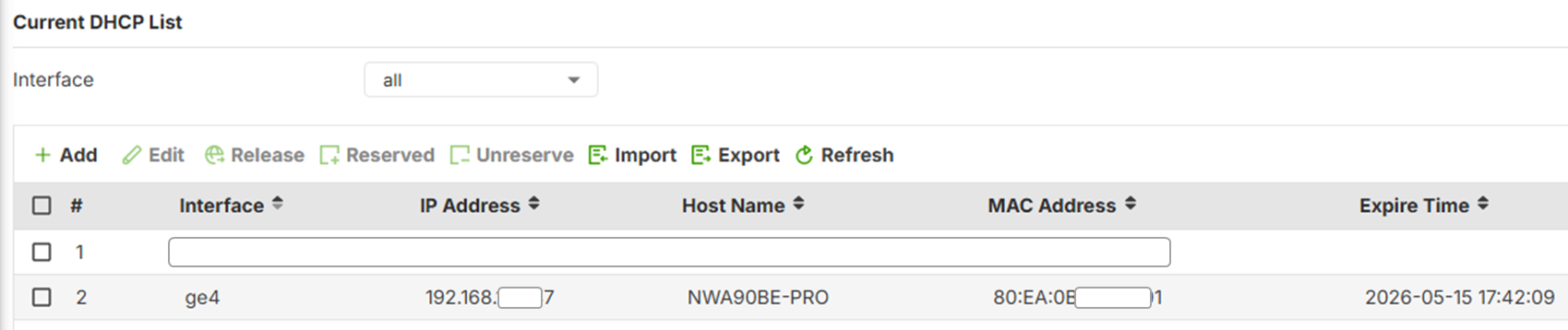
(After)

Since we are unable to reproduce the issue on our side, it would be very helpful if you could preserve your current environment as-is. We'd like to arrange a remote session to connect to your device directly so we can capture packets and logs for further investigation.
Could you let us know your availability for a remote session?
Thank you for your patience and cooperation!
Zyxel Tina
0




 Zyxel Employee
Categories
- All Categories
- 442 Beta Program
- 3.1K Nebula
- 243 Nebula Ideas
- 6.8K Security
- 783 USG FLEX H Series
- 389 Security Ideas
- 1.8K Switch
- 87 Switch Ideas
- 1.5K Wireless
- 58 Wireless Ideas
- 7.2K Consumer Product
- 325 Service & License
- 527 News and Release
- 101 Security Advisories
- 31 Education Center
- 10 [Campaign] Zyxel Network Detective
- 5.3K FAQ
- 34 Documents
- 91 About Community
- 122 Security Highlight


