How can I check event logs for blocked websites on an H Series firewall through Nebula?
Options

Zyxel_Stanley
Posts: 1,482




 Zyxel Employee
Zyxel Employee
Question:
How can I check event logs for blocked websites on an H Series firewall through Nebula?
Answer:
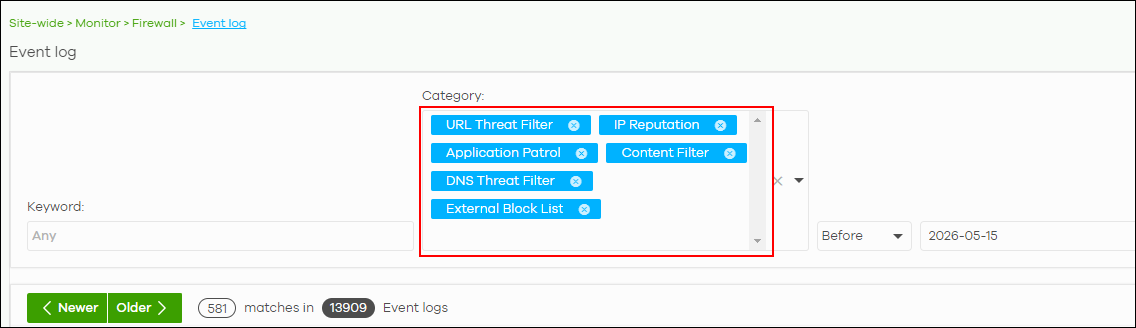
In Nebula, go to Site-wide > Monitor > Firewall > Event log.
To review blocked website/security events, select categories such as URL Threat Filter, IP Reputation, Application Patrol, Content Filter, DNS Threat Filter, and External Block List, then filter by time, source IP, or keyword as needed.
0
Categories
- All Categories
- 442 Beta Program
- 3.1K Nebula
- 243 Nebula Ideas
- 6.8K Security
- 783 USG FLEX H Series
- 389 Security Ideas
- 1.8K Switch
- 87 Switch Ideas
- 1.5K Wireless
- 58 Wireless Ideas
- 7.2K Consumer Product
- 325 Service & License
- 527 News and Release
- 101 Security Advisories
- 31 Education Center
- 10 [Campaign] Zyxel Network Detective
- 5.3K FAQ
- 34 Documents
- 91 About Community
- 122 Security Highlight