How can I access the firewall without using Putty or TeraTerm?
Options

Zyxel_Emily
Posts: 1,499




 Zyxel Employee
Zyxel Employee
Question:
How can I access the firewall without using Putty or TeraTerm?
Answer:
You can use the 'Remote Configurator' from Nebula to log into the web GUI of the firewall and access the web console:
- Establish a remote connection using the 'Remote Configurator' on Nebula. For example, access it via: https://3.254.52.229:24258
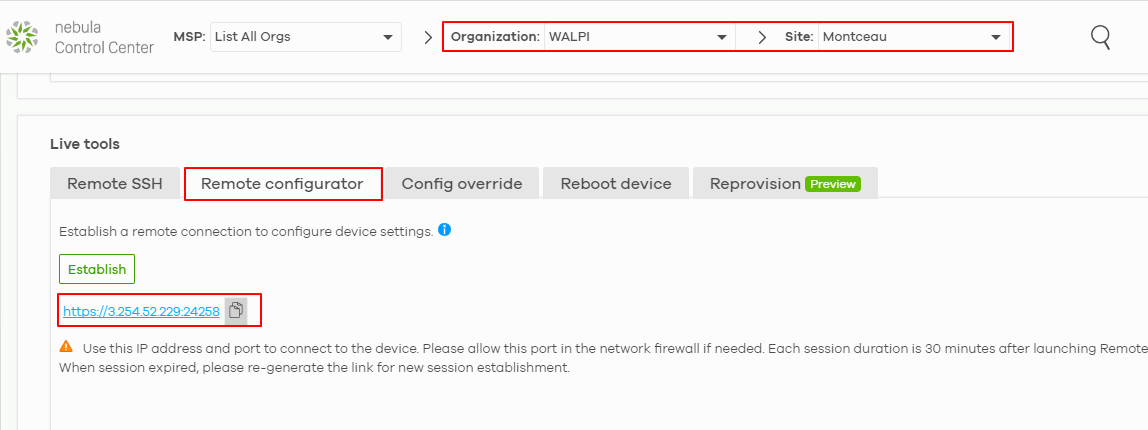
- Log in to the device via this connection.
- Open the 'Web Console' option from the web GUI. If the web console does not load successfully, it might be due to an incorrect URL like: https://3.254.52.229/webconsole/
- Manually adjust the URL by updating the port to match the 'Remote Configurator'. For example: https://3.254.52.229:24258/webconsole/

This method allows you to securely access the firewall's web console without needing external tools like Putty or TeraTerm.
Tagged:
0
Categories
- All Categories
- 442 Beta Program
- 3.1K Nebula
- 243 Nebula Ideas
- 6.8K Security
- 783 USG FLEX H Series
- 389 Security Ideas
- 1.8K Switch
- 87 Switch Ideas
- 1.5K Wireless
- 58 Wireless Ideas
- 7.2K Consumer Product
- 325 Service & License
- 527 News and Release
- 101 Security Advisories
- 31 Education Center
- 10 [Campaign] Zyxel Network Detective
- 5.3K FAQ
- 34 Documents
- 91 About Community
- 122 Security Highlight