How do I see if Nebula is done configuring my device? (SCR 50AXE)


 Freshman Member
I have a SCR 50AXE at home and so I'm configuring it via Nebula. I'm struggling with this because I can't really see when my Change and consequent Save is accepted, if it's done, and/or when it's actually active, because I feel I've been in the situation where the Nebula interface tells me one thing but the device is in a total different state.
Accepted Solution
-
Hi @frijsd,
Welcome to the Zyxel Community!
To verify when your SCR 50AXE has successfully received and applied configuration changes from Nebula, you can monitor the Configuration Status directly in the Nebula Control Center (NCC).
- Check the Configuration Status: Navigate to Site-wide > Devices > Security Router. Look for the Configuration status column.
- Up to date: The device has successfully synchronized with the cloud and applied the latest settings.
- Not up to date: This indicates that changes have been saved in Nebula but are still being pushed to or processed by the device.
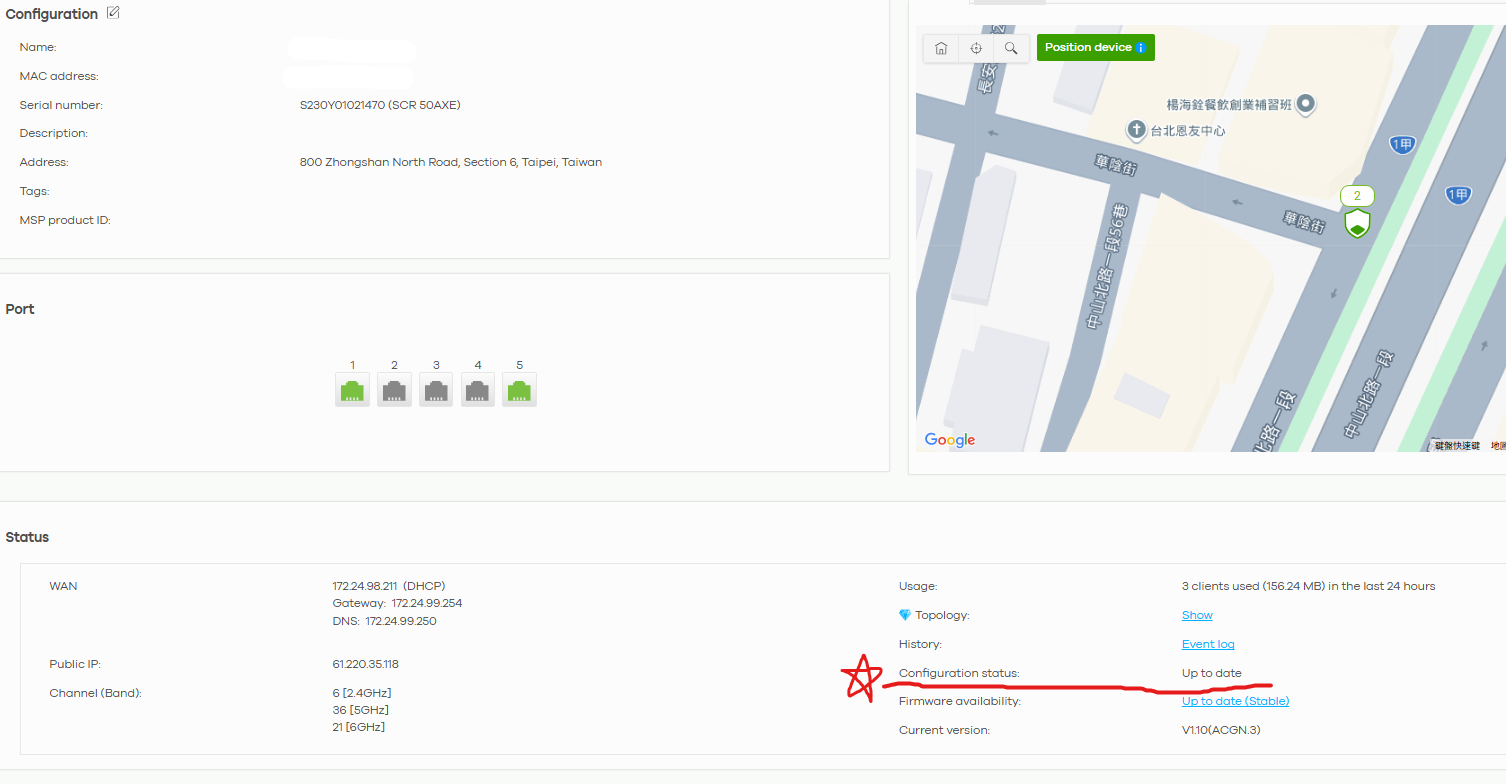
- Wait for Synchronization: Depending on your internet connection and the complexity of the changes, it typically takes between 2 to 10 minutes for the SCR 50AXE to fully apply the new settings. Avoid making further changes while the status is not Up to date to prevent configuration queuing or delays.
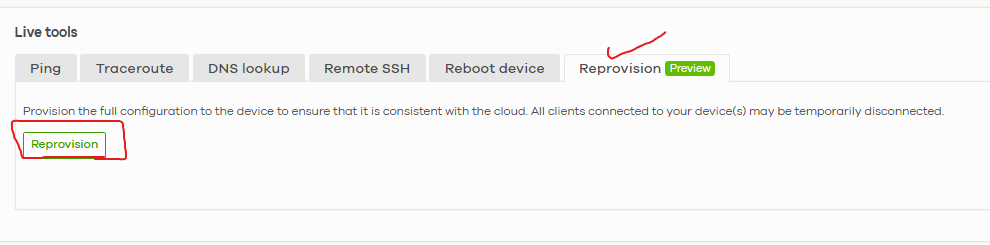
- Use the Reprovision Tool: If you suspect the device is stuck or "Out of Sync" even though Nebula shows it as online, you can force a full configuration push. Go to the device detail page and look for the Reprovision button under the Live Tools section. Please note that this button is only clickable when the config status is "Up to date”.
To help us investigate why your device might be showing a different state than expected, could you clarify the following? (Screenshots are welcome.)
- Which specific settings (e.g., firewall rules, SSID, WAN) appear to be out of sync?
- What is the current firmware version shown for your SCR 50AXE in Nebula?
Zyxel Tina
0 - Check the Configuration Status: Navigate to Site-wide > Devices > Security Router. Look for the Configuration status column.





 Zyxel Employee
All Replies
-
Hi @frijsd,
Welcome to the Zyxel Community!
To verify when your SCR 50AXE has successfully received and applied configuration changes from Nebula, you can monitor the Configuration Status directly in the Nebula Control Center (NCC).
- Check the Configuration Status: Navigate to Site-wide > Devices > Security Router. Look for the Configuration status column.
- Up to date: The device has successfully synchronized with the cloud and applied the latest settings.
- Not up to date: This indicates that changes have been saved in Nebula but are still being pushed to or processed by the device.
- Wait for Synchronization: Depending on your internet connection and the complexity of the changes, it typically takes between 2 to 10 minutes for the SCR 50AXE to fully apply the new settings. Avoid making further changes while the status is not Up to date to prevent configuration queuing or delays.
- Use the Reprovision Tool: If you suspect the device is stuck or "Out of Sync" even though Nebula shows it as online, you can force a full configuration push. Go to the device detail page and look for the Reprovision button under the Live Tools section. Please note that this button is only clickable when the config status is "Up to date”.
To help us investigate why your device might be showing a different state than expected, could you clarify the following? (Screenshots are welcome.)
- Which specific settings (e.g., firewall rules, SSID, WAN) appear to be out of sync?
- What is the current firmware version shown for your SCR 50AXE in Nebula?
Zyxel Tina
0 - Check the Configuration Status: Navigate to Site-wide > Devices > Security Router. Look for the Configuration status column.
-
Thank you!
Edit: while the breadcrumb says Site-wide > Monitor > Devices > Security router, it's actually
Site-wide > Devices > Security router
This is really confusing. But I found it :)
0 -
Categories
- All Categories
- 442 Beta Program
- 3.1K Nebula
- 243 Nebula Ideas
- 6.8K Security
- 783 USG FLEX H Series
- 389 Security Ideas
- 1.8K Switch
- 87 Switch Ideas
- 1.5K Wireless
- 58 Wireless Ideas
- 7.2K Consumer Product
- 325 Service & License
- 527 News and Release
- 101 Security Advisories
- 31 Education Center
- 10 [Campaign] Zyxel Network Detective
- 5.3K FAQ
- 34 Documents
- 91 About Community
- 122 Security Highlight


