How can I troubleshoot the network environment if it cannot reach 8.8.8.8?
Options

Zyxel_Stanley
Posts: 1,482




 Zyxel Employee
Zyxel Employee
Question:
How can I troubleshoot the network environment if it cannot reach 8.8.8.8?
Answer:
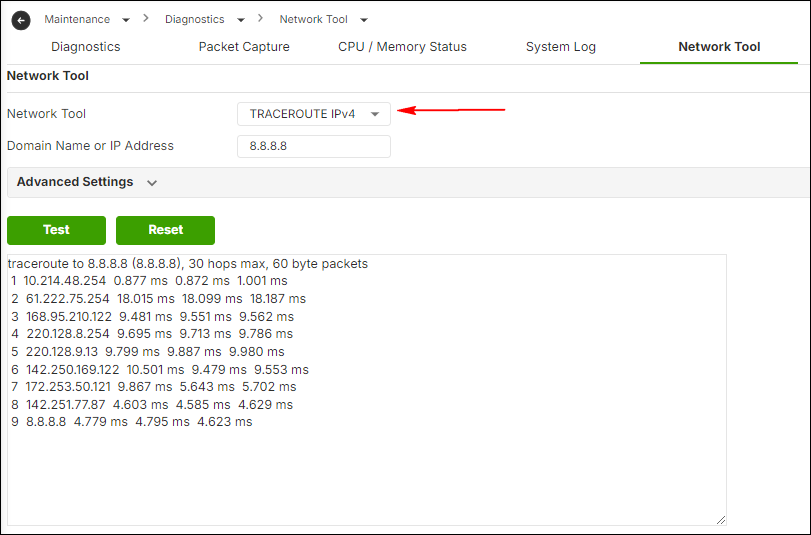
In the Firewall local WebGUI, go to Monitor > Diagnostics > Network Tool > Tracert Router IPv4, then test the route to 8.8.8.8 to identify where traffic is blocked. If the Firewall can reach 8.8.8.8 but the PC cannot, please provide traceroute results from both the PC and the Firewall, and contact support for further investigation.
0
Categories
- All Categories
- 442 Beta Program
- 3.1K Nebula
- 243 Nebula Ideas
- 6.8K Security
- 783 USG FLEX H Series
- 389 Security Ideas
- 1.8K Switch
- 87 Switch Ideas
- 1.5K Wireless
- 58 Wireless Ideas
- 7.2K Consumer Product
- 325 Service & License
- 527 News and Release
- 101 Security Advisories
- 31 Education Center
- 10 [Campaign] Zyxel Network Detective
- 5.3K FAQ
- 34 Documents
- 91 About Community
- 122 Security Highlight