XGS 2220-30 L3 vlan config


 Freshman Member
Hello team,
I am used to Cisco configuration so not sure how to use the XGS 2220-30 L3 switch to route between different vlans. We are trying to connect 1915 zyxel in one vlan to 1915 zyxel in another vlan via 2220-30 switch. Do I need to use a default gateway on each vlan like in Cisco? I don't see that in the GUI, but noticed that when configuring the switch via CLI, I am able to configure ip addresses for each subnet based vlan. I would rather not use DCHP.
Thank you!
Kind regards,
Stevimir
Best Answers
-
Hi @Stevimir ,
Based on your description, we assume your typology as below
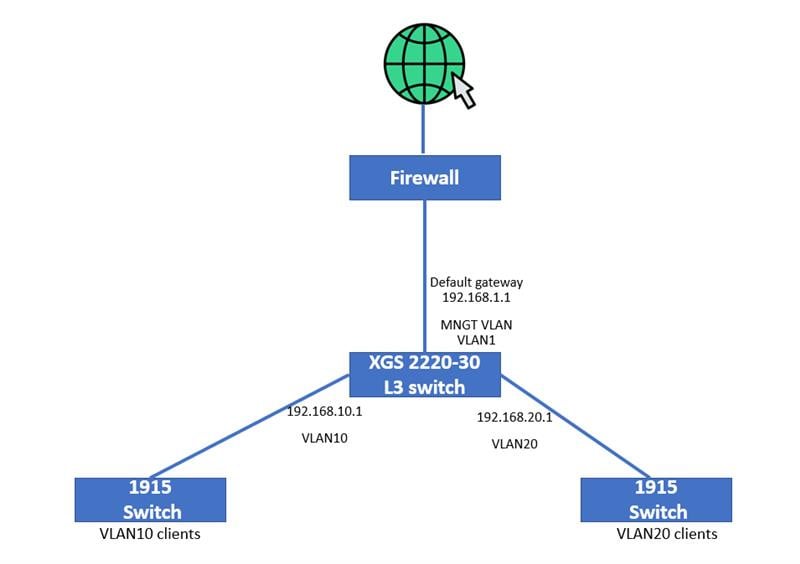
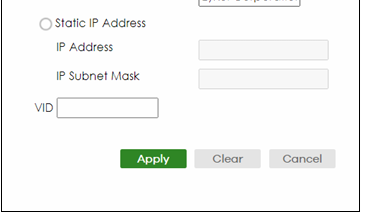
Inter-VLAN routing on the XGS2220-30 is enabled by default. To use the XGS 2220-30 L3 switch to route between different VLANs (VLAN10 and VLAN20 as example), you just assign an IP address to each VLAN by going to SYSTEM > IP Setup > IP Setup, click Add, and assign an IP address for each VLAN (192.168.10.1 and 192.168.20.1 as example).
The default gateway configured on the XGS2220-30 switch is only needed for the management VLAN — this gives the clients reach the firewall or internet. In this case, set the default gateway on each client device (or DHCP setting).
For VLAN configuration details, please refer to the FAQ below:
Zyxel_Judy
0 -
Hi @Stevimir ,
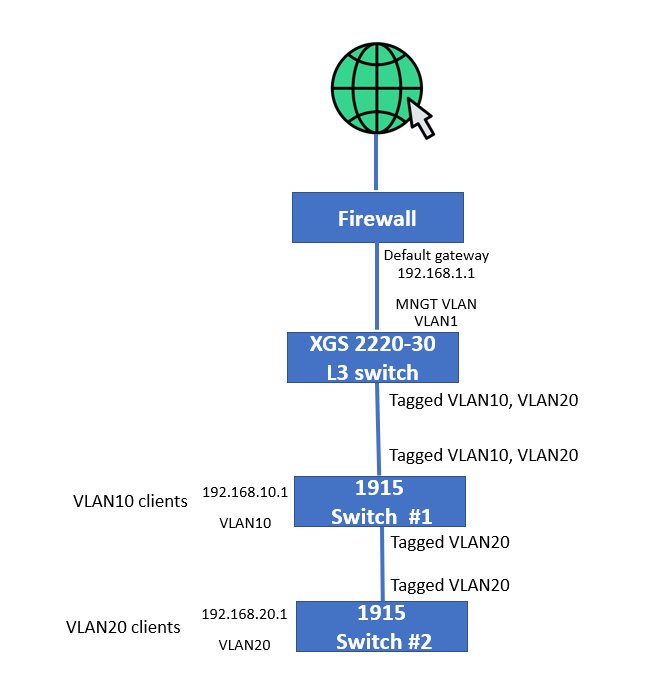
To pass multiple VLANs over a single link between switches, please configure as below:
- On the port connecting two switches: Set the port as a Tagged port for all VLANs that need to pass through (e.g., VLAN 10 and VLAN 20). This allows a single cable/port to carry traffic from multiple VLANs simultaneously.
- On the port where end devices connect: Set the port as Untagged for the specific VLAN that device belongs to
Zyxel_Judy
0





 Zyxel Employee
All Replies
-
Hi @Stevimir ,
Based on your description, we assume your typology as below
Inter-VLAN routing on the XGS2220-30 is enabled by default. To use the XGS 2220-30 L3 switch to route between different VLANs (VLAN10 and VLAN20 as example), you just assign an IP address to each VLAN by going to SYSTEM > IP Setup > IP Setup, click Add, and assign an IP address for each VLAN (192.168.10.1 and 192.168.20.1 as example).
The default gateway configured on the XGS2220-30 switch is only needed for the management VLAN — this gives the clients reach the firewall or internet. In this case, set the default gateway on each client device (or DHCP setting).
For VLAN configuration details, please refer to the FAQ below:
Zyxel_Judy
0 -
Thank you for your reply, much appreciated.
And what if I want to use a daisy-chain topography and add more 1915s in my design? How would I configure ports that connect switches in that fashion when I must pass multiple VLANs across the single link connecting the switches?
0 -
Hi @Stevimir ,
To pass multiple VLANs over a single link between switches, please configure as below:
- On the port connecting two switches: Set the port as a Tagged port for all VLANs that need to pass through (e.g., VLAN 10 and VLAN 20). This allows a single cable/port to carry traffic from multiple VLANs simultaneously.
- On the port where end devices connect: Set the port as Untagged for the specific VLAN that device belongs to
Zyxel_Judy
0
Categories
- All Categories
- 442 Beta Program
- 3.1K Nebula
- 243 Nebula Ideas
- 6.8K Security
- 783 USG FLEX H Series
- 389 Security Ideas
- 1.8K Switch
- 87 Switch Ideas
- 1.5K Wireless
- 58 Wireless Ideas
- 7.2K Consumer Product
- 325 Service & License
- 527 News and Release
- 101 Security Advisories
- 31 Education Center
- 10 [Campaign] Zyxel Network Detective
- 5.3K FAQ
- 34 Documents
- 91 About Community
- 122 Security Highlight


