Random Nebula disconnections on XGS1930 fiber uplink, CRC errors and STP changes


 Freshman Member
Hello,
We recently took over a customer already using Zyxel Nebula switches, so we inherited the existing setup. This issue started before our takeover, so unfortunately we do not have the full history of previous incidents or changes.
We are seeing recurring network interruptions affecting users behind one switch, and it looks like the problem is tied to a fiber uplink flap.
Switches involved:
- Switch Y: GS1350-18HP
- Switch X: GS2220-50
- Switch Z: XGS1930-52HP
- Switch W: XGS1930-52HP
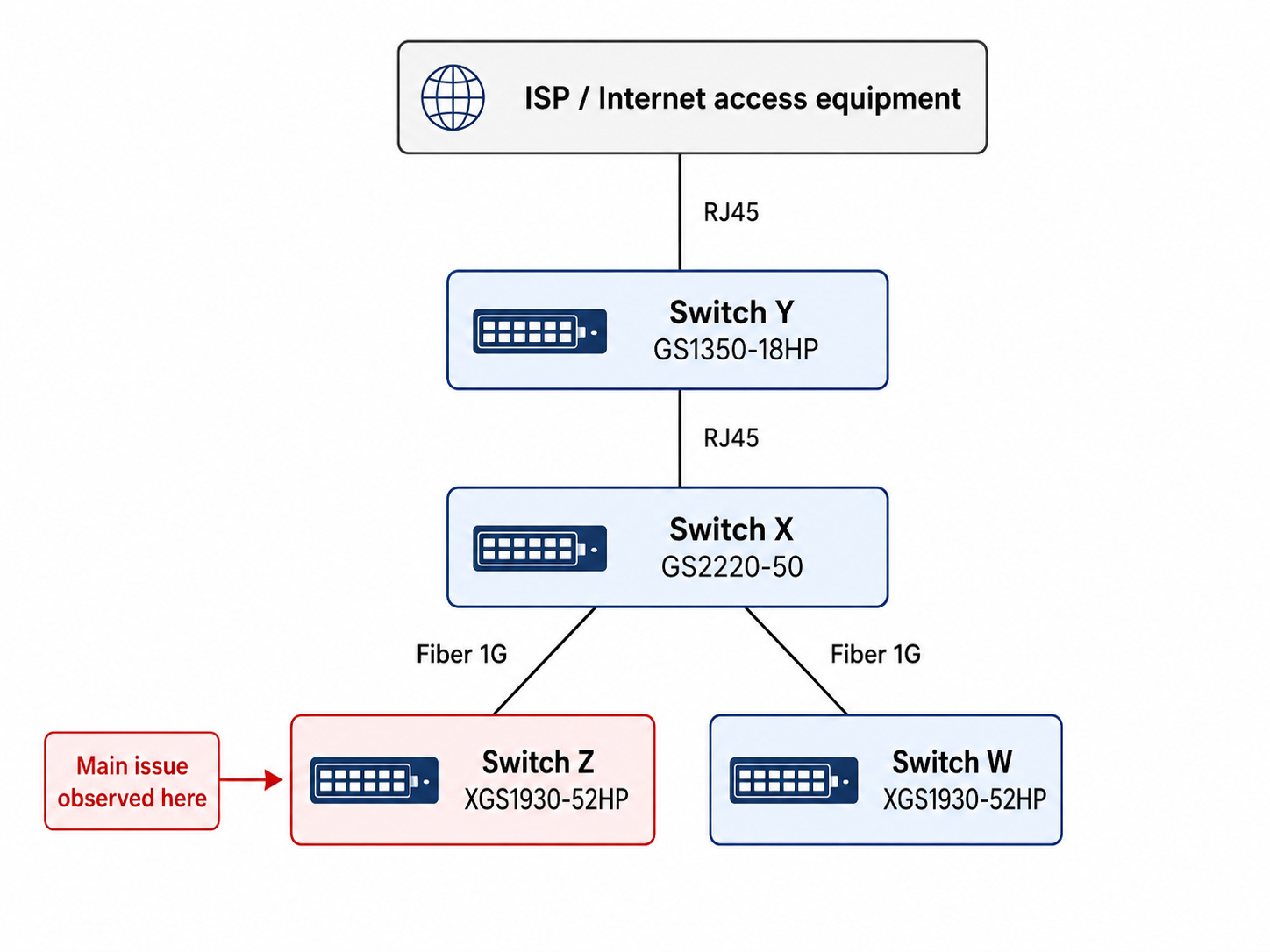
Simplified topology:
- ISP / Internet access equipment → Switch Y via RJ45
- Switch Y → Switch X via RJ45
- Switch X (p18) → Switch Z (p51) via fiber
- Switch X → Switch W via fiber
The issue mainly affects Switch Z.
Several times a day, randomly, Switch Z disconnects from Nebula, and at the same time users behind it also lose network connectivity. So this is not only a Nebula visibility issue, the traffic is actually interrupted. Outages usually last from a few seconds up to 1–2 minutes.
On the fiber uplink between Switch X and Switch Z, we see:
- link down / link up events
- STP topology changes
- sometimes “switch becomes the STP new root”
- CRC errors, mainly on Switch Z

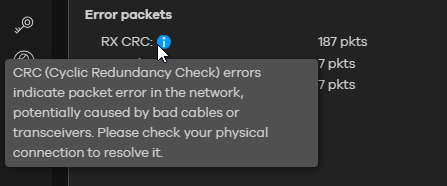
We also checked the other side of the uplink, and the event seems real on both ends. For example, on Switch X we can see at the same time:
- Port 18 link down
- STP topology changes
- later Port 18 link up, speed 1G/F
- STP topology changes again

What we already tried:
- changed the fiber patch cable
- changed the fiber connection on the patch panel
- checked the physical connection
- uplink is running at 1G / auto
The issue remains.
Another thing I noticed: when I try to display DDMI / DDM information on the SFP port, nothing is shown.
Since the flap is visible on both ends and CRC errors are mainly seen on Switch Z, do you have any idea where the problem is most likely located, or what you would check next?
Also, since this topology is not supposed to be redundant, I assume the STP events are more likely a consequence of the uplink instability than the original cause.
Any feedback would be appreciated.
Thanks.
Accepted Solution
-
Hi @Dada57 ,
Since the flap is visible on both ends and CRC errors are mainly seen on
Switch ZEven though you have already replaced the patch cable and checked the physical connections, the problem may still lie in the patch panel connection itself or the SFP module in Switch Z. We recommend connect Switch X and Switch Z directly with a fiber patch cable, if possible (bypass the patch panel), to determine whether the patch panel is the source of the problem.
when I try to display DDMI / DDM information on the SFP port, nothing is shown
Since DDMI data is not showing, may be the SFP transceiver compatibility issue here, which could also contribute to signal integrity issues causing CRC errors. We strongly recommend using Zyxel-certified SFP modules to ensure full compatibility, including reliable DDM monitoring.

Zyxel_Judy
0





 Zyxel Employee
All Replies
-
Hi @Dada57 ,
Since the flap is visible on both ends and CRC errors are mainly seen on
Switch ZEven though you have already replaced the patch cable and checked the physical connections, the problem may still lie in the patch panel connection itself or the SFP module in Switch Z. We recommend connect Switch X and Switch Z directly with a fiber patch cable, if possible (bypass the patch panel), to determine whether the patch panel is the source of the problem.
when I try to display DDMI / DDM information on the SFP port, nothing is shown
Since DDMI data is not showing, may be the SFP transceiver compatibility issue here, which could also contribute to signal integrity issues causing CRC errors. We strongly recommend using Zyxel-certified SFP modules to ensure full compatibility, including reliable DDM monitoring.
Zyxel_Judy
0 -
Hi,
Thank you for your support.
After further investigation and a discussion with the previous provider, I found out that the uplink was using third-party “D-Link compatible” GBIC/SFP transceivers. Apparently, they had been advised at the time that there was no real difference compared to Zyxel ones.
To remove the transceiver compatibility variable from the troubleshooting, I replaced the modules with Zyxel multimode SFP modules on the link.
Since that change, I have not observed any more uplink flaps or user disconnections.
At this stage, it looks like the issue was most likely related to transceiver compatibility rather than the fiber path itself.
Thank you again for your help and guidance.
0
Categories
- All Categories
- 442 Beta Program
- 3.1K Nebula
- 243 Nebula Ideas
- 6.8K Security
- 783 USG FLEX H Series
- 389 Security Ideas
- 1.8K Switch
- 87 Switch Ideas
- 1.5K Wireless
- 58 Wireless Ideas
- 7.2K Consumer Product
- 325 Service & License
- 527 News and Release
- 101 Security Advisories
- 31 Education Center
- 10 [Campaign] Zyxel Network Detective
- 5.3K FAQ
- 34 Documents
- 91 About Community
- 122 Security Highlight


