How to configure alert emails for admin and VPN user successful and failed logins on USG FLEX H?
Options

Zyxel_Emily
Posts: 1,499




 Zyxel Employee
Zyxel Employee
in Other Topics
Question:
How to configure alert emails for admin and VPN user successful and failed logins on USG FLEX H?
Answer:
- Login to the web GUI and navigate to System > Notification > Event Notification.
- In Event, select "Admin Login", "Admin Login Fail", "User Login" and "User Login Fail".
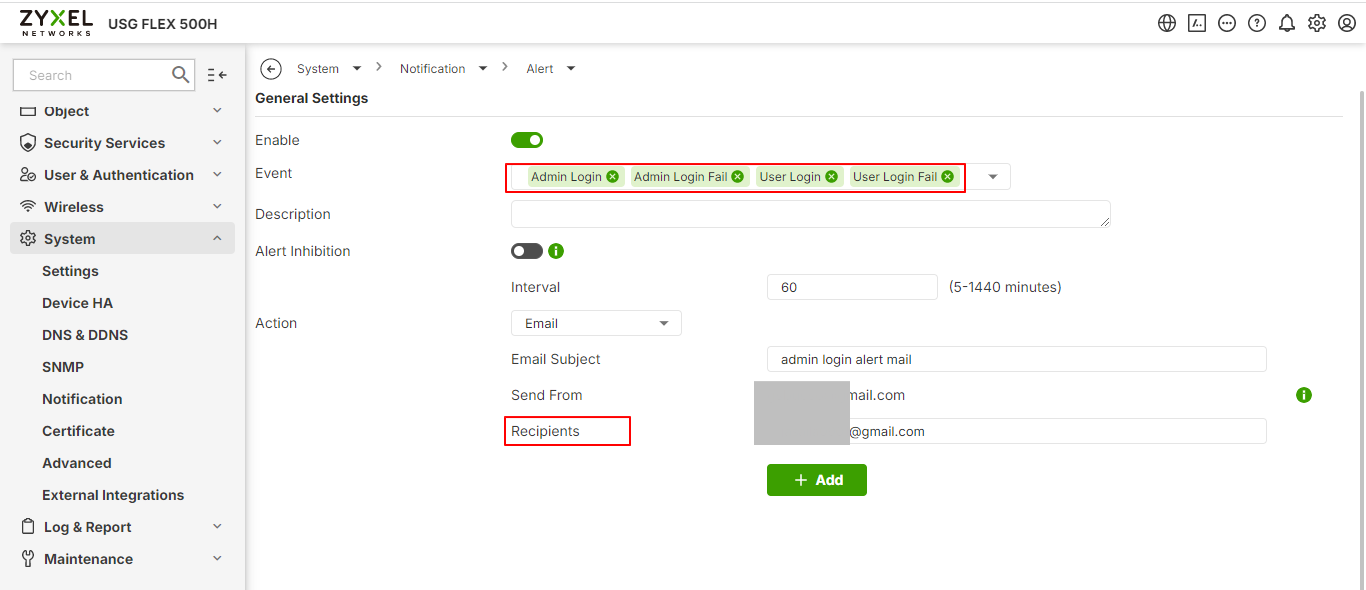
- Enter the email in Recipients.
You will receive alert emails after admin/VPN user login.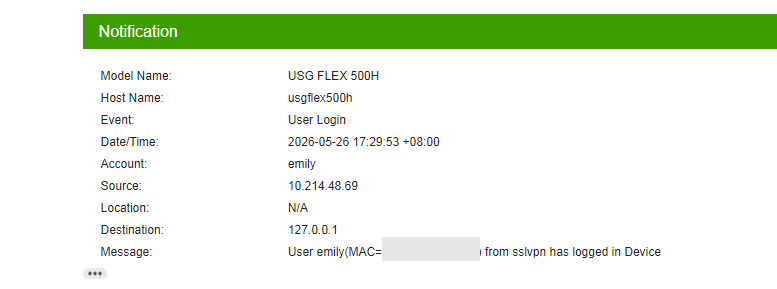
Tagged:
0
Categories
- All Categories
- 442 Beta Program
- 3.1K Nebula
- 243 Nebula Ideas
- 6.8K Security
- 783 USG FLEX H Series
- 389 Security Ideas
- 1.8K Switch
- 87 Switch Ideas
- 1.5K Wireless
- 58 Wireless Ideas
- 7.2K Consumer Product
- 325 Service & License
- 527 News and Release
- 101 Security Advisories
- 31 Education Center
- 10 [Campaign] Zyxel Network Detective
- 5.3K FAQ
- 34 Documents
- 91 About Community
- 122 Security Highlight