VLAN Configuration on Zyxel Switch and UniFi SSIDs


 Freshman Member
Hello everyone,
I am configuring a network using a Zyxel switch and a UniFi router/controller, and I would like to confirm whether my setup is correct.
Scenario:
Zyxel switch with two VLANs:
VLAN 1 (main network)
VLAN 2 (guest network)
UniFi configured with two SSIDs:
Main SSID → VLAN 1
Guest SSID → VLAN 2
My question is regarding the switch port configuration. What is the best practice for configuring the port connected to the UniFi device? Should it be configured as a trunk/tagged port for both VLANs, while the other ports are configured as access/untagged ports according to the desired VLAN?
All Replies
-
Hi @Fagnerpb ,
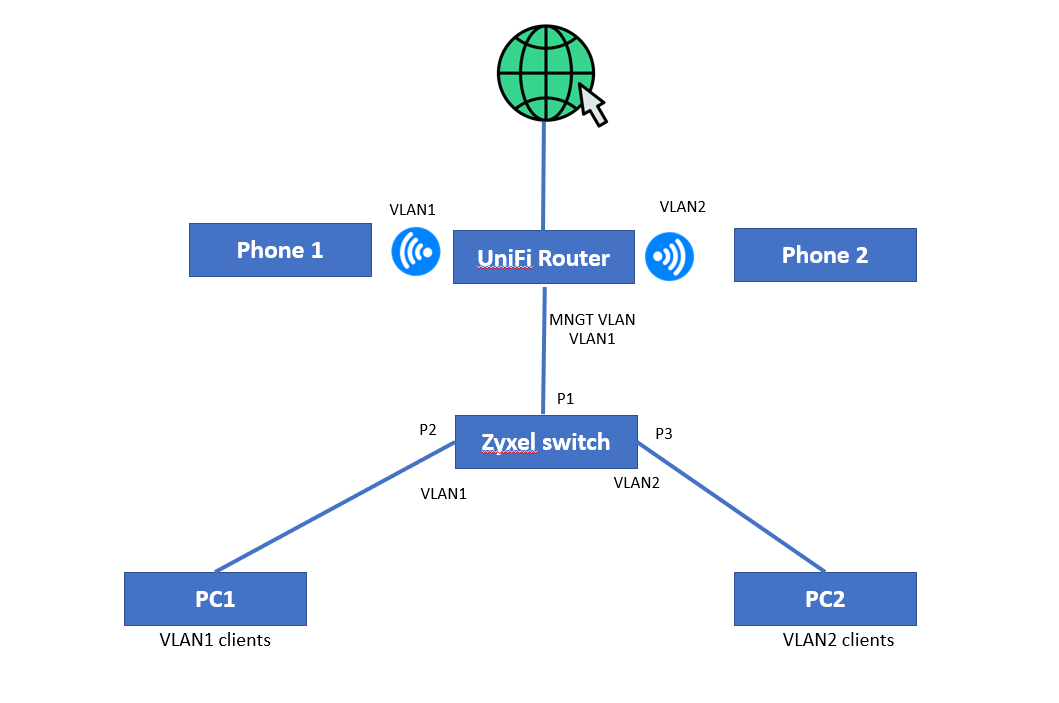
Based on your description, we assume your topology matches the diagram above.
Since VLAN 1 is your main/management network, here is the recommended port configuration on the Zyxel switch:
Uplink Port / Trunk Port (P1 — connected to UniFi Router):
- VLAN 1: Untagged, PVID = 1
- VLAN 2: Tagged
This port carries both VLANs. VLAN 1 traffic is untagged (since it's the native/management VLAN), while VLAN 2 guest traffic is tagged so the router can distinguish it.
Access Port for VLAN 1 clients (P2 — e.g. PC1):
- VLAN 1: Untagged, PVID = 1
Access Port for VLAN 2 clients (P3 — e.g. PC2):
- VLAN 2: Untagged, PVID = 2
Note: If the UniFi router has a dedicated VLAN 1 interface configured with a VLAN ID of 1 (i.e., it sends and expects tagged VLAN 1 traffic on the uplink), then P1 should be changed so that VLAN 1 is also tagged instead of untagged. However, in most typical UniFi setups, VLAN 1 is the native/default VLAN carried untagged on the uplink, so the configuration above should apply for the majority of cases. When in doubt, check your UniFi router's WAN/LAN port tagging behavior to confirm.
Zyxel_Judy
0 -
VLAN1 is a untagged? And PF Sense LAN is untagged native?
So
VLAN 1 on switch should be
port 1 VLAN 1 fixed untagged PVID 1
port 3 VLAN 1 fixed untagged PVID 1VLAN 2 is tagged
port 2 VLAN 2 fixed tagged
port 3 VLAN 2 fixed tagged1





 Zyxel Employee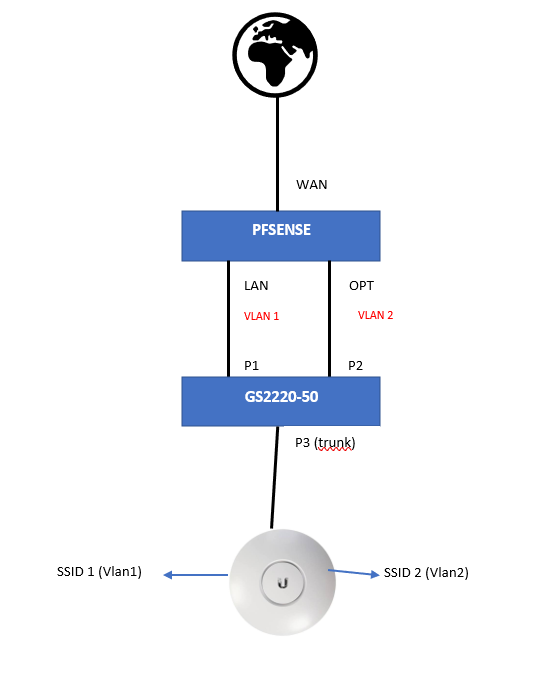




 Guru Member
Categories
- All Categories
- 442 Beta Program
- 3.1K Nebula
- 243 Nebula Ideas
- 6.8K Security
- 783 USG FLEX H Series
- 389 Security Ideas
- 1.8K Switch
- 87 Switch Ideas
- 1.5K Wireless
- 58 Wireless Ideas
- 7.2K Consumer Product
- 325 Service & License
- 527 News and Release
- 101 Security Advisories
- 31 Education Center
- 10 [Campaign] Zyxel Network Detective
- 5.3K FAQ
- 34 Documents
- 91 About Community
- 122 Security Highlight


