Full Cone NAT via FLEX H



 Freshman Member
Hi, I replaced an ATP200 with a USG FLEX 100 H on a network with a public IP address and a PBX in LAN.
Some public ports were mapped via NAT to the internal PBX. With ATP200 was all ok, with FLEX H clients can start VoIP calls, but the voice didn't pass via NAT.
PBX Technincian spoke about Full Cone NAT, Restricted Cone NAT and Symmetric NAT… he wasn't able to explain exactly how it works, but checking some RFC about STUN Protocol, seems that ATP and USG FLEX H works different.
My environment seems to need Restricted Cone NAT instead of Symmetric NAT.
The following image was the instruction he gaves to me in 2020.
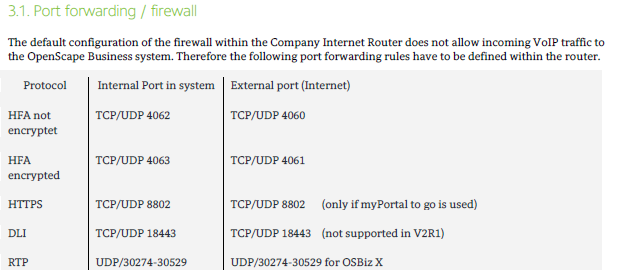
I found the PBX manual here
page 15.
Could you address how to configure USG FLEX H to restore VoIP softphones?
Thank you
Federico
Accepted Solution
-
Hi @fedebros
Could you share your topology and the configurations(ATP and USG FLEX H) so we can better check this issue? You may send the information to me by private message. Additionally, what firmware version is your ATP using?
Update:
USG FLEX H setting is correct. Issue was because of the SIP server's setting.
Zyxel Melen0





 Zyxel Employee
All Replies
-
You might have to enable SIP then again maybe not.
Best way to find what needs to be allowed is to packet capture LAN and WAN as you start a VoIP call to then look what is blocked so if you have like many (I don't) Have LAN to WAN allow any then your looking on the WAN side for traffic you need to allow that if your not behind another NAT unless you know that is not a problem by testing without FLEX H.
With some logic thinking when looking at a packet capture you should be able to work out traffic you need but may take some attempt.
0 -
Hi @fedebros
Could you share your topology and the configurations(ATP and USG FLEX H) so we can better check this issue? You may send the information to me by private message. Additionally, what firmware version is your ATP using?
Update:
USG FLEX H setting is correct. Issue was because of the SIP server's setting.
Zyxel Melen0 -
Hi all,
I checked the PBX configuration and discovered that the DNS was set incorrectly... So what the PBX technician told me about NAT was not correct. The ATP had an IP alias on the LAN network interface, but with the USG FLEX H it is no longer possible to create an IP alias within the same subnet as the network interface.I then created a NAT from the old DNS IP to the new DNS server, but I had forgotten to enable NAT Loopback, so it wasn't resolving addresses correctly.
Sorry for the wasted time, everything is fine now. :(
0



 Guru Member
Categories
- All Categories
- 442 Beta Program
- 3.1K Nebula
- 243 Nebula Ideas
- 6.8K Security
- 783 USG FLEX H Series
- 389 Security Ideas
- 1.8K Switch
- 87 Switch Ideas
- 1.5K Wireless
- 58 Wireless Ideas
- 7.2K Consumer Product
- 325 Service & License
- 527 News and Release
- 101 Security Advisories
- 31 Education Center
- 10 [Campaign] Zyxel Network Detective
- 5.3K FAQ
- 34 Documents
- 91 About Community
- 122 Security Highlight


