SCR 50AXE NAT rule IP addresses





 Freshman Member
Hi,
I have read numerous articles about this, but don't seem to be able to get a definitive answer.
I need to have multiple IP addresses in the 'Allow remote IP' but can't as it supports a single address. So the solution for that is to add multiple rules, but when I try that it says that the port is already used. So is it possible?
Simon.
All Replies
-
Yes I think this is a limitation that the high end models have with 'Allow remote IP' aka 'Source IP' on like FLEX H how ever you should have been able to do many multiple rules so that looks like a coded logic in thinking you can't limitation when you can the FLEX H models can do this in like rule order logic like
rule1
Source IP 2.2.2.2
External IP WAN
Internal IP 192.168.0.100
External Port port 80
Internal Port port 80rule2
Source IP 3.3.3.3
External IP WAN
Internal IP 192.168.0.200
External Port port 80
Internal Port port 80rule3
Source IP any
External IP WAN
Internal IP 192.168.0.50
External Port port 80
Internal Port port 80so with the above traffic does a match if its from Source IP aka Allow remote IP 2.2.2.2 or 3.3.3.3 before matching rule 3
You can try to put in a support request to see if they can match NAT logic of like FLEX H models
your only other option are get a FLEX H
0 -
Thanks for coming back to me.
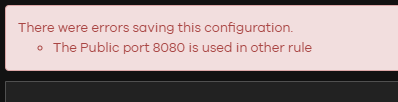
But that is the issue, when I try and add a 2nd Rule, is tells me that the Public port is already used in another rule.
 0
0 -
SCR50AXE can't set multiple remote IP. Please use security policy to restrict the allowed remote IP.
Here is the FAQ:
Does IP range feature for NAT Virtual Server support on SCR 50AXE? — Zyxel Community
Zyxel Melen0 -
OK great, thanks for coming back to me.
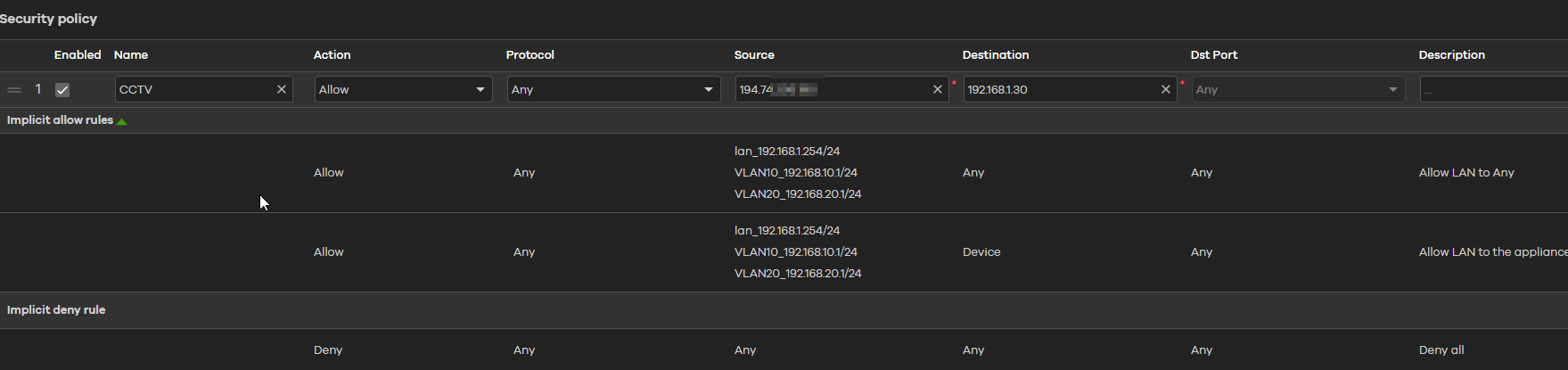
So I have added an IP in the Source field - not my current Static IP address - and I can still access the destination unit?
 0
0 -
The destination IP of security policy can set "any" or "NAT rule LAN IP". Therefore, your setting is correct.
Zyxel Melen0




 Guru Member
 Zyxel Employee
Categories
- All Categories
- 442 Beta Program
- 3.1K Nebula
- 243 Nebula Ideas
- 6.8K Security
- 783 USG FLEX H Series
- 389 Security Ideas
- 1.8K Switch
- 87 Switch Ideas
- 1.5K Wireless
- 58 Wireless Ideas
- 7.2K Consumer Product
- 325 Service & License
- 527 News and Release
- 101 Security Advisories
- 31 Education Center
- 10 [Campaign] Zyxel Network Detective
- 5.3K FAQ
- 34 Documents
- 91 About Community
- 122 Security Highlight


