Trouble connecting all devices to Nebula (SOLVED)


 Freshman Member
Equipment list:
1 x XMG1915-18EP switch
1 x XMG1915-10EP switch
2 x NWA210BE AP's
Long story short, I initially setup all my devices as standalone. Just recently I decided to move them to cloud based with Nebula. I successfully moved the 10EP switch and both AP's. When I finally tried to move the 18EP switch (main switch that connects to my PFSense firewall), I was running into issues. The biggest issue being the 18EP would connect to Nebula but none of my devices (the other switch and AP's) would not. I configured it the same way as it was in standalone mode. I ended up removing it from Nebula and going back to standalone mode and everything came back up. I'm having trouble finding an example setup like mine in documentation on how to configure it properly. I'm sure I'm missing something or not understanding it correctly. Below is info on the ports and uplinks and how they are configured or were configured in Nebula. I have attached screenshots of the standalone mode as well. Any help would be greatly appreciated!
- XMG1915-18EP (main switch)
- mgmt vlan 101, dhcp
- port 1 & 2 - to AP's, configured as trunk, allowed vlans 101, 201, 501 PVID = 1, Mgmt VLAN control = disabled
- port 14 - to PFSense LAN3, configured as access port, vlan 501, Mgmt VLAN control = disabled
- port 15 - to PFSense LAN1, configured as access port, vlan 101, Mgmt VLAN control = disabled (but does show "uplink" and connects to Nebula)
- port 16 - to PFsense LAN2, configured as access port, vlan 201, Mgmt VLAN control = disabled
- port 18 - to 10EP switch on port 10, configured as trunk, allowed vlans 101, 201, 501 PVID = 1, Mgmt VLAN control = disabled
- XMG1915-10EP (office switch)
- mgmt vlan 101, dhcp
- port 10 - to 18EP switch on port 18, configured as a trunk, allowed vlan 101, 201, 501 PVID =1, Mgmt VLAN control = enabled
- NWA210BE AP's (both configured same way)
- - mgmt vlan 101, "tagged" checked, dhcp-
Uplink port - to 18EP switch on port 1 & 2, SSID1 = vlan 101, SSID2 = 201, SSID3 = 501
- - mgmt vlan 101, "tagged" checked, dhcp-
All Replies
-
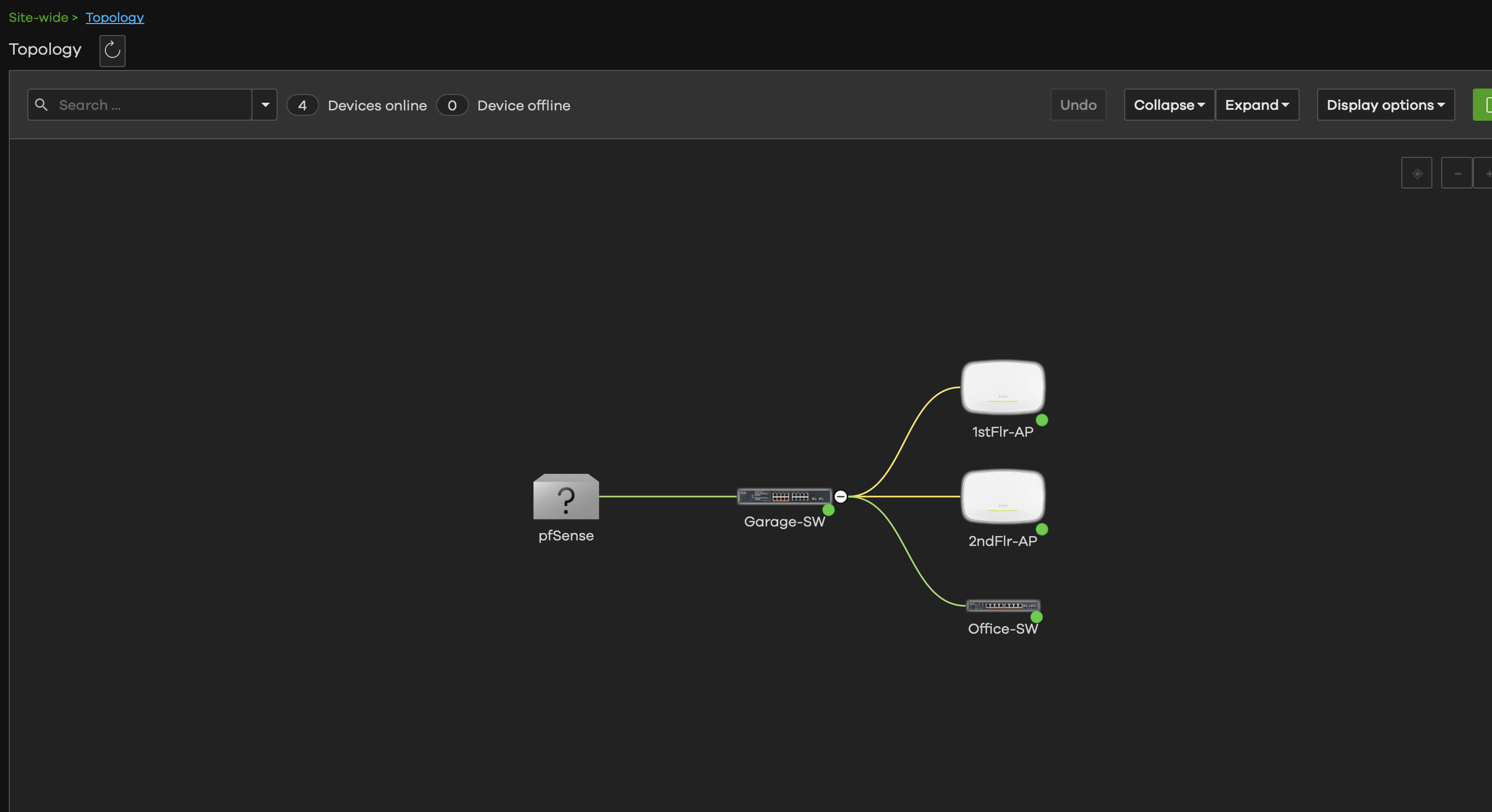
I resolved this. I misunderstood how the "mgmt vlan control" setting worked when I initially read it. I just needed to enable it on the 18EP switch on ports 1, 2, & 18. I also made my uplink (access port) to the firewall enabled for mgmt vlan control. Everything is connected and working now.
0 -
Here is a diagram just in case anyone else has same issue understanding uplinks for mgmt.
 0
0
Categories
- All Categories
- 442 Beta Program
- 3.1K Nebula
- 243 Nebula Ideas
- 6.8K Security
- 783 USG FLEX H Series
- 389 Security Ideas
- 1.8K Switch
- 87 Switch Ideas
- 1.5K Wireless
- 58 Wireless Ideas
- 7.2K Consumer Product
- 325 Service & License
- 527 News and Release
- 101 Security Advisories
- 31 Education Center
- 10 [Campaign] Zyxel Network Detective
- 5.3K FAQ
- 34 Documents
- 91 About Community
- 122 Security Highlight


