NWA55BE
Options


 Freshman Member
Accepted Solution
-
Hi @Wees ,
To disable NCC Discovery (Nebula Control Center Discovery) on your standalone NWA55BE, you can do this either directly through the ZON Utility or via the AP's local Web Configurator:
Method 1: Using the ZON Utility
- Open the ZON Utility and let it discover your devices.
- Select your NWA55BE from the list.
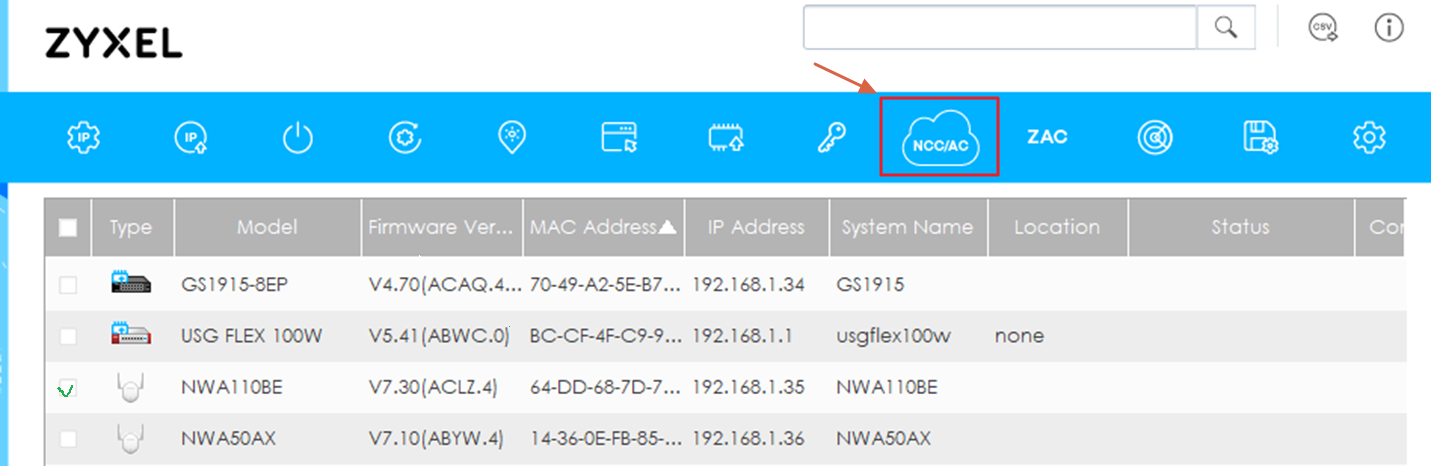
- Click the Configure Controller Discovery and NCC Discovery icon on the top menu bar.
- Disable the Nebula Control Center (NCC) discovery option and save your changes.
Method 2: Using the Web Configurator (Local GUI)
- Log into your NWA55BE's local IP address via web browser.
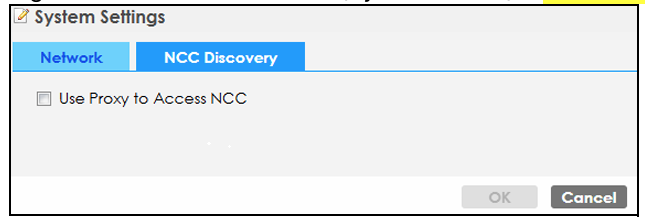
- Go to Dashboard > Edit (System Status) > NCC Discovery
- Turn off / disable the Nebula Control Center Discovery option and click OK to save.
Zyxel_Judy
0





 Zyxel Employee
All Replies
-
Hi @Wees ,
To disable NCC Discovery (Nebula Control Center Discovery) on your standalone NWA55BE, you can do this either directly through the ZON Utility or via the AP's local Web Configurator:
Method 1: Using the ZON Utility
- Open the ZON Utility and let it discover your devices.
- Select your NWA55BE from the list.
- Click the Configure Controller Discovery and NCC Discovery icon on the top menu bar.
- Disable the Nebula Control Center (NCC) discovery option and save your changes.
Method 2: Using the Web Configurator (Local GUI)
- Log into your NWA55BE's local IP address via web browser.
- Go to Dashboard > Edit (System Status) > NCC Discovery
- Turn off / disable the Nebula Control Center Discovery option and click OK to save.
Zyxel_Judy
0 -
Thank you Zyxel_Judy.
NCC Discovery is now disabled.
Apprecciate!
0
Categories
- All Categories
- 442 Beta Program
- 3.1K Nebula
- 243 Nebula Ideas
- 6.8K Security
- 783 USG FLEX H Series
- 389 Security Ideas
- 1.8K Switch
- 87 Switch Ideas
- 1.5K Wireless
- 58 Wireless Ideas
- 7.2K Consumer Product
- 325 Service & License
- 527 News and Release
- 101 Security Advisories
- 31 Education Center
- 10 [Campaign] Zyxel Network Detective
- 5.3K FAQ
- 34 Documents
- 91 About Community
- 122 Security Highlight


