FLEX 100H v1.38 BWM policy created for specific VLAN affects *all* interfaces





 Ally Member
As the title states, there seems to be some bug with BWM.
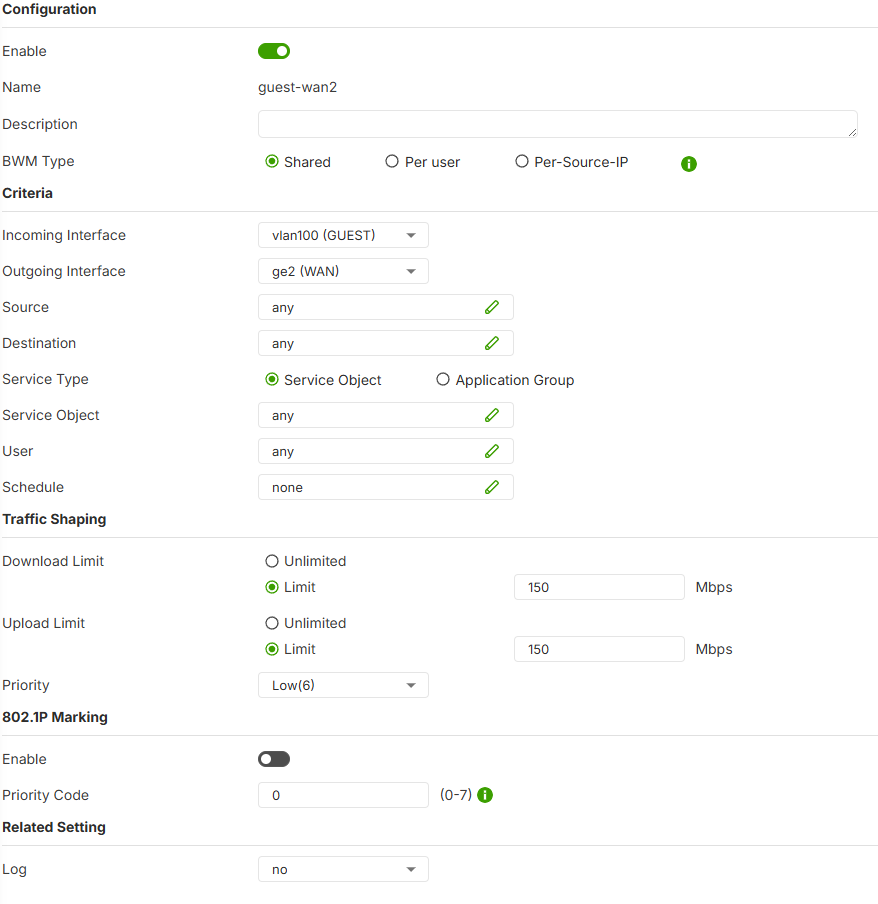
If we create a BWM policy to limit the internet bandwidth on vlan100 to 150mbps upload/download, the policy also affects the internet *upload* bandwidth on other interfaces(download seems unaffected on the other interfaces).
Screenshot of the BWM policy is below.
With this policy in place, despite the 'incoming interface' being set to vlan100, the speed on ge3(LAN) interface is also affected. Even if we set the 'source' IP to vlan100 subnet(10.200.100.1/23), internet traffic on ge3 subnet(10.251.201.71/16) is still affected. I would expect this rule to only affect traffic coming from vlan100, it should not be affecting traffic coming from ge3.
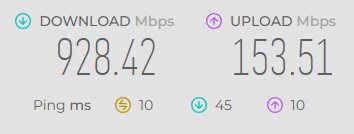
Here is a screenshot from a computer on ge3/LAN interface, showing the internet upload speed is being limited to ~150mbps due to the rule pictured above being activated.
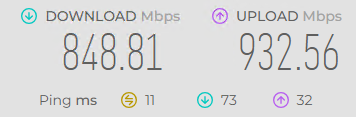
And here is another screenshot from the same computer on ge3/LAN showing 'normal' upload speeds when the vlan100 traffic shaping is disabled.
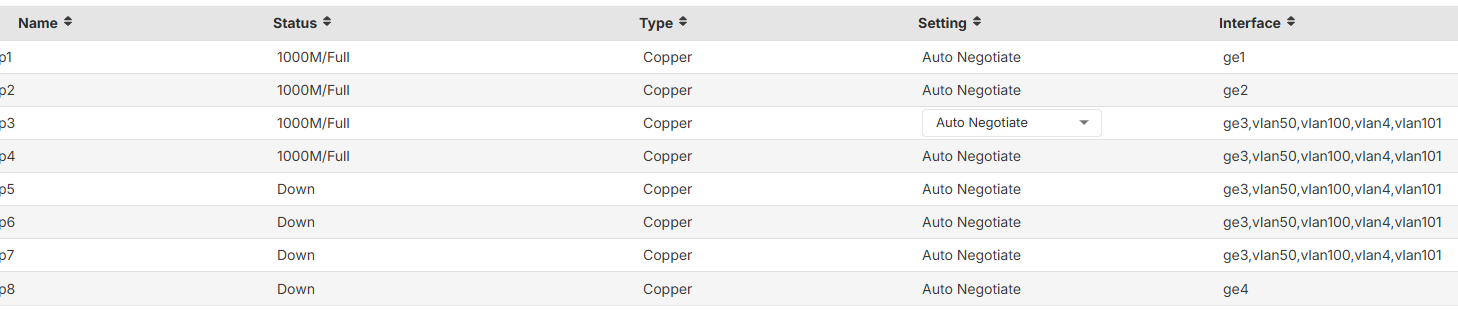
Finally here is a screenshot of the Port configuration on the 100H, you can see ge3 and vlan100 share the same physical ports, not sure if that is relevant to this issue.
Please let me know when Zyxel can fix this issue.
All Replies
-
Yes that likely is a bug or current limitation I would say the BWM is still being improved.
next firmware might fix it
0 -
Let me check if next firmware fixes this issue or not first.
Zyxel Melen0 -
Hi @p4_greg
Could you also share how many devices in VLAN100 and GE3 when you testing? And also, your network topology when testing is?
Zyxel Melen0 -
There are roughly 100 devices on each interface on the specific firewall i tested to get the above screenshots. But I have also seen this same issue on much smaller networks with less than 10 total users…so I dont think the number of devices/users should matter.
There is a switch connected to p3(ge3/vlan100) on firewall. The switch port connected to the firewall has vlan1 untagged and vlan100 as tagged. VLAN1 is used for hardwired clients and vlan100 is used for wifi clients(NWA130BE APs).
The client I tested is on vlan1(ge3) and is hardwired to the switch, and the internet speeds on this client are affected by the BWM rule for vlan100 like I described previously.
0 -
Hi @p4_greg
I did the test with internal 1.39 firmware and the uplink is 1G/600M. My PC is connecting to USG FLEX H directly, and use Speedtest to test, but my test result is both good on download and upload.
Since your issue is similar with EEE(green ethernet) issue, which cause upload or download can't get ideal result. Could you help to check if the switch enables EEE and disable it if enables? This will help us to narrow down this issue.
Zyxel Melen0 -
This has nothing to do with EEE setting on the switch.
If I enable the BWM rule pictured above in my initial post, which should only affect clients on vlan100 interface, the upload speed for clients connected to ge3 interface is immediately limited to the 'Upload Limit' value in the BWM rule. If I disable this BWM rule, the ge3 upload speeds are immediately back to normal. This exact same BWM rule works properly on non-H series firewalls, such as USGFLEX100 or ZyWALL110, we have been using this rule for years to limit the 'guest' wifi on vlan100.
0 -
So testing here on FLEX 200H on V1.38(ABWV.0)ITS-26WK16-m11228 I rebooted it due to the other problem where BWM would not work but now is.
I'm not seeing this issue I have
ge4 zone LAN port 4 192.168.255.243/26
VLAN48 zone VLAN48
port 4 192.168.255.66/28ge3
zone WAN3
192.168.177.3/2I limit in BWM
Incoming Interface ge4 LAN
Outgoing Interface ge3 WAN3
Download Limit 50MB
Upload Limit 5MB
did the speed test from ge4 zone LAN and was limited
did the speed test from VLAN48 zone VLAN48 and was not limited
Its possible you have a setup that makes it not work?
2 -
-
Thanks for testing this @PeterUK
If you change the BWM rule to 'Incoming Interface VLAN48' and test from 'ge4 zone LAN', can you verify that ge4/LAN is not limited?
I will try to test out the weekly firmware as soon as I am able to and I will reply back with the result.
0 -
Yes just checked the other way round and show correct
0



 Guru Member



 Zyxel Employee
Categories
- All Categories
- 442 Beta Program
- 3.1K Nebula
- 243 Nebula Ideas
- 6.8K Security
- 782 USG FLEX H Series
- 387 Security Ideas
- 1.8K Switch
- 87 Switch Ideas
- 1.5K Wireless
- 58 Wireless Ideas
- 7.2K Consumer Product
- 324 Service & License
- 527 News and Release
- 101 Security Advisories
- 31 Education Center
- 10 [Campaign] Zyxel Network Detective
- 5.3K FAQ
- 34 Documents
- 91 About Community
- 121 Security Highlight


