[5.38.0] Skip setup wizard




 Master Member
I try to setup reseted USG Flex 50W in other town.
On step with register i can't do any.
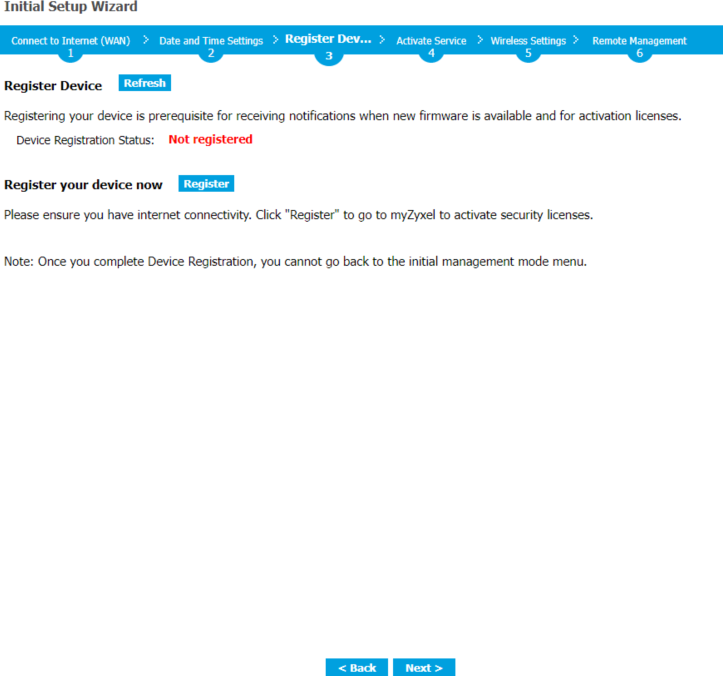
How i can skeep this screen. Device don't have internet. Device already registered.
All Replies
-
Hi @alexey
Please upgrade to 5.42 patch 1 which support to skip the registration check. Additionally, you can use FTP upgrade process to upgrade firmware.
How to Upgrade Firmware via FTP
1. Connect your laptop to the LAN interface of the ATP/USG FLEX.
2. Use an FTP client on your computer to connect to the ATP/USG FLEX. This example uses the ftp command in the Windows Command Prompt. Ex: ftp 192.168.1.1.
3. Log in with the username and password of the ATP/USG FLEX.
4. Set the transfer mode to binary (“bin”), then transfer the firmware file from your computer to the ATP/USG FLEX.
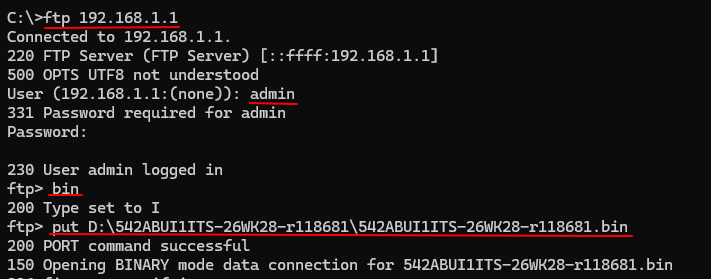
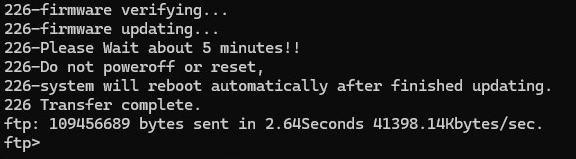
Or use the CLI command I sent in message to skip.
Zyxel Melen0





 Zyxel Employee
Categories
- All Categories
- 442 Beta Program
- 3.1K Nebula
- 243 Nebula Ideas
- 6.8K Security
- 783 USG FLEX H Series
- 389 Security Ideas
- 1.8K Switch
- 87 Switch Ideas
- 1.5K Wireless
- 58 Wireless Ideas
- 7.2K Consumer Product
- 325 Service & License
- 527 News and Release
- 101 Security Advisories
- 31 Education Center
- 10 [Campaign] Zyxel Network Detective
- 5.3K FAQ
- 34 Documents
- 91 About Community
- 122 Security Highlight


