NWA50BE PRO — DNS Server IP Address field breaks connectivity (bridge mode, static IP)





 Ally Member
Firmware/model: V7.40(1), newest currently, NWA50BE PRO, bridge mode, static IP configuration
Issue: Under Configuration > Network > IP Setting, the "DNS Server IP Address" field is labelled (Optional). In practice, it is not optional — populating it with any valid DNS server IP (tested with a public resolver and with a local gateway IP) causes the AP to lose internet connectivity entirely, not just DNS resolution. Leaving the field empty restores full connectivity immediately, with no other change.
Similarly, the Gateway field is also labelled (Optional), but removing it breaks connectivity — it is required in practice despite the label.
Impact: Hostname-based configuration (e.g. NTP server by name) cannot be used, because DNS resolution requires a configured DNS server, which cannot be entered without breaking the device's connectivity. Workaround is to use raw IP addresses instead of hostnames wherever the AP needs to reach something by name (e.g. NTP), and to leave the DNS field blank permanently.
Reproduction:
- Static IP, valid Gateway set, DNS field empty → internet works.
- Enter any DNS server IP (public resolver or local) → internet breaks.
- Clear the DNS field again → internet restored, no other changes made.
Request: Please clarify whether this is expected behaviour, a labelling error (fields should not say "Optional" if they're required, and the DNS field should not be blocking basic connectivity when populated), or a firmware bug to be fixed. This behaviour is not documented and cost significant troubleshooting time to isolate, since the fields are explicitly marked optional.
The issue was also when I had a Zyxel USG20W-VPN firewall in place, and the Zyxel AP was on the same internal network, in bridging mode. The configurations on the AP are a minefield, just trial and kaboom-error.
Pretty sick of debugging all this and considering to bin not only your firewall, but also the AP.
All Replies
-
I have a NWA130BE with same firmware.
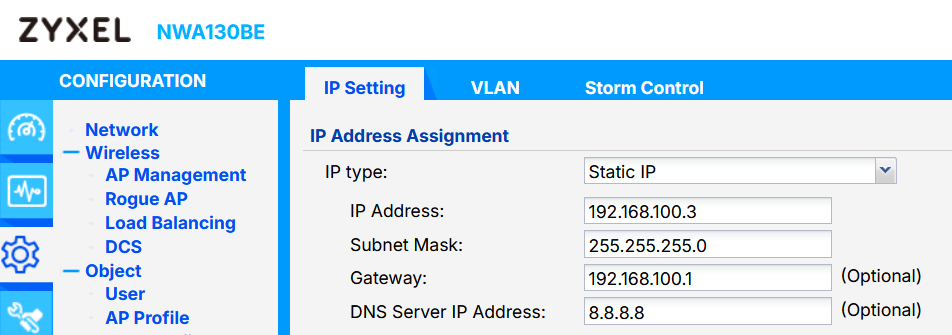
In this configuration, seems to work.
Obviously you need to configure the right Policy Rule if you use a firewall; also without the gateway.
I think that these two parameters are taken from the "source" if are blank.0 -
Hi @Zyxel_USG_User,
We tried to reproduce this issue on our side using an NWA50BE PRO running the same firmware version, V7.40(1), with an SSID configured as Local Bridge and a static IP address set.
In our testing, the connectivity of WiFi clients connected to the AP remained stable in all of the following cases:
- Both the Gateway and DNS Server IP addresses were left blank.
- The Gateway was filled in, while DNS was left blank.
- The DNS was filled in, while the Gateway was left blank.
- Both fields were filled in.
We were not able to reproduce the connectivity loss issue you experienced by changing these fields. At this point, we would like to collect a few more details from your setup to help us identify the differences between our test environment and yours.
- Network topology (a diagram would be appreciated).
- AP configuration file.
- When you mentioned that the AP loses connectivity after entering the DNS field, could you clarify whether this refers to:
- WiFi clients connected to the AP losing internet access, or
- The AP itself becoming unreachable (eg., via the Web GUI), while WiFi clients remain unaffected?
Zyxel Tina
0





 Master Member



 Zyxel Employee
Categories
- All Categories
- 442 Beta Program
- 3.1K Nebula
- 243 Nebula Ideas
- 6.8K Security
- 783 USG FLEX H Series
- 389 Security Ideas
- 1.8K Switch
- 87 Switch Ideas
- 1.5K Wireless
- 58 Wireless Ideas
- 7.2K Consumer Product
- 325 Service & License
- 527 News and Release
- 101 Security Advisories
- 31 Education Center
- 10 [Campaign] Zyxel Network Detective
- 5.3K FAQ
- 34 Documents
- 91 About Community
- 122 Security Highlight


