[USG Flex H - uOS 1.39] - SNMP OID missing





 Master Member
Hello everyone,
After update my 500H to the newest uOS, the OID about the "Forward Active Session" (1.3.6.1.4.1.890.1.15.3.1.19.0) are missing.
Also, seems that are missing also the Memory Usage (1.3.6.1.4.1.890.1.15.3.2.5.0); now to calculate the memory usage % I need to reading the total memory (1.3.6.1.4.1.2021.4.5.0) and the available (1.3.6.1.4.1.2021.4.6.0), then I use this formula:
((total-available)/total) * 100
Also, already from the old firmware version, the load of Core 3 and 4 are fixed to 100%
Core3: 1.3.6.1.2.1.25.3.3.1.2.196610
Core4: 1.3.6.1.2.1.25.3.3.1.2.196611
Can you confirm that the Core 3 and 4 are fixed to 100%?
Also, how about the missing Forward Active Session and the Memory Usage %?
Thank you
Best Answers
-
Hi @Maverick87
Additionally, the OID 1.3.6.1.4.1.890.1.15.3.1.19.0 and 1.3.6.1.4.1.890.1.15.3.2.5.0 malfunction is because the V1.39 enhancement. It will be fixed in next firmware release.
Zyxel Melen0 -
Hi Melen,
after received last patch firmware, now seems that all the missing OIDs works again.Thank you
1



 Zyxel Employee
All Replies
-
Hi @Maverick87
Let me help to check OID 1.3.6.1.4.1.890.1.15.3.1.19.0 and 1.3.6.1.4.1.890.1.15.3.2.5.0.
The Core 3 and 4 are fast path CPU, use the public OID will get the wrong result.
Please use sysMgmtFPCPUUsage(.1.3.6.1.4.1.890.1.15.3.2.21 in ZYXEL-ES-COMMON > esSysMgmt) to get the information. Additionally, this OID will provide the average CPU usage of Core 3 and 4.
Zyxel Melen1 -
Hi Melen,
also in the GUI the Core 3&4 are 0%, and seems that the memory usage is more or less 34.2/34.4%
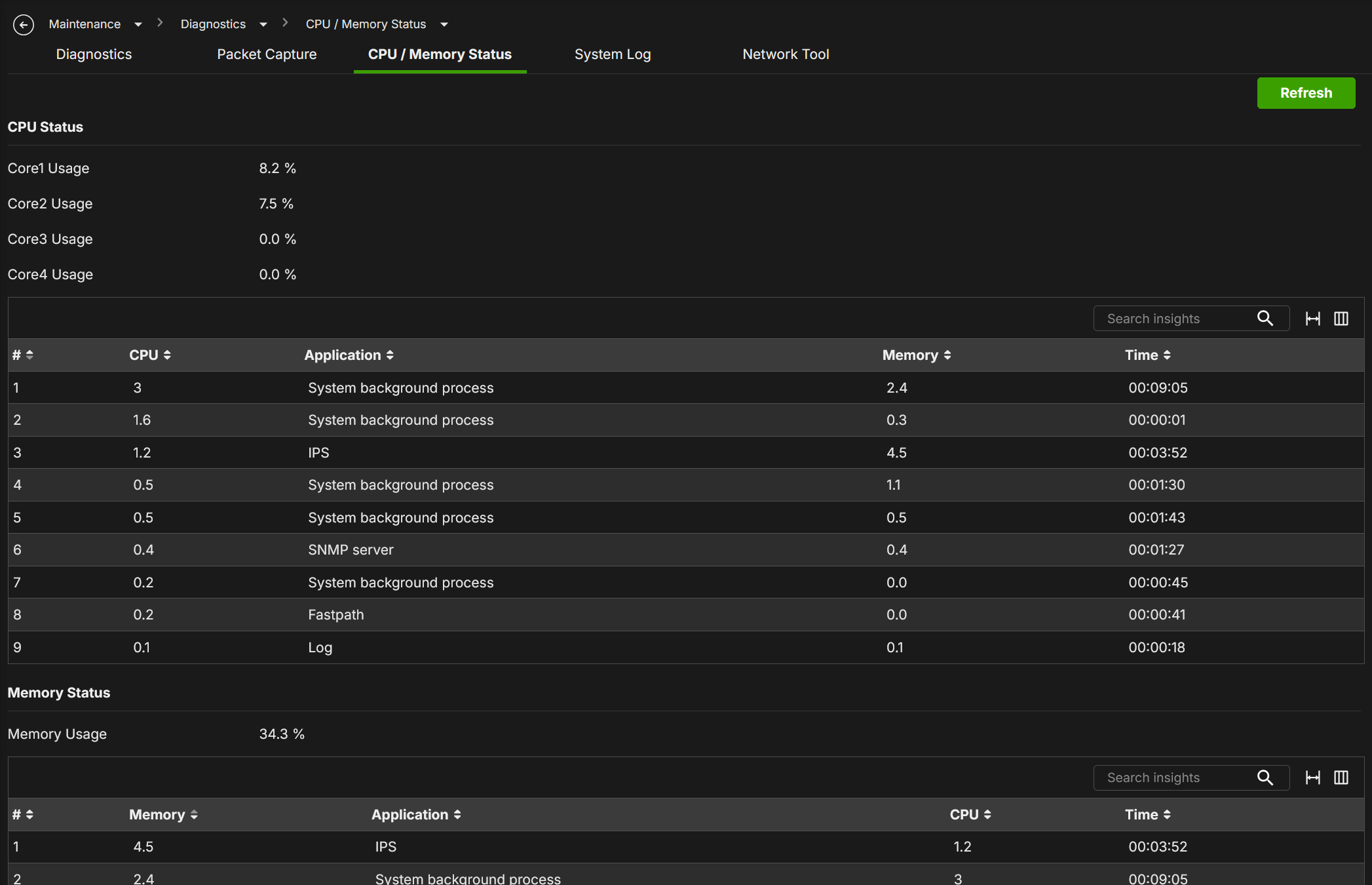
With my calculation I've more memory usage than this:
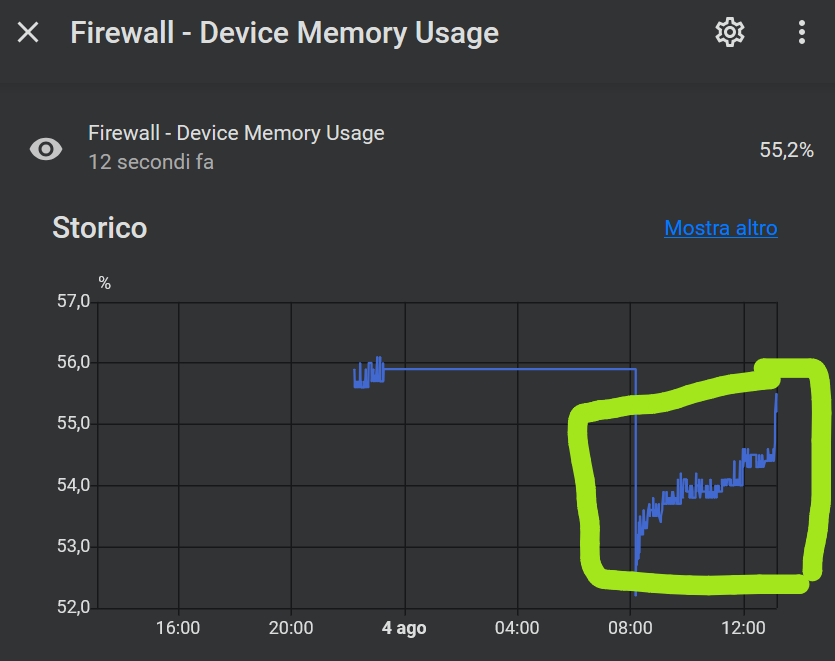
For calculate this, I use the formula:
Device Memory Usage = ((total-available)/total) * 100
Total OID: 1.3.6.1.4.1.2021.4.5.0 (8.147.344 KiB)
Available OID: 1.3.6.1.4.1.2021.4.6.0Is this correct? Why throught my formula, seems that the % is more than the GUI?
In some cases, seems that the GUI show CPU 3&4 loads:
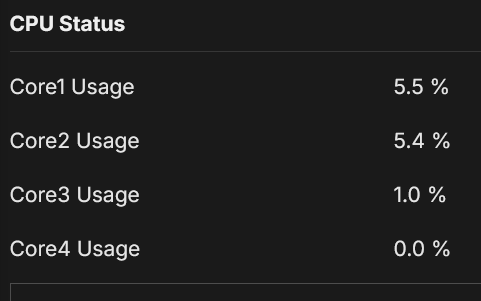
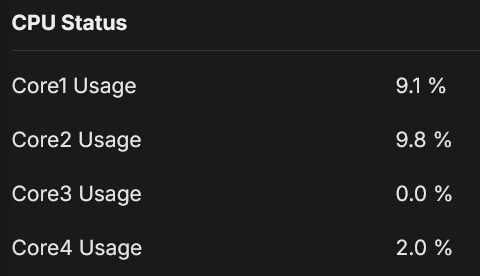
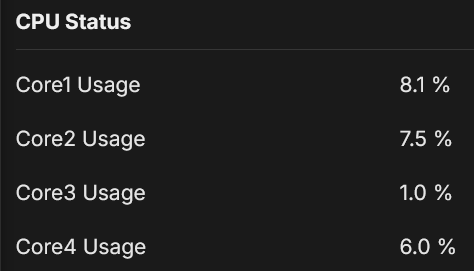
So seems that the Core3&4 works; why there isn't an official Core3&4 OIDs?
Thank you0 -
Hi @Maverick87
The formula needs to adjust since .1.3.6.1.4.1.2021.4.6.0 is MemFree, not MemAvailable.
((1 - <.1.3.6.1.4.1.2021.4.6.0> - <.1.3.6.1.4.1.2021.4.14.0> - <.1.3.6.1.4.1.2021.4.15.0>) / <.1.3.6.1.4.1.2021.4.5.0>) * 100
why there isn't an official Core3&4 OIDs?
The MIB sysMgmtFPCPUUsage(.1.3.6.1.4.1.890.1.15.3.2.21 in ZYXEL-ES-COMMON > esSysMgmt) is the official OID. Do you mean the OID the individual Core 3 & 4 CPU usage?
Zyxel Melen0 -
Hi Melen,
Thank you, proceed to modify my formula.
For the missing OIDs of Core3&4, yes, why there aren't the OIDs for the individual core? Can be implemented?
0 -
Hi Melen,
I check better your formula((1 - <.1.3.6.1.4.1.2021.4.6.0> - <.1.3.6.1.4.1.2021.4.6.0> - <.1.3.6.1.4.1.2021.4.6.0>) / <.1.3.6.1.4.1.2021.4.5.0>) * 100
But seems that you reply the OID 1.3.6.1.4.1.2021.4.6.0 more that one. Could you tell me if the formula is correct?
Thank you
0 -
Hi @Maverick87
Sorry it is .1.3.6.1.4.1.2021.4.14.0 and .1.3.6.1.4.1.2021.4.15.0. I also notice the error of the formula, please check the new formula below:
((<.1.3.6.1.4.1.2021.4.5.0> - <.1.3.6.1.4.1.2021.4.6.0> - <.1.3.6.1.4.1.2021.4.14.0> -<.1.3.6.1.4.1.2021.4.15.0>) / <.1.3.6.1.4.1.2021.4.5.0>) * 100Zyxel Melen0 -
Hi @Maverick87
Additionally, the OID 1.3.6.1.4.1.890.1.15.3.1.19.0 and 1.3.6.1.4.1.890.1.15.3.2.5.0 malfunction is because the V1.39 enhancement. It will be fixed in next firmware release.
Zyxel Melen0 -
Hi Melen,
can you fix the problem and release to me the beta firmware? So I don't wait a lot.
Another question: when you fix the 1.3.6.1.4.1.890.1.15.3.2.5.0, is not anymore necessary the calculation formula, right?
Thank you
0 -
Hi Melen,
I've tried your formula, but seems there are some distances about the real used memory %, probably missing something.0 -
Hi Melen,
after received last patch firmware, now seems that all the missing OIDs works again.Thank you
1
Categories
- All Categories
- 442 Beta Program
- 3.1K Nebula
- 241 Nebula Ideas
- 6.8K Security
- 761 USG FLEX H Series
- 383 Security Ideas
- 1.8K Switch
- 87 Switch Ideas
- 1.5K Wireless
- 58 Wireless Ideas
- 7.2K Consumer Product
- 323 Service & License
- 522 News and Release
- 100 Security Advisories
- 31 Education Center
- 10 [Campaign] Zyxel Network Detective
- 5.3K FAQ
- 34 Documents
- 90 About Community
- 119 Security Highlight


