Sign-on method 'Click to Continue' Kills Guest SSID Broadcast




 Freshman Member
I have 6 wifi access points, 1 x NWA55AXE and 5 x NWA50BE PRO. The router is a BT Business Hub (not a ZYXEL Product but I'm not sure that matters). I have 3 x wifi SSIDs, one 5GHz, 1 x 2.4GHz and the third is Guest. If I set Guest up for WPA Personal with WPA2 based logon, sign-in method 'disabled', it works fine. If I set Guest wifi for sign-in method 'click to continue' then the Guest wifi stops broadcasting. I do this through the advanced wifi settings. I've tried having it in NAT or bridge mode. I've tried setting it 'open' security. No matter what I do, it seems as soon as I set sign-in method to click to continue the SSID stops broadcasting. Somebody please set me on the right track here.
Accepted Solution
-
Hi @Gibsonmb,
This behavior occurs due to how different access point models handle unsupported features in Nebula.
Why the SSID Stops Broadcasting
- The NWA50BE PRO is designed as a cost-effective, high-performance SOHO/Small Business model. Unlike the NWA90BE PRO or your NWA55AXE, the NWA50BE PRO does not natively support advanced portal features such as the Captive Portal ("Click to Continue") or RADIUS authentication.
- In Nebula, if an unsupported feature (such as Captive Portal) is enabled on an SSID, any connected AP models that do not support this feature will automatically stop broadcasting that SSID. You can check which models support this feature in Nebula under Help > Device function table.
Recommended Solutions & Workarounds
- Option 1: Standard Guest SSID (Recommended for NWA50BE PRO deployment)
Keep the Guest SSID's Sign-in method set to "Disabled". You can secure it using WPA2/WPA3 Personal and enable Guest Network (L2 Isolation) to keep guests isolated from your private LAN.
- Option 2: Use SSID Tagging (To keep Captive Portal on supported APs)
If you must use the "Click to Continue" portal, you can restrict the SSID to broadcast only on the APs that support it (the NWA55AXE) using Nebula's tagging feature:
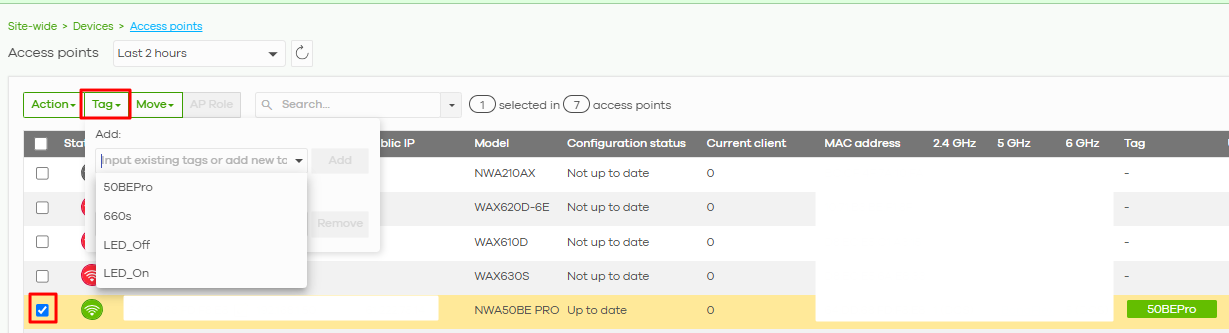
- Go to Site-wide > Devices > Access points, select your NWA55AXE, click Tag, and assign a tag (e.g.,
portal_supported). - Go to Site-wide > Configure > SSID settings.
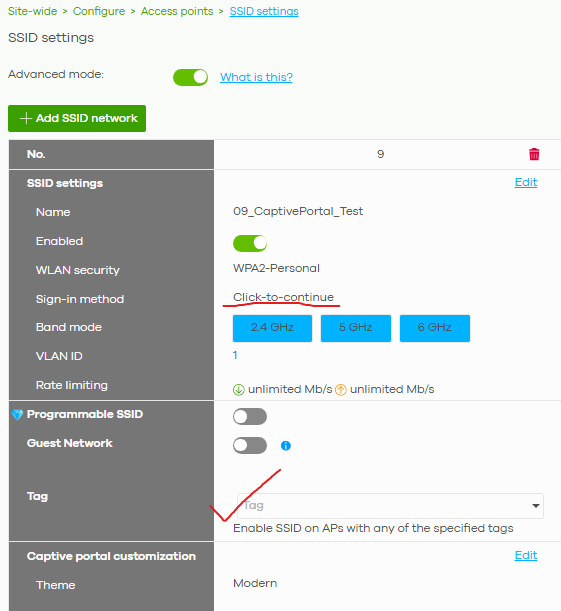
- Under your Guest SSID, find the Tags field and enter
portal_supported. - This ensures only the NWA55AXE attempts to broadcast the portal-enabled Guest SSID, and prevents the NWA50BE PRO APs from configuration conflict.
Zyxel Tina
0





 Zyxel Employee
All Replies
-
Hi @Gibsonmb,
This behavior occurs due to how different access point models handle unsupported features in Nebula.
Why the SSID Stops Broadcasting
- The NWA50BE PRO is designed as a cost-effective, high-performance SOHO/Small Business model. Unlike the NWA90BE PRO or your NWA55AXE, the NWA50BE PRO does not natively support advanced portal features such as the Captive Portal ("Click to Continue") or RADIUS authentication.
- In Nebula, if an unsupported feature (such as Captive Portal) is enabled on an SSID, any connected AP models that do not support this feature will automatically stop broadcasting that SSID. You can check which models support this feature in Nebula under Help > Device function table.
Recommended Solutions & Workarounds
- Option 1: Standard Guest SSID (Recommended for NWA50BE PRO deployment)
Keep the Guest SSID's Sign-in method set to "Disabled". You can secure it using WPA2/WPA3 Personal and enable Guest Network (L2 Isolation) to keep guests isolated from your private LAN.
- Option 2: Use SSID Tagging (To keep Captive Portal on supported APs)
If you must use the "Click to Continue" portal, you can restrict the SSID to broadcast only on the APs that support it (the NWA55AXE) using Nebula's tagging feature:
- Go to Site-wide > Devices > Access points, select your NWA55AXE, click Tag, and assign a tag (e.g.,
portal_supported). - Go to Site-wide > Configure > SSID settings.
- Under your Guest SSID, find the Tags field and enter
portal_supported. - This ensures only the NWA55AXE attempts to broadcast the portal-enabled Guest SSID, and prevents the NWA50BE PRO APs from configuration conflict.
Zyxel Tina
0 -
Thanks, I had wrongly assumed that, as the NWA50BE PRO was a much newer AP, that it would support 'captive portal'. As it does not, and that is the main wifi unit, I'll leave 'captive portal' turned off. Such a pity.
0
Categories
- All Categories
- 442 Beta Program
- 3.1K Nebula
- 243 Nebula Ideas
- 6.8K Security
- 783 USG FLEX H Series
- 389 Security Ideas
- 1.8K Switch
- 87 Switch Ideas
- 1.5K Wireless
- 58 Wireless Ideas
- 7.2K Consumer Product
- 325 Service & License
- 527 News and Release
- 101 Security Advisories
- 31 Education Center
- 10 [Campaign] Zyxel Network Detective
- 5.3K FAQ
- 34 Documents
- 91 About Community
- 122 Security Highlight


