Let's Encrypt Certificate Support in uOS 1.39
Options

Zyxel_Lynn
Posts: 212




 Zyxel Employee
Zyxel Employee
Let's Encrypt Certificate Support
uOS 1.39 introduces native support for Let's Encrypt, a free and automated Certificate Authority (CA). This feature allows Zyxel firewalls to automatically request, install, and renew trusted certificates, eliminating the manual effort and cost associated with traditional CA services.
Key Features and Protocol
- ACME Protocol: Uses the standard ACME protocol for automated certificate issuance and renewal.
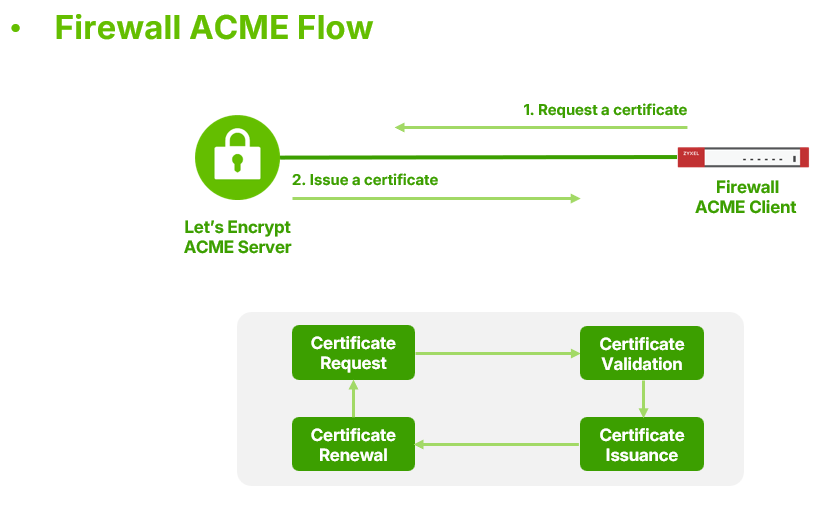
- Validity Period: Certificates are valid for 90 days. The firewall defaults to renewing 30 days before expiration, though this is adjustable between 30 and 60 days.
- Subject Alternative Name (SAN): Supports up to 5 additional FQDN entries per certificate, allowing one certificate to protect multiple domains.
- Active Certificates: Supports up to 5 active Let's Encrypt certificates at once.
Validation Methods
To prove domain ownership, Let's Encrypt uses two primary challenge types:
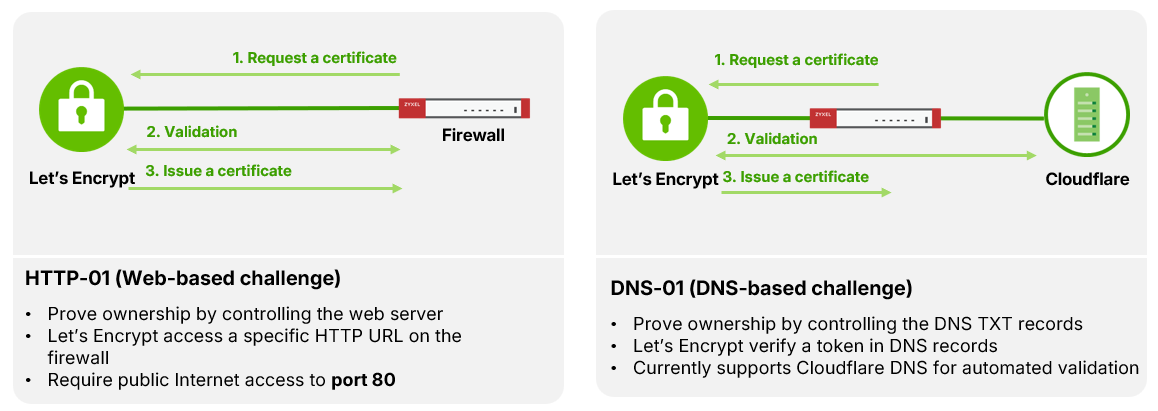
- HTTP-01 (Web-based): The firewall acts as a temporary web server on Port 80. It automatically opens Port 80 during the validation process (3-5 minutes) and closes it immediately after completion. Users must ensure that Port 80 is not being used by internal servers during this window to avoid conflicts.
- DNS-01 (Cloudflare Integration): Specifically for Cloudflare users. The firewall uses an API token to automatically create and delete a DNS TXT record for validation, removing the need for a public IP on the firewall itself.
Integration and Usage
Once issued, certificates are stored under "My Certificates" and automatically imported into "Trusted Certificates".
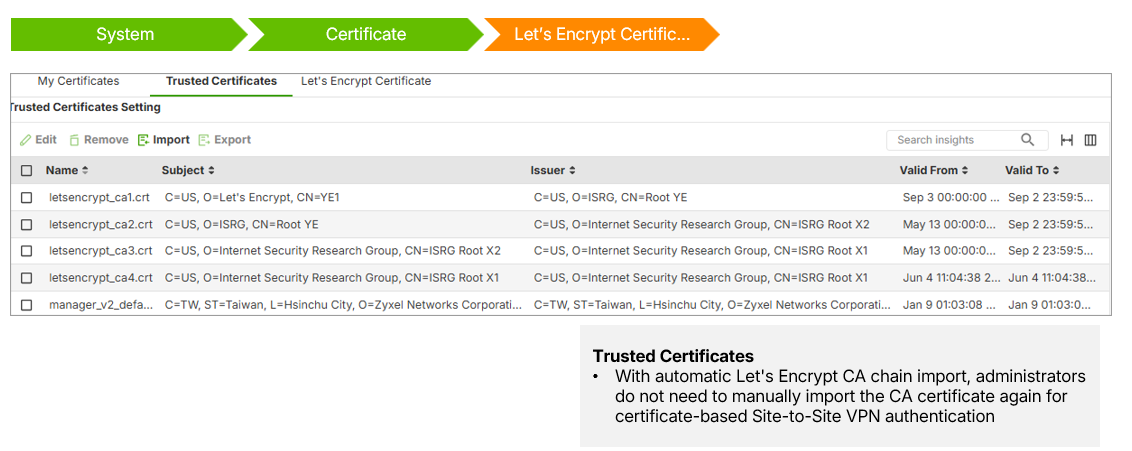
These certificates can be used for HTTPS Web GUI access, Captive Portal redirection, and IPsec VPN authentication. Note that SSL Inspection and SSL VPN authentication are currently not supported for these certificates.
0
Categories
- All Categories
- 442 Beta Program
- 3.1K Nebula
- 243 Nebula Ideas
- 6.8K Security
- 783 USG FLEX H Series
- 389 Security Ideas
- 1.8K Switch
- 87 Switch Ideas
- 1.5K Wireless
- 58 Wireless Ideas
- 7.2K Consumer Product
- 325 Service & License
- 527 News and Release
- 101 Security Advisories
- 31 Education Center
- 10 [Campaign] Zyxel Network Detective
- 5.3K FAQ
- 34 Documents
- 91 About Community
- 122 Security Highlight