Firmware Upgrade Priority: Stable vs. Latest
Options

Zyxel_Lynn
Posts: 212




 Zyxel Employee
Zyxel Employee
Firmware Upgrade Priority Enhancement
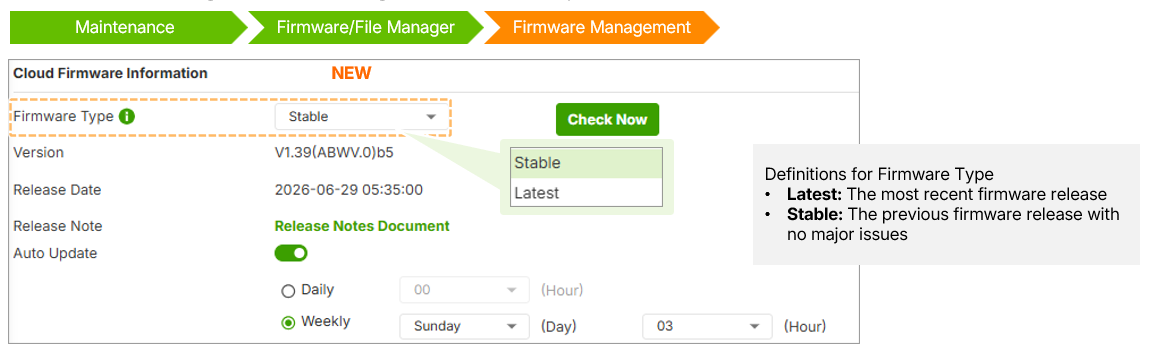
Starting with uOS 1.39, Zyxel introduces a new firmware categorization system to give administrators better control over their update cycles. Users can now choose between Stable and Latest firmware types.
Firmware Type Definitions
- Stable (Default): Versions that have undergone extensive field testing and have no major reported issues.
- Latest: The most recently released firmware version, including the newest features and enhancements.
Operational Behavior
- Independent Management: Firmware type settings on the local Web GUI and Nebula Control Center (NCC) are independent and do not synchronize.
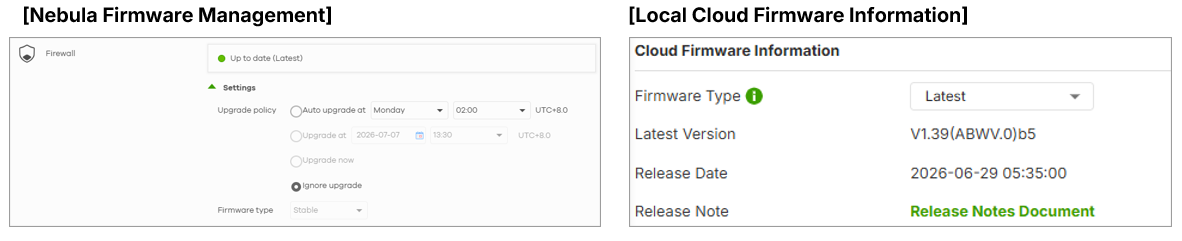
- Prevention of Downgrades: To maintain system stability, the firewall will not perform an auto-update if the current installed version is newer than the target firmware type (e.g., if the firewall is on "Latest" it will not automatically "downgrade" to a "Stable" version).
Administrators can manually check for updates and toggle between types under Firmware Management to see available versions based on current POM (Product Operations Management) decisions.
0
Categories
- All Categories
- 442 Beta Program
- 3.1K Nebula
- 243 Nebula Ideas
- 6.8K Security
- 783 USG FLEX H Series
- 389 Security Ideas
- 1.8K Switch
- 87 Switch Ideas
- 1.5K Wireless
- 58 Wireless Ideas
- 7.2K Consumer Product
- 325 Service & License
- 527 News and Release
- 101 Security Advisories
- 31 Education Center
- 10 [Campaign] Zyxel Network Detective
- 5.3K FAQ
- 34 Documents
- 91 About Community
- 122 Security Highlight