CLI Script Support for Advanced Configuration
Options

Zyxel_Lynn
Posts: 212




 Zyxel Employee
Zyxel Employee
Advanced CLI Script Support
The latest release introduces the ability for administrators to upload and execute CLI scripts directly through the firewall's web interface. This is ideal for deploying consistent configurations across multiple branch offices or performing complex object modifications.
Script Requirements
- File Format: Files must use the .cli extension.
- Syntax: Commands must follow standard CLI syntax and use full paths (starting with a slash `/`). A space is required after the slash.
- Limits: Supports up to 5 script files, with a maximum file size of 1MB each. Empty files are not permitted.
Execution and Validation
The firewall provides two ways to run a script:
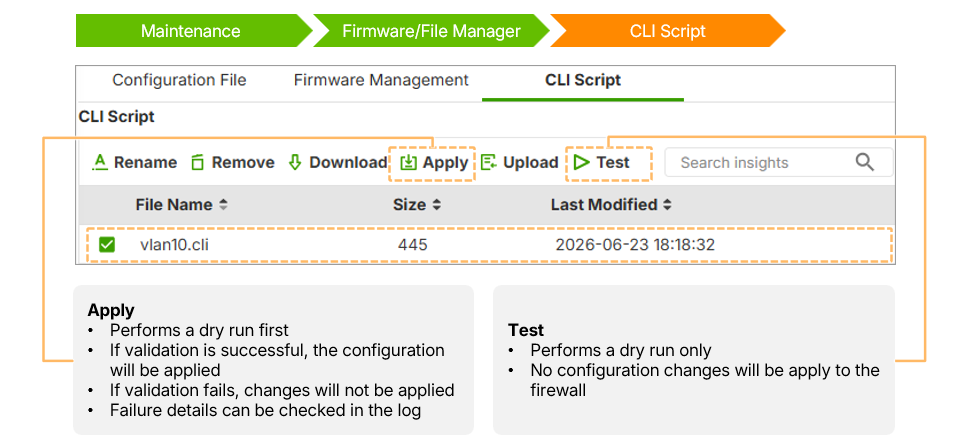
- Test: A "trial run" that performs Stage 1 (Syntax) and Stage 2 (Data Model) validation. It checks for typos or binding errors without applying changes.
- Apply: Performs full validation, including Stage 3 (Commit), which checks for configuration conflicts (like duplicate VLAN IDs). Changes are only applied if all validation stages pass.
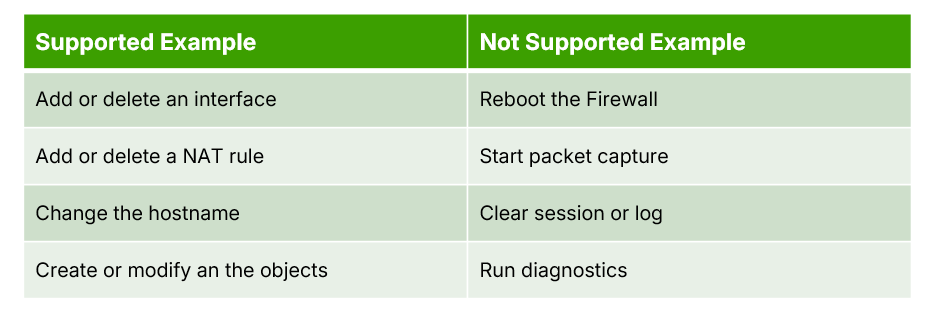
Supported tasks include modifying interfaces, NAT rules, hostnames, and objects. It does not support operational tasks like reboots, packet captures, or diagnostics.
0
Categories
- All Categories
- 442 Beta Program
- 3.1K Nebula
- 243 Nebula Ideas
- 6.8K Security
- 783 USG FLEX H Series
- 389 Security Ideas
- 1.8K Switch
- 87 Switch Ideas
- 1.5K Wireless
- 58 Wireless Ideas
- 7.2K Consumer Product
- 325 Service & License
- 527 News and Release
- 101 Security Advisories
- 31 Education Center
- 10 [Campaign] Zyxel Network Detective
- 5.3K FAQ
- 34 Documents
- 91 About Community
- 122 Security Highlight