How to configure Split Tunnel SSL VPN for specific website access on USG FLEX H?





 Zyxel Employee
Question:
How can I configure the USG FLEX H to route traffic for a specific website through the SSL VPN tunnel using the wan IP of the USG FLEX H, while allowing all other internet traffic to bypass the VPN and use my home's external IP?
Answer:
To achieve specific website routing through your SSL VPN tunnel on a USG FLEX H while maintaining split tunneling for other traffic, follow these configuration steps:
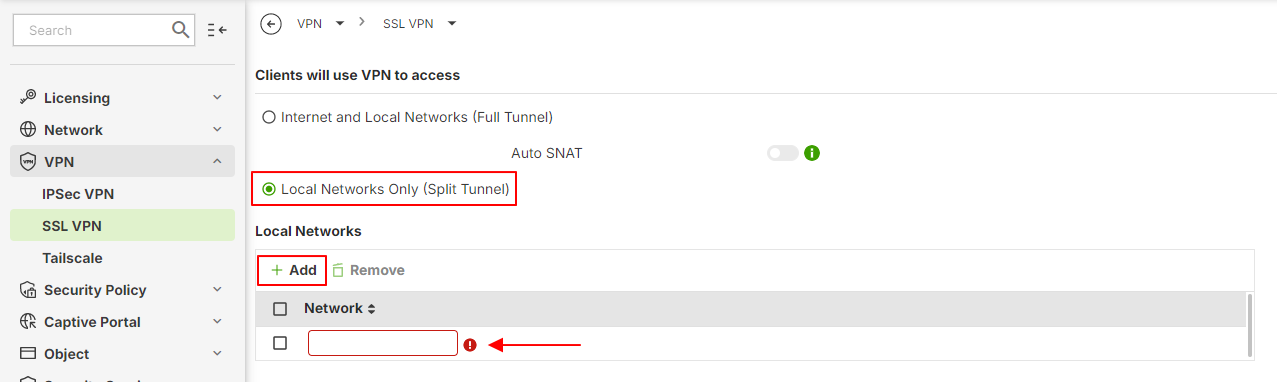
Step 1: Configure SSL VPN for Split Tunneling
Navigate to VPN > SSL VPN.
In "Clients will use VPN to access," select "Local Networks Only (Split Tunnel)".
In the "Local Networks" section, click "Add" and enter the IP addresses of the specific website(s) you wish to route through the VPN tunnel.
Step 2: Configure a Policy Route for the Specific Website
Go to Network > Routing > Policy Route. Add a new policy route with the following settings:
Source: Specify your SSL VPN client IP pool.
Destination: Enter the IP addresses of the specific website(s) (the same ones you added in the SSL VPN settings).
Next Hop Type: Select "Interface".
Next Hop Interface: Choose your active outbound WAN interface.
SNAT Address: Select "Outgoing-Interface".
Categories
- All Categories
- 442 Beta Program
- 3.1K Nebula
- 243 Nebula Ideas
- 6.8K Security
- 783 USG FLEX H Series
- 389 Security Ideas
- 1.8K Switch
- 87 Switch Ideas
- 1.5K Wireless
- 58 Wireless Ideas
- 7.2K Consumer Product
- 325 Service & License
- 527 News and Release
- 101 Security Advisories
- 31 Education Center
- 10 [Campaign] Zyxel Network Detective
- 5.3K FAQ
- 34 Documents
- 91 About Community
- 122 Security Highlight