Unable to access the page of Email Security and Anti-Malware on USG FLEX 500
Options

Zyxel_Emily
Posts: 1,499




 Zyxel Employee
Zyxel Employee
Question:
Why am I encountering an error "CLI Number: 16, Error Number: -36009, Error Message: Invalid Email Security profile number." on the Email Security and indefinite loading on Anti-Malware tab on my USG FLEX 500?
Answer:
This issue often occurs when specific Email Security and Anti-Malware configuration settings are missing from your USG FLEX 500's configuration file. Without these essential settings, the device cannot properly display or manage the Email Security and Anti-Malware pages, leading to errors or perpetual loading states.
How to Resolve:
Ensure that all necessary Anti-Spam and Anti-Malware profiles and their associated settings are present and correctly applied in your device's configuration.
- Check Configuration File:
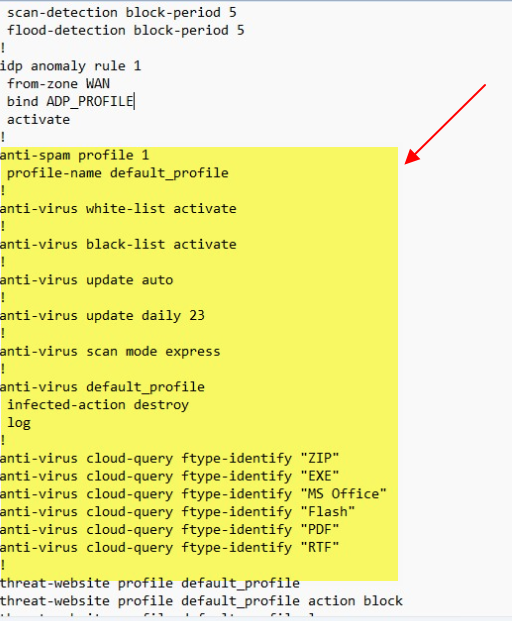
Review your startup-config.conf file for the presence of anti-spam profile and anti-virus default_profile configurations. Ensure all related commands are present, such as anti-virus white-list activate, anti-virus black-list activate, anti-virus update auto, anti-virus scan mode express, infected-action destroy, and anti-virus cloud-query for various file types. - Add Missing Settings:
If settings are found to be missing, they need to be added back into the configuration file. For example, the following commands are crucial: - Apply Configuration:
After modifying the configuration, apply the updated file to your USG FLEX 500.
Tagged:
0
Categories
- All Categories
- 442 Beta Program
- 3.1K Nebula
- 243 Nebula Ideas
- 6.8K Security
- 783 USG FLEX H Series
- 389 Security Ideas
- 1.8K Switch
- 87 Switch Ideas
- 1.5K Wireless
- 58 Wireless Ideas
- 7.2K Consumer Product
- 325 Service & License
- 527 News and Release
- 101 Security Advisories
- 31 Education Center
- 10 [Campaign] Zyxel Network Detective
- 5.3K FAQ
- 34 Documents
- 91 About Community
- 122 Security Highlight