Wifi 7 BE and Hide SSID


 Freshman Member
I know the docs state that if you enable a radio to be BE mode, it prevents an SSID from being hidden.
I have a single AP. I have two SSIDs. A standard user SSID that I would like to take advantage of MLO and the extra features, but I also have an IOT SSID. The IOT SSID I don't care about BE or MLO. I have the IOT SSID set to only use the 2.4 radio. The standard user SSID I have set to use 2.4, 5, and 6ghz.
I have hide SSID set on the IOT SSID config, but it doesn't work as the radio configured to BE prevents the SSID config from working.
My question is: Is is possible to allow the functionality on a per-SSID config? Isn't BE backwards compatible and should allow devices within an SSID to be contained and work with hide SSID while a separate SSID has a different config that would allow MLO?
All Replies
-
Hi @clifford64
Could you share your model is? If is NWA/WBE series, you may create a specific SSID for your IoT device. Please note that for IoT device, we recommend the 2.4G radio setting need to change from BE mode to AX mode first. If the IoT device still not able to connect, please change to b/g/n mode which is compatible for most of IoT devices.
After the 2.4G band mode changed, you may create a new SSID with hidden SSID setting and assign to 2.4G only for your IoT devices.
Zyxel Melen0 -
I have an NWA130BE. However, the only way I can hide the IOT SSID is by setting the 2.4ghz radio to AX. But this then prevents the 2.4ghz band from being used with the standard user SSID and MLO.
I did further research and iI'm guessing it's not possibe based on the WiFi 7 standard, but is it possible to enable the compatibility at the radio level while controling the functionality per SSID?
0 -
Hi Clifford,
I use the NWA130BE with IoT and standard network.I configure the 2.4Ghz in N, 5Ghz in AX and 6Ghz in BE.
All my IoT sensor works well, and my pc wifi 7 MLO connected perfectly in 7 with MLO.
0 -
Hi @clifford64
is it possible to enable the compatibility at the radio level while controling the functionality per SSID?
No, it is not possible since per SSID share the same radio module, which only applies one radio setting in each band. If you want to set different radio setting for 2.4G, you might need second NWA130BE or other AP to use for IoT device.
You may also reference @Maverick87 experience above.
Zyxel Melen0 -
Hi @clifford64,

192.168.10.2 is my computer
192.168.10.3 is my iPhone 17
192.168.10.4 is my macbookAnd this is my configuration:
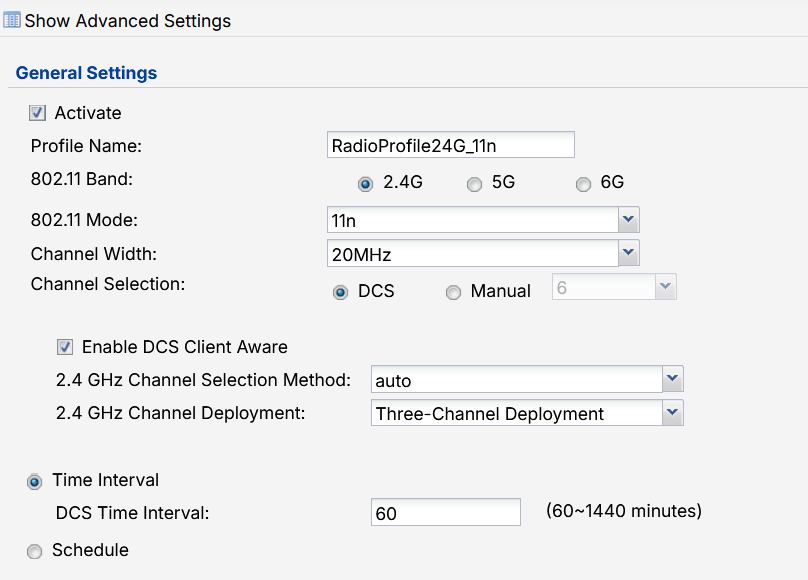
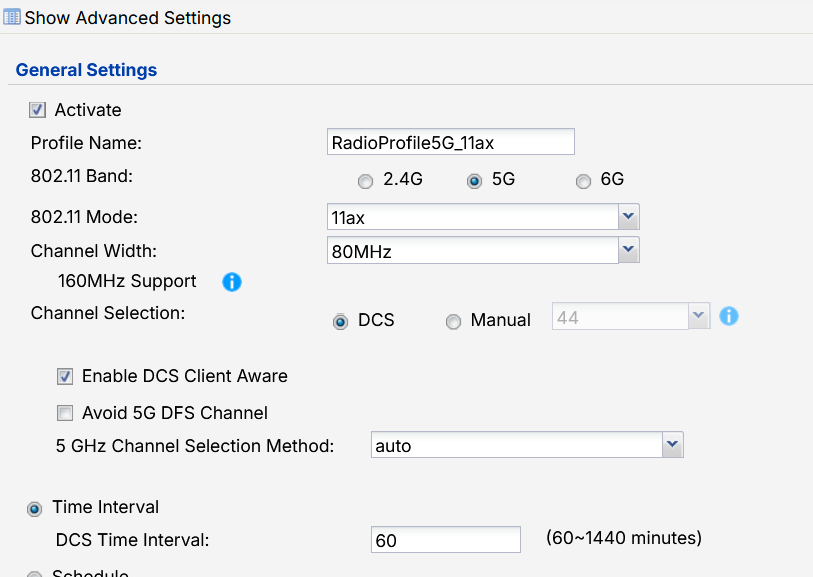
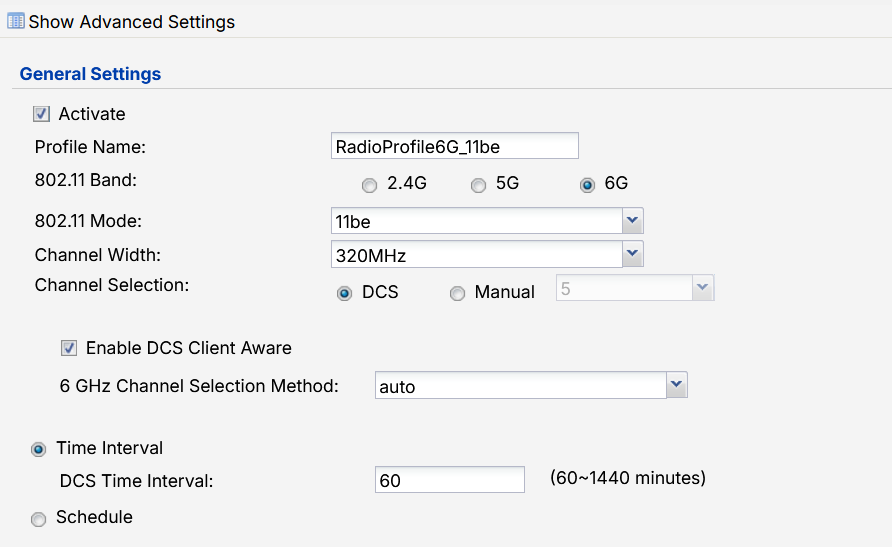 0
0





 Zyxel Employee


 Master Member
Categories
- All Categories
- 442 Beta Program
- 3.1K Nebula
- 242 Nebula Ideas
- 6.8K Security
- 780 USG FLEX H Series
- 387 Security Ideas
- 1.8K Switch
- 87 Switch Ideas
- 1.5K Wireless
- 58 Wireless Ideas
- 7.2K Consumer Product
- 324 Service & License
- 527 News and Release
- 101 Security Advisories
- 31 Education Center
- 10 [Campaign] Zyxel Network Detective
- 5.3K FAQ
- 34 Documents
- 91 About Community
- 121 Security Highlight


