Policy control rule not allowing traffic when it should




 Guru Member
USG FLEX 200H V1.39(ABWV.0)
this might have been fix in the ITS-26WK32-m12287 for FLEX 700H but don't have this fireware for FLEX 200H
So I have this excellent app call Input Director and it works the way it does but I add NAT and routeing rules for the traffic.
So the setup is
ge4 zone LAN 192.168.255.243/26 P4
VLAN47 zone VLAN47 192.168.255.39/28 (Static) 47 VLAN p8,p6
PC at 192.168.255.250 on LAN Input Director target 192.168.255.243 port 31234
test PC at 192.168.255.44 on VLAN47
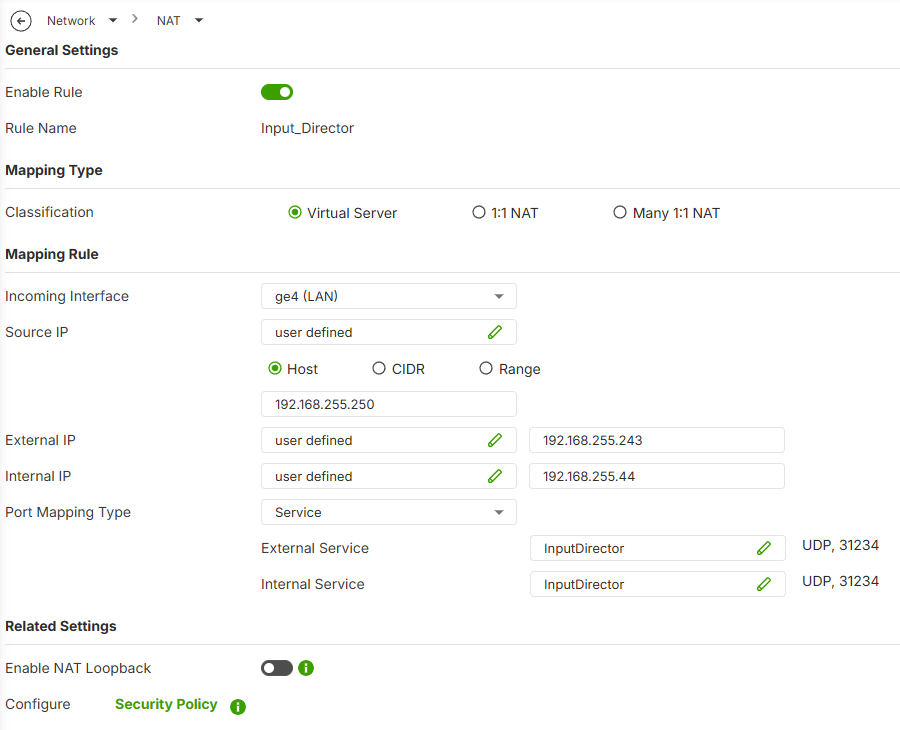
NAT rule
incoming ge4 LAN
Source IP 192.168.255.250
External IP 192.168.255.243
Port Mapping Type Input Director 31234
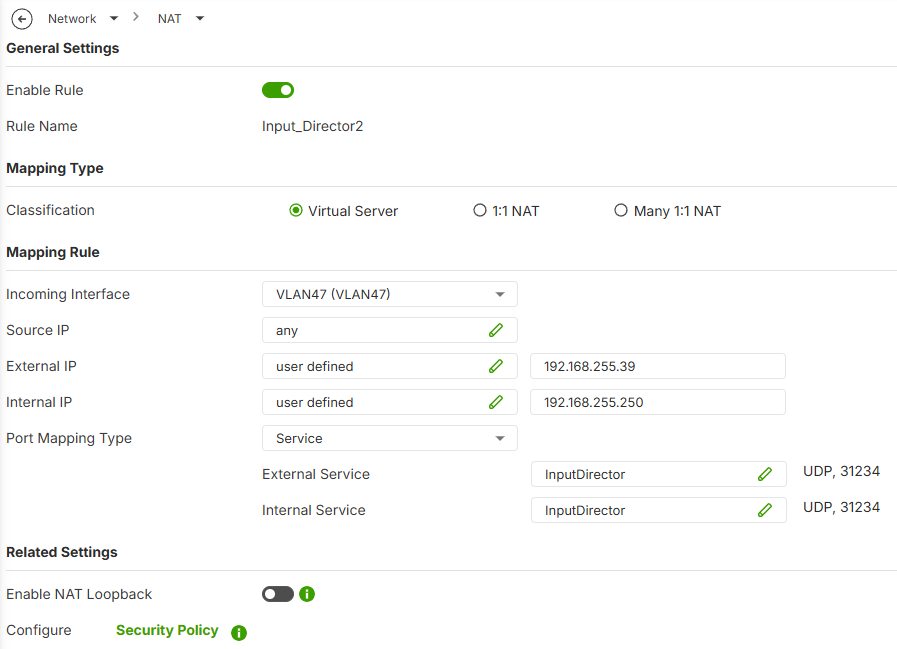
NAT rule
incoming VLAN47
Source IP any
External IP 192.168.255.39
Port Mapping Type Input Director 31234
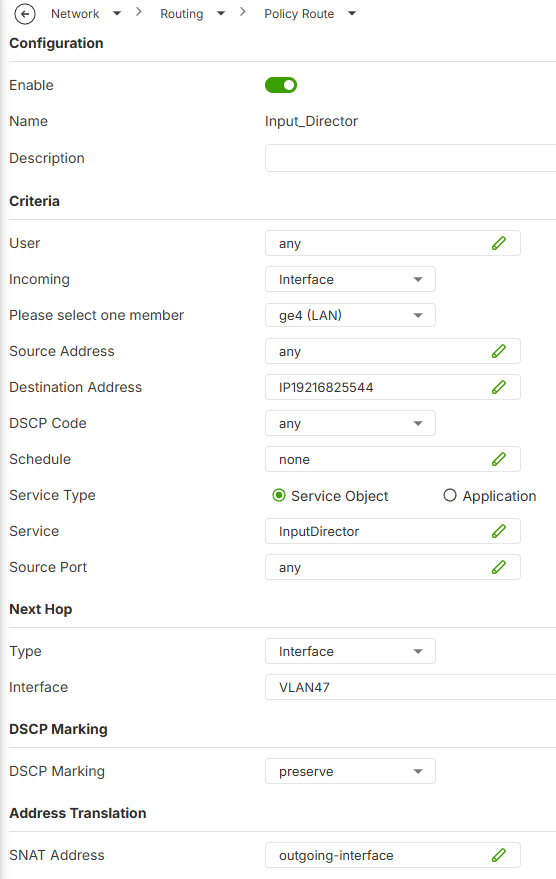
routing routing rule
incoming ge4 LAN
Destination Address 192.168.255.44
Service Input Director 31234
next hop VLAN47
SNAT Address outgoing-interface
Policy control
From LAN
To VLAN47
Service Input Director 31234
From VLAN47
To LAN
Service Input Director 31234
and for some reason did not work which I know it did back on V1.38
so changed
From LAN
To any
Service Input Director 31234
now it works
All Replies
-
Hi @PeterUK
What's each of your NAT rule's Internal IP? I didn't see this option which cause I can't replicate this case. Please help to share it, thanks.
Zyxel Melen0 -
Hi Melen
Yes forgot to add the Internal IP here are some screenshots of them rules but the real problem is Policy control where you can't set it to the to zone and this all worked fine on V1.38 but think it might be fixed in ITS-26WK32-m12287 because I have that for FLEX 700H but not that firmware for FLEX 200H
 0
0 -
Hi @PeterUK
Thanks. I used the latest weekly with your configuration to test, and it is work.
Policy control
From LAN
To VLAN47
Service Input Director 31234From VLAN47
To LAN
Service Input Director 31234Let me send you the latest weekly.
Zyxel Melen0 -
This is most troubling just installed latest weekly firmware for FLEX 200H and the issue remains.
Let me test back to V1.38 and I update
update bit of a problem going back to V1.38 with the current config I try a older config..also needed to do a reset…
…this is just strange even on V1.38(ABWV.0)ITS-26WK16-m11228 with a old config from 03 July 2026 and it has
Policy control
From LAN
To VLAN47
Service Input Director 31234From VLAN47
To LAN
Service Input Director 31234it does not work…but it must of at some point!
let me know if you need a test PC to view the issue
could a nebula update cause this? I can't see how…it seems like for the given model 200H the 700H has similar config and is fine?
so needed to go back to V1.38 for more testing on the BIG BAD Throughput issue
0 -
Well..I found the cause its really odd how it works with to zone any
so doing testing I did at some point I needed to use VLAN47 but not on FLEX 200H so I just disabled the VLAN47 thinking I would remember what I done so I have a site to site VPN that was enabled but not connected with Policy local 0.0.0.0 and remote…. 192.168.255.32/28 and that was the issue
1





 Zyxel Employee
Categories
- All Categories
- 442 Beta Program
- 3.1K Nebula
- 243 Nebula Ideas
- 6.8K Security
- 782 USG FLEX H Series
- 387 Security Ideas
- 1.8K Switch
- 87 Switch Ideas
- 1.5K Wireless
- 58 Wireless Ideas
- 7.2K Consumer Product
- 324 Service & License
- 527 News and Release
- 101 Security Advisories
- 31 Education Center
- 10 [Campaign] Zyxel Network Detective
- 5.3K FAQ
- 34 Documents
- 91 About Community
- 121 Security Highlight


