[2026 October Tips & Tricks] Nebula SD-VPN Connects Remote Access VPN Users Across Sites




 Zyxel Employee
As hybrid work and distributed teams become the norm, remote employees increasingly need more than just a connection back to headquarters. They may also need secure access to resources across branch offices, data centers, and other sites. Traditionally, enabling this kind of cross-site access could mean configuring VPN connectivity site by site, which takes time and increases the risk of configuration errors.
With the latest uOS 1.40 update, USG FLEX H Series firewalls introduce a major enhancement: Remote Access VPN subnets can now be added directly to Nebula SD-VPN.
👉 What does this mean?
Once a Remote Access VPN subnet is added to an SD-VPN community, remote users can securely reach local networks behind VPN gateways in the same SD-VPN community through a single Remote Access VPN connection.
Instead of configuring separate remote-access VPN connectivity for each site, administrators can connect remote users to multiple sites through the existing SD-VPN environment.
In short: connect once, reach multiple sites.
🔍 Why it matters
- Secure Cross-Site Access — Remote-access users can securely reach authorized local networks behind VPN gateways in the same SD-VPN community, while access remains centrally controlled.
- Simple Configuration — Enable the IPSec Remote Client VPN Subnet option on the Site-to-Site VPN page to add the Remote Access VPN subnet to the SD-VPN community.
- Centralized VPN Management — Manage Remote Access VPN and SD-VPN connectivity through Nebula, reducing repetitive site-by-site VPN configuration.
- Save Time and Effort — Simplify VPN deployment and maintenance across large, distributed networks while reducing the risk of manual configuration errors.
⚙️How to configure it
Simply go to Nebula > Site-to-Site VPN and enable Use VPN for both the IPSec Remote Access VPN and SSL Remote Access VPN subnets to include them in your Nebula SD-VPN community, as shown below:
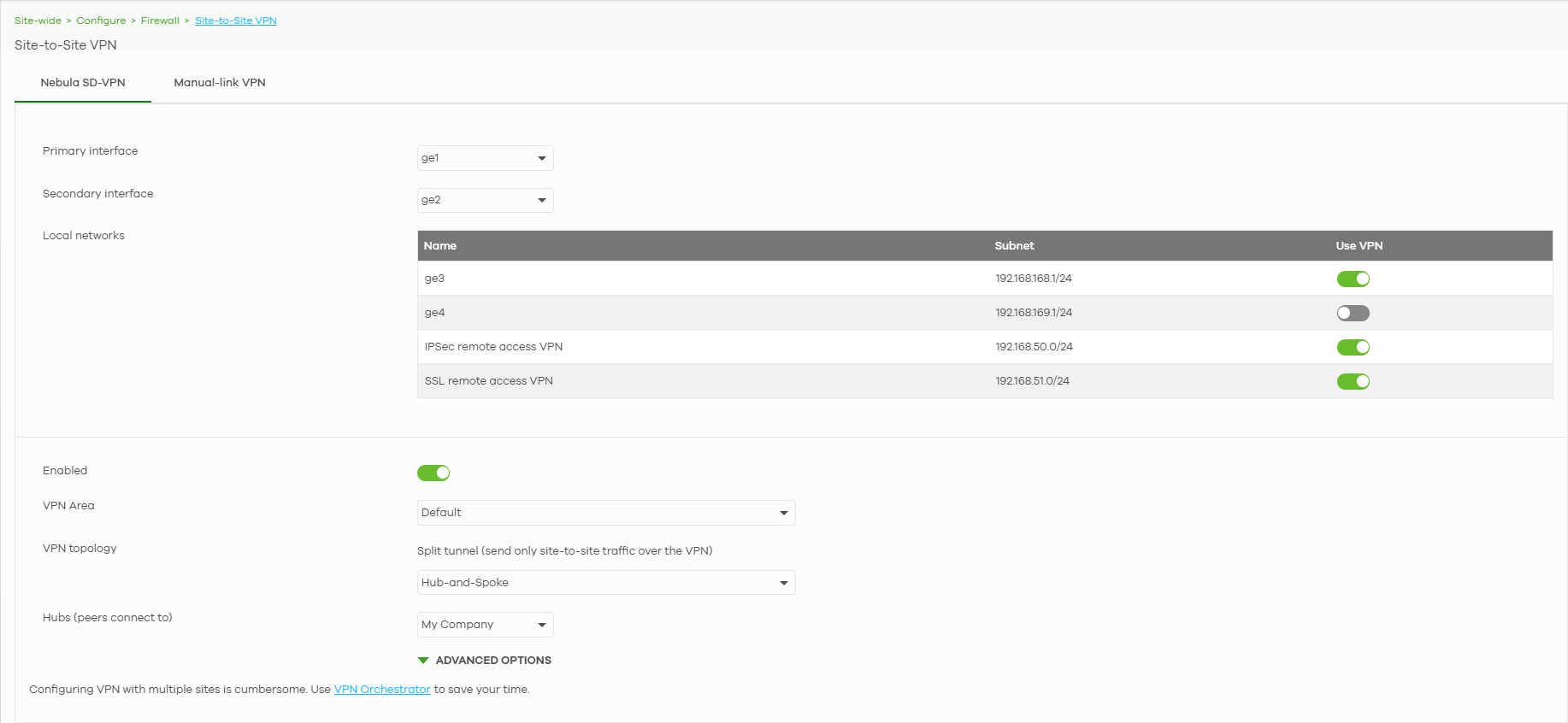
Once configured, remote-access users can access authorized local networks behind other VPN gateways in the same SD-VPN community without requiring separate remote-access VPN configurations for each site.
✨ Summary
This enhancement connects Remote Access VPN with Site-to-Site SD-VPN, allowing remote users to securely access multiple sites through a single Remote Access VPN connection.
For organizations with distributed networks, it provides a simpler way to extend remote access across sites while keeping VPN connectivity centrally managed through Nebula.
Have questions or want to learn more about the setup? Drop a comment below! 💬
Categories
- All Categories
- 442 Beta Program
- 3.1K Nebula
- 245 Nebula Ideas
- 6.9K Security
- 811 USG FLEX H Series
- 393 Security Ideas
- Threat Watch!
- 1.8K Switch
- 88 Switch Ideas
- 1.5K Wireless
- 60 Wireless Ideas
- 7.3K Consumer Product
- 333 Service & License
- 543 News and Release
- 106 Security Advisories
- 31 Education Center
- 10 [Campaign] Zyxel Network Detective
- 5.5K FAQ
- 34 Documents
- 89 About Community
- 125 Security Highlight