[USG Flex H] - DDNS public IP - decrease minimum check period





 Master Member
Hello,
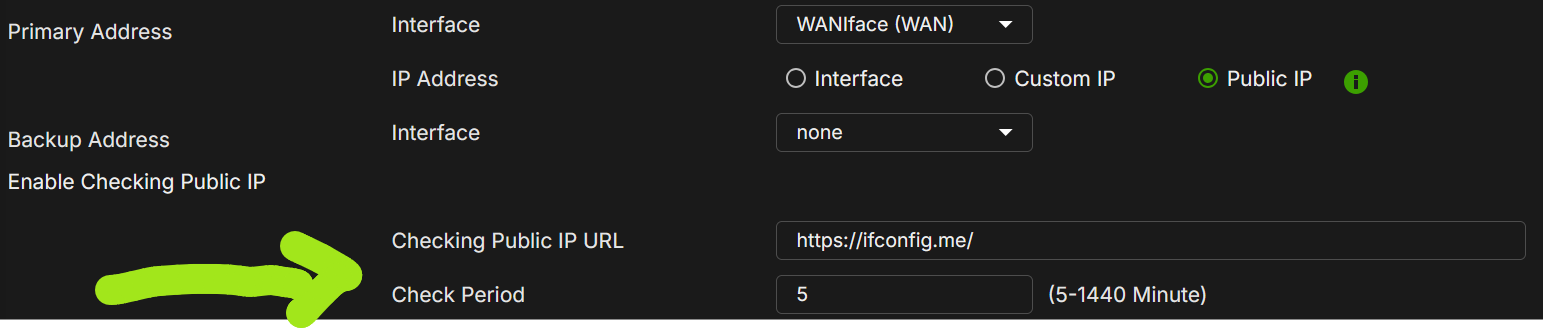
I would like to decreare the minimum check period for a public check URL.
Until now, the minimum is fixed to 5 minutes; this can be a problem, because, if the WAN IP change, the DDNS can check a public URL to know the new IP, in the worst-case scenario, only after 5 mins after the change.
Is possible to change this behaviou, via CLI as work-around and then implement a "per second" modification?
Thank you
Accepted Solution
-
Hi @Maverick87 ,
Thank you for the suggestion. We're evaluating lowering the minimum DDNS Check Period from 5 minutes to 1 minute as a feature request. The idea post here:
[USG FLEX H] Allow DDNS Check Period lower than 5 minutes (e.g. 1 minute) — Zyxel Community
The reason 1 minute is being considered as the new floor (rather than per-second) is that most DDNS providers cap their record TTL around 60 seconds, so checking much faster than that is unlikely to bring a noticeable benefit on the DNS resolution side.
Zyxel_Judy
1





 Zyxel Employee
All Replies
-
Hi @Maverick87 ,
Thank you for the suggestion. We're evaluating lowering the minimum DDNS Check Period from 5 minutes to 1 minute as a feature request. The idea post here:
[USG FLEX H] Allow DDNS Check Period lower than 5 minutes (e.g. 1 minute) — Zyxel Community
The reason 1 minute is being considered as the new floor (rather than per-second) is that most DDNS providers cap their record TTL around 60 seconds, so checking much faster than that is unlikely to bring a noticeable benefit on the DNS resolution side.
Zyxel_Judy
1 -
Hi @Zyxel_Judy,
In my opinion decrease to seconds it's only for "observe" if the IP is changed, not for update "as-is".For example: if I set "10 seconds" into the field; every 10 seconds I check the URL page that return to me the external IP. Then, I compare this returned IP with the external effective IP; if is not changed do nothing, if is changed, update the DDNS.
The field is only to trigger a check, not for update really. Presumibly I can would check the change every 10 seconds, but can be possible that the effective external IP never change or change 1-2 per day.
Do you think this is feasible? Does that line of reasoning make sense to you?
0 -
Hi @Maverick87 ,
As you understand this field only triggers a check of the public IP URL, and that the DDNS record is updated only when the IP actually changes.
However, based on our evaluation of the current product architecture, a 1-minute as minimum check interval is the option we believe has the best chance of being achieved.Zyxel_Judy
0 -
Hi @Zyxel_Judy,
Yes, only for trigger a DDNS Update. However, if you increase the checking period (as for example, 1 minute), if the IP change, you trigger the update, in the worst case, only after 1 minute, a big time if you need to use the DDNS immediately.
Instead, if your trigger allow less than minute, you could have, as a best scenario, a "near real-time" DDNS change.
For example, when you use as trigger the interface WAN IP, when the WAN IP change, the trigger is immediately (for example: if you disconnect and reconnect a PPPoE, when you reconnect it and the IP change, the DDNS update is triggered in real-time as when the PPPoE is up&running).
0 -
Hi @Maverick87 ,
We understand that if the "Checking Public IP URL" polling happened on a per-second basis, and aligned with how often DDNS providers actually refresh their record TTL (typically around a minute), the best-case result would be a near real-time DDNS update.
That said, as mentioned previously, based on our evaluation of the current product architecture, a 1-minute minimum check interval remains the option we believe has the best chance of being achieved.
Zyxel_Judy
0 -
I can see where Judy is coming from Checking Public IP URL does and does not impact or have any relation to DDNS and the TTL record however.
Like if you go to http://ip1.dynupdate.no-ip.com/ you just see a blank page with
92.239.74.95
OK so farso here is what goes on lets say you have example.com and when ever its looked up example.com its TTL is 60 seconds
now lets say your ISP or any 3rd party has it cached even if you do DNS lookup without cache the TTL does not reset it counts down.
So lets say Public IP URL is checked just after the DNS cached for example.com for TTL 60 seconds and DDNS your new IP gets updated but if you do DNS lookup for example.com it will show TTL of like 40 seconds on you old IP till where you pull your DNS lookups go to 0 then gets the new IP.
However what your thinking Maverick87 is no ISP or any 3rd party has example.com cached meaning Public IP URL is checked new IP is detected DDNS gets updated then you do a DNS lookup for example.com only then with it show the new IP for TTL 60 seconds.
0




 Guru Member
Categories
- All Categories
- 442 Beta Program
- 3.1K Nebula
- 243 Nebula Ideas
- 6.8K Security
- 782 USG FLEX H Series
- 387 Security Ideas
- 1.8K Switch
- 87 Switch Ideas
- 1.5K Wireless
- 58 Wireless Ideas
- 7.2K Consumer Product
- 324 Service & License
- 527 News and Release
- 101 Security Advisories
- 31 Education Center
- 10 [Campaign] Zyxel Network Detective
- 5.3K FAQ
- 34 Documents
- 91 About Community
- 121 Security Highlight


