How do I set up standalone WDS/Mesh on the NWA55AX PTP?



 Zyxel Employee
The NWA55AX PTP is sold as a pre-configured 2-piece kit, with both units factory-paired to each other before shipping.
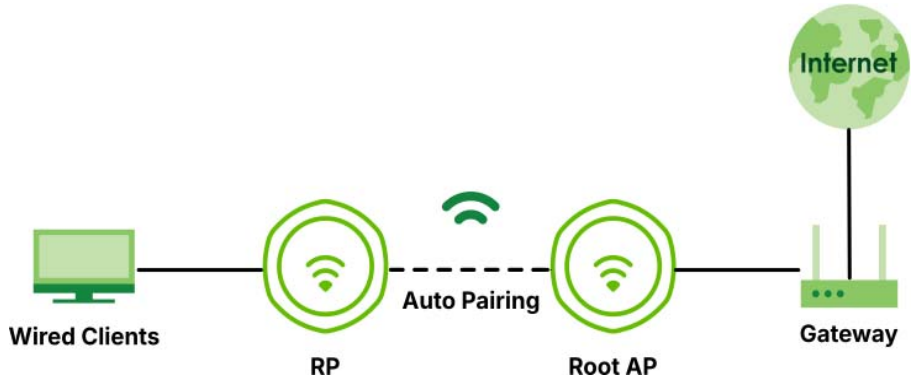
■Plug-and-Play (No Configuration Required): One unit is pre-configured at the factory as the Root AP (master), while the other is set as the Repeater AP (satellite).
■Automatic Pairing: You only need to mount both devices at your site and power them up via PoE.
They will automatically pair over a dedicated 5GHz wireless band and establish a WDS wireless bridge.
There is no need to manually log into the web GUI to perform complex pairing or security key configurations.
■Dedicated Management Band: The wireless backhaul bridge between the two devices is locked onto the 5GHz band, leaving the 2.4GHz band available for local management connections.
(Note: This pre-paired out-of-the-box feature only applies when purchasing the NWA55AX PTP dual-pack kit.
If you purchase two individual, standard-packaged NWA55AX / NWA55AXE units,
you will need to manually log into their local Web GUIs or use the Nebula Cloud to configure Smart Mesh/WDS pairing.)
Currently, the NWA55AX PTP is designed to minimize deployment hurdles through the following mechanisms:
- Factory Pairing: The units are pre-paired as a matched set out of the box.
Once powered on, they are designed to locate each other and establish a secure bridge link automatically (in standalone mode) without requiring manual configuration. - On-Device LED Indicators: The hardware features a clear LED link indicator that illuminates when the connection is established, serving as the immediate physical guide during installation to verify proper alignment and link status.
The LED indicator on the repeater unit confirms when the connection is live, so you can verify the link is working at a glance without needing to log into any software.
Categories
- All Categories
- 442 Beta Program
- 3.1K Nebula
- 243 Nebula Ideas
- 6.8K Security
- 783 USG FLEX H Series
- 389 Security Ideas
- 1.8K Switch
- 87 Switch Ideas
- 1.5K Wireless
- 58 Wireless Ideas
- 7.2K Consumer Product
- 325 Service & License
- 527 News and Release
- 101 Security Advisories
- 31 Education Center
- 10 [Campaign] Zyxel Network Detective
- 5.3K FAQ
- 34 Documents
- 91 About Community
- 122 Security Highlight