usgflex200H partitions ?!?



 Freshman Member
Hello, we have a number of H series firewall and we have never seen two partitions in "Firmware management" except in this UsgFlex200HP.
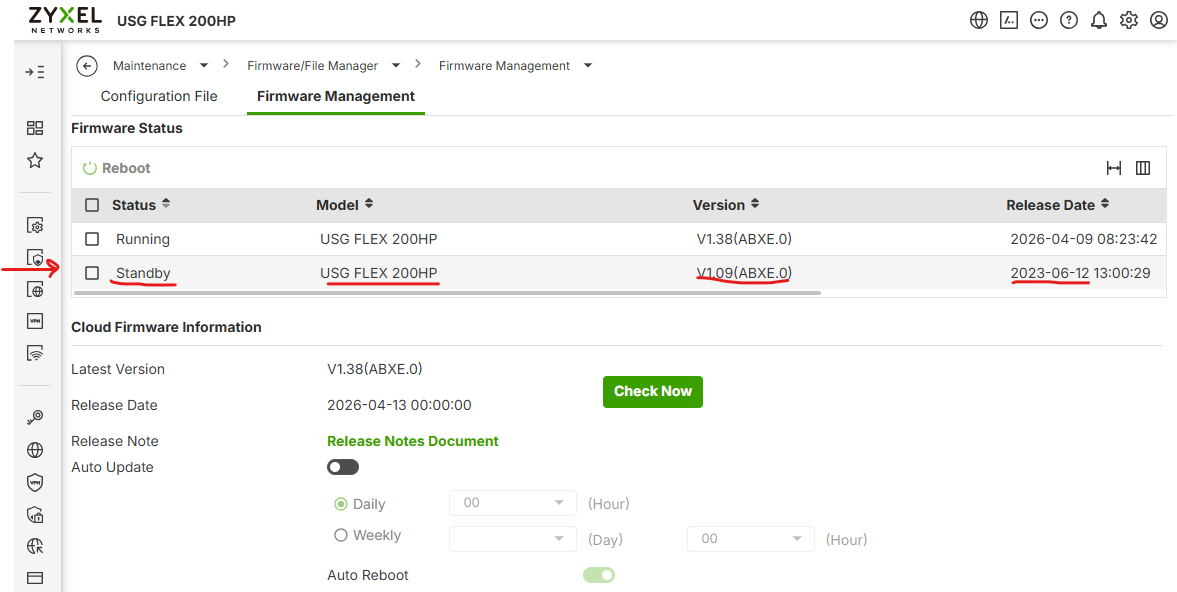
How come ?
regards
Paolo
All Replies
-
Its been there all the time until you enable it.
How to display the standby firmware partition on GUI? — Zyxel Community
So maybe its the default now?
0 -
Hi @noc_aba ,
On the USG FLEX H series firewalls, there are always two firmware partitions (Running and Standby) to ensure dual-image fallback redundancy.
However, by default, the standby partition is hidden from the Web GUI. The reason you are seeing both partitions is because the display feature has been manually enabled via the command-line interface (CLI) on this device.
How to display/hide the Standby Partition
If you want to make the standby partition visible (or hide it again) on the USG FLEX H firewalls, you can run a few quick CLI commands via SSH or console:
- After connecting the device through SSH/console, enter the configuration mode and enable the GUI standby firmware display:
usgflex200h> edit running
usgflex200h running config# gui system standby-firmware-display true
usgflex200h running config# commit
usgflex200h running config# copy running startup
(Note: Set the value to
falseif you wish to hide the standby partition again.)Once applied, the Web GUI on those devices will display both the active (Running) and backup (Standby) partitions under Firmware Management, allowing you to easily view the standby version or manually trigger a boot switch if necessary.
Zyxel Tina
0




 Guru Member



 Zyxel Employee
Categories
- All Categories
- 442 Beta Program
- 3.1K Nebula
- 243 Nebula Ideas
- 6.8K Security
- 783 USG FLEX H Series
- 389 Security Ideas
- 1.8K Switch
- 87 Switch Ideas
- 1.5K Wireless
- 58 Wireless Ideas
- 7.2K Consumer Product
- 325 Service & License
- 527 News and Release
- 101 Security Advisories
- 31 Education Center
- 10 [Campaign] Zyxel Network Detective
- 5.3K FAQ
- 34 Documents
- 91 About Community
- 122 Security Highlight


