[2026 November Tips & Tricks] Send Firewall DNS Queries Through Your VPN with Local Out




 Zyxel Employee
Your branch office has a working VPN connection to headquarters. Users can access remote resources—but what happens when the firewall itself needs to query a DNS server at HQ?
With Local Out in uOS 1.40, you can specify the source IP address for traffic generated by the firewall. This is especially handy when accessing private services through a policy-based VPN.
💡Why does the source IP matter?
A policy-based VPN carries traffic that matches its configured local and remote subnets. If a firewall-generated DNS query uses a source IP outside the VPN’s local subnet, it may fail to match the tunnel’s policy.
Local Out lets you select an appropriate source address, helping those queries match the VPN policy and reach the remote DNS server.
🔍Example: Resolve HQ domain names from a branch
In this example, a policy-based VPN connects two networks:
- HQ LAN:
192.168.168.0/24, where the private DNS server resides. - Branch LAN:
192.168.11.0/24, connected to the branch firewall’sge3interface.
Branch clients use the branch firewall as their DNS server. The firewall forwards queries for an internal domain to the DNS server at HQ.
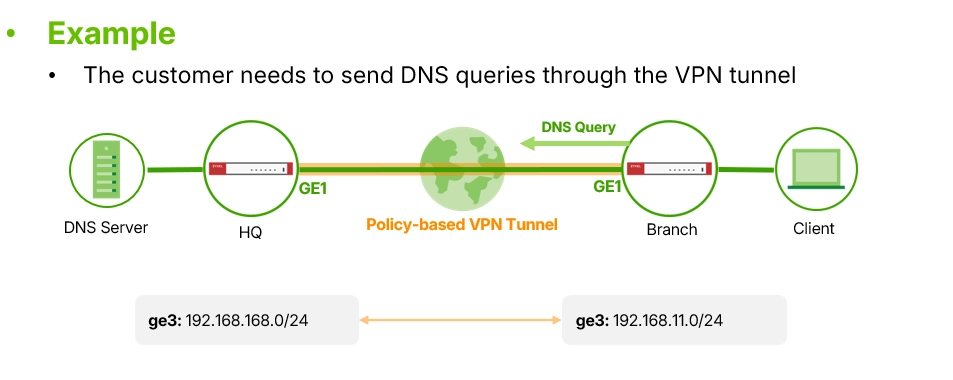
By selecting ge3 as the Local Out source, the forwarded queries use the interface’s primary IP address in the branch subnet. With matching VPN settings, the queries can travel through the tunnel.
You can keep the clients’ existing DNS settings while the firewall handles forwarding for the internal domain.
⚙️How to configure it
Before starting, make sure the site-to-site VPN is established and its policies cover the branch and HQ subnets.
1. Configure the domain zone forwarder
In the branch firewall’s local web GUI, go to System > DNS & DDNS and add or edit a Domain Zone Forwarder.
Enter your internal domain and the HQ DNS server’s IPv4 address. Set Query Via to Auto.
2. Set the source with Local Out
Click the Local Out shortcut next to Query Via to open the configuration panel.
Configure the following:
Setting | Value for this example |
|---|---|
Active | On |
Type | DNS |
Destination | HQ DNS server’s IPv4 address |
My address / source | Interface: |
Save the Local Out rule and the DNS forwarder configuration.
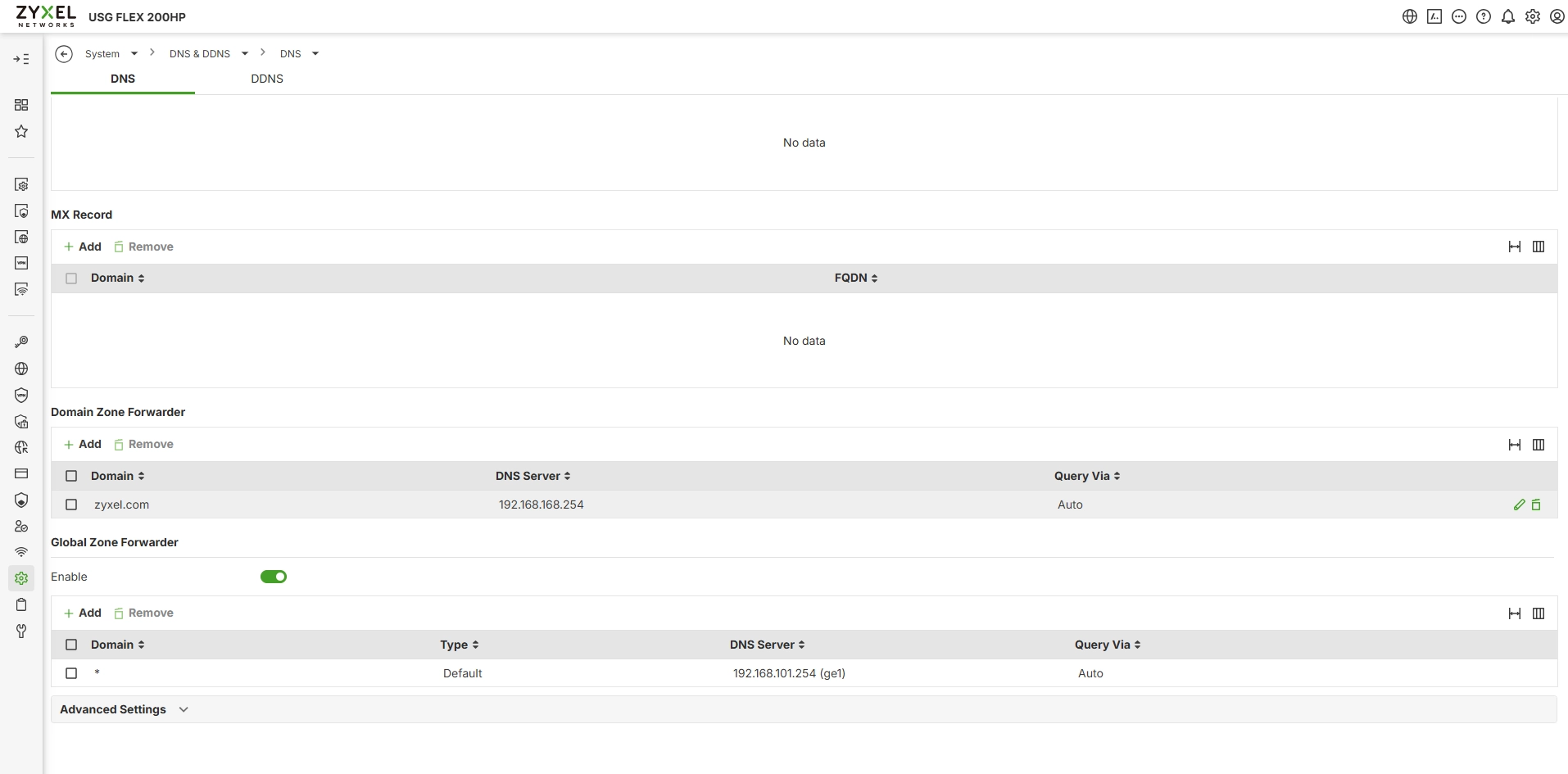
Selecting an interface uses its primary IP address. If that address changes, the Local Out rule updates automatically. You can also specify a source IPv4 address manually.
3. Verify the result
From a branch client using the branch firewall for DNS, look up a hostname in your internal domain. Confirm that it resolves to the expected private IP address.
If resolution fails, check the VPN subnet selectors, DNS server access rules, and the return path to the selected source IP.
✅Useful beyond DNS
Local Out also supports LDAP, RADIUS, Syslog, SNMP traps, SMTP, and NTP, plus custom services defined by a TCP or UDP port.
Manage these rules under Network > Routing > Local Out.
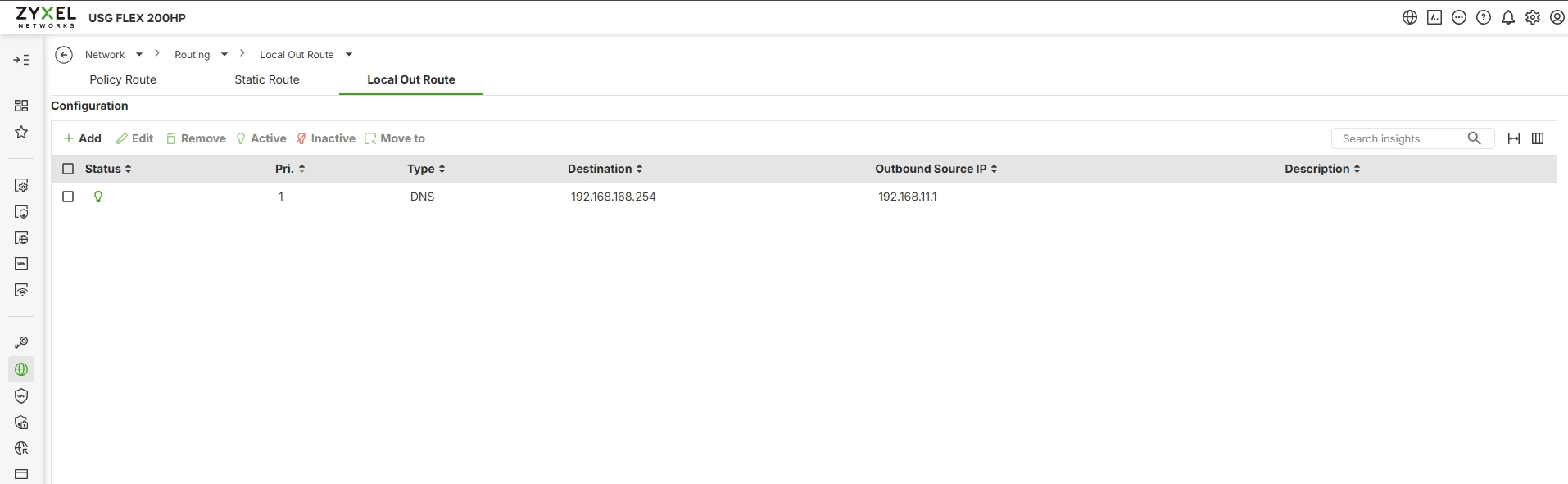
Whether you centralize DNS, authentication, or logging at HQ, Local Out gives you more control over the source address your firewall uses to reach those services.
💬Have you ever encountered connectivity issues with firewall-generated traffic over a policy-based VPN? Share your experience in the comments!
Categories
- All Categories
- 442 Beta Program
- 3.1K Nebula
- 245 Nebula Ideas
- 6.9K Security
- 811 USG FLEX H Series
- 393 Security Ideas
- Threat Watch!
- 1.8K Switch
- 88 Switch Ideas
- 1.5K Wireless
- 60 Wireless Ideas
- 7.3K Consumer Product
- 333 Service & License
- 543 News and Release
- 106 Security Advisories
- 31 Education Center
- 10 [Campaign] Zyxel Network Detective
- 5.5K FAQ
- 34 Documents
- 89 About Community
- 125 Security Highlight