[USG Flex 500H] - New firmware 1.40 and port P2 DEAD





 Master Member
Hello everyone,
yesterday I've upgraded my 500H to the newest 1.40 uOS version and seems, that for a strange question, that the port P2 is always down using the same cable.
Disconnecting and reconnecting the same cable don't change the question, the port P2 is always disconnected and down. I've tried also to force manual negotiation (2.5Gb/1Gb) but nothing to do.
Anyone that have the same problem?
All Replies
-
cold boot the USG
0 -
Reverting to 1.39 not working.
@PeterUK how I can cold boot the USG? disconnect and reconnect the power cord directly?
0 -
Yes thats a cold boot
0 -
I've tried now a cold boot but nothing.
The cable connected to P1 work, the same cable connected to P2 not (the P2 led remaining off).
The old cable connected to P2, moved on P1 work correctly, into P2 not (the P2 led remaining off).It's very strange… broken port? Strange, nobody touch the firewall from at least 15 days, and until sunday the P2 port worked correctly.
0 -
maybe try the port with another cable and to some other device like a switch to see if it lights up?
0 -
I've tried with a PC and a NAS, do the same.
During boot all the 4 led light power on as green, then P1 and P4 switch on sky blue and the P2 remaining green, then P2 power off.
The PC and the NAS are 2.5Gb capable (now the PC are connected successfully, with the same cable, on port P4 and the light are sky blue), if disconnect the PC on P4 and connect it on P2, the led remaining off and no connection are showed.
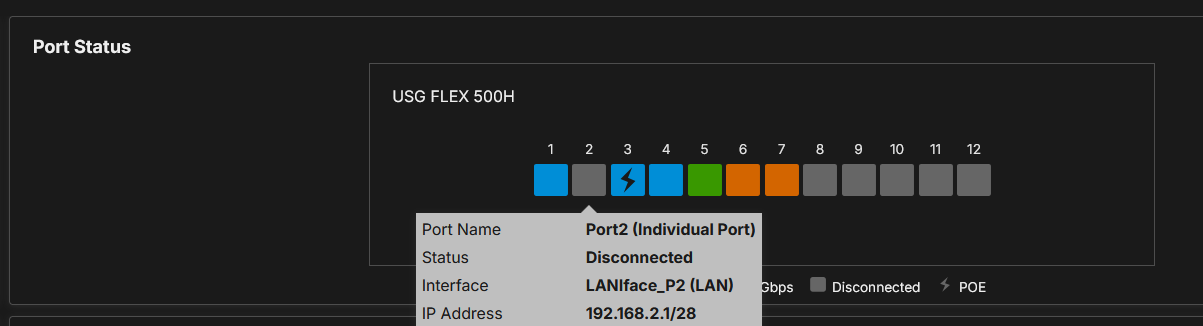
Now on P2, I've connected the NAS → the same cable to NAS work on P1/P4
0 -
I've connected an external switch to port P2:

Instead the cable between the switch and the firewall are status "normal" with a cable length of 0-20m (the cable are 50cm)
0 -
update the firmware again?
or maybe a config is stopping it from working? you could try a reset to defaults.
seems bad timing that it should stop working unless a solder joint break
0 -
I've tried to reset on 1.39 firmware, but seems not working, it's very very strange.
Don't touch cables from about 2 weeks, it's so strange also a solder joint break.0 -
It might be you need to apply .ri boot code when the firmware update done it badly?
0




 Guru Member
Categories
- All Categories
- 442 Beta Program
- 3.1K Nebula
- 243 Nebula Ideas
- 6.8K Security
- 783 USG FLEX H Series
- 389 Security Ideas
- 1.8K Switch
- 87 Switch Ideas
- 1.5K Wireless
- 58 Wireless Ideas
- 7.2K Consumer Product
- 325 Service & License
- 527 News and Release
- 101 Security Advisories
- 31 Education Center
- 10 [Campaign] Zyxel Network Detective
- 5.3K FAQ
- 34 Documents
- 91 About Community
- 122 Security Highlight


